1 Ticket
I cannot find where is the option to approve new users
 1 Ticket
I cannot find where is the option to approve new users
 2,762
2,762
Hi there and thank you for purchasing our plugin.
The option to approve users is in each user's profile.
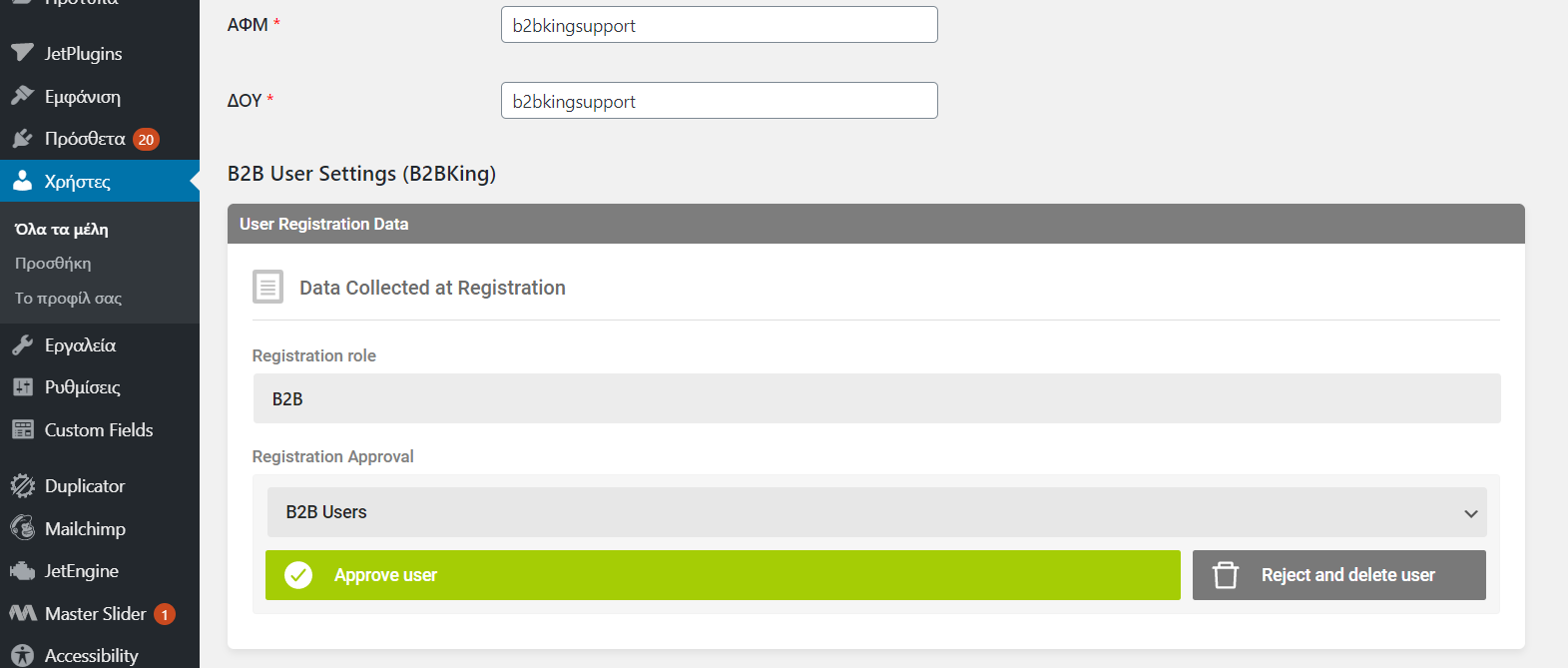
If you go to users, click on the user, you should see the following panel and approve/reject buttons:
You can see this panel here in our demo: https://demo.b2bkingplugin.com/wp-admin/user-edit.php?user_id=13&wp_http_referer=%2Fwp-admin%2Fusers.php
Please let me know if you can see that.
Kind Regards,
Stefan
1 Ticket
Hi, Thanks for the quick response, but unfortunatelly there are no such buttons in the user details page. Do you known what may goes wrong? If you need access to the website, the credentials are:
blackbirdcashandcarry.gr/wp-admin
username: admin
password: actl2010@blackbird
2,762
Hi,
The issue is that you have no b2bking registration roles or custom fields, so the plugin is basically thinking: "If you are not collecting data from any custom fields, how are you deciding to approve or reject this user?"
I see you are collecting data in registration through a separate mechanism / plugin.
I have created a registration role for the dropdown and enabled the dropdown in b2bking settings -> registration. I have hidden the dropdown with CSS, so your registration looks the same as before.
Registration approval will now work for new users. I created a new user "b2bkingsupport":