Public Ticket #2535998

Creating and assigning groups

Closed
Comments
8 Tickets 2
Yan started the conversation 6 years ago on September 11, 2020 at 8:22am

I have a problem assigning roles to groups. Also, I can't find how to create new groups. 


I have the following roles: (Image)
EU Company
Non-EU Company
Individuals


I have the following groups: (Image)
EU Company
Non-EU Company 

Problem 1: How do I create new groups? I want also Individuals to be a group and assigned to B2C. When I go to Groups section in the plugin, I don't see any buttons to create new groups. Also, how do I put a filter that automatically assign each role to B2C or B2B upon registration?


Problem 2: When I switch manually users from group to group (From B2C to B2B) the tax rules don't change with the group, and they get still charged VAT. 

Problem 3: I want the fields VAT and Company to be "must fields" only for business customers 

Problem 4: When people register under group EU-Companies, can I allow them only to choose the EU countries from the country list? 

Problem 5: Can I redirect the page when people need manual approval? So it is not the writing above... 


Thank you for your help. 


2,762
KingsPlugins replied 6 years ago on September 14, 2020 at 9:12am

Hi,

1) This code snippet, added to functions.php can help you control where users are sent after registration, if they need manual approval.

add_filter( 'woocommerce_registration_redirect', 'custom_redirection_after_registration', 1000, 1 );
function custom_redirection_after_registration( $redirection_url ){
    // check if user requires approval
    $user_id = get_current_user_id();
    $user_approval = get_user_meta($user_id, 'b2bking_account_approved', true);
    if ($user_approval === 'no'){
        // change the redirection Url
        $redirection_url = 'https://yourcustomlink.com'; 
        return $redirection_url; 
    }
}

In the snippet above, change yourcustomlink.com to your desired page.


2) B2BKing will generally not override WooCommerce rules. Depends on what you're doing exactly.

If you want to totally override WooCommerce tax rules you would do something like this : 1) First create a tax exemption for some users, this completely removes WooCommerce tax, 2) Add a custom fee/tax with b2bking

8 Tickets 2
Yan replied 6 years ago on September 14, 2020 at 9:18am

Thank for the reply. 

I have a general VAT rule in WooCommerce for 16%. 

In B2Bking I made a dynamic rule to exempt businesses. 

It seems to work ok at the checkout. I hope I'm not overseeing something. Do you think it is safer to make all the rules exclusivity in B2Bking and leave WooCommerce tax rules empty? 

2,762
KingsPlugins replied 6 years ago on September 14, 2020 at 1:49pm

The tax exemption should be safe, we are actually using a woocommerce function set_is_vat_exempt so you shouldn't see compatibility issues.

Are you using the "pay tax in cart" option? If so, it's best to check the calculation in the cart, just to be sure it's correct.

Best,

Stefan

2,762
KingsPlugins replied 6 years ago on September 16, 2020 at 1:07pm

Hi,

Regarding that plugin, version, it will be the latest publicly available version in the next update.

So the modifications will be part of the plugin from now on, starting with the 2.3.0 version

8 Tickets 2
Yan replied 6 years ago on September 18, 2020 at 9:11am

I have a problem with the VAT field during registration at the checkout for EU customers. It appears for a second but then disappears. Choosing countries doesn't help. 

It works with registration in my-account, but not during registration at checkout. It is problematic, because then people can register and buy without it. 

8 Tickets 2
Yan replied 6 years ago on September 23, 2020 at 7:47am

Yes, it seems to solve that problem. But here comes another issue:)


even though I choose the EU company, it doesn't remove the VAT, during check out registration. 

If I'm logged in already, it works well. 

2,762
KingsPlugins replied 6 years ago on September 25, 2020 at 10:17am

By remove the vat, You mean it doesn't apply the vat exemption, the company must still pay the vat, right?


This is a tough one. The plugin needs to apply the vat exemption but since the registration happens at the same time as the order, it doesn't have time to apply it.


I will find a solution. Will release an update next week with some improvements and this will be amongst them. 


I will update you about this.

- Stefan


2,762
KingsPlugins replied 6 years ago on September 30, 2020 at 11:35am

Hi, 

I have an updated version that introduces this function:


1) You will need to enable this setting:

9734563977.png


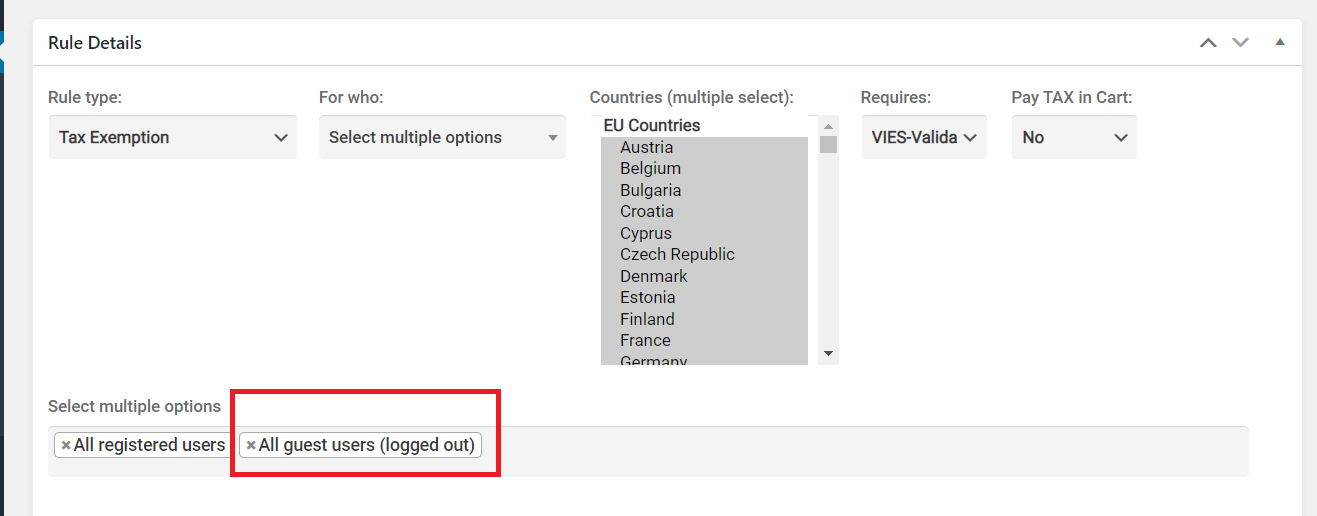
2) Your Tax Exemption rule will need to include "Guest Users". Like this:

5805210961.png

3)

This adds a validate button to checkout:

8573808257.png


2,762
KingsPlugins replied 6 years ago on October 1, 2020 at 6:21am

I would recommend you keep old versions installed until you are sure the new version works correctly for your needs. If it does, feel free to delete old versions.

There's currently no auto-update possible. Updates must be downloaded as they are released from Envato. We will notify users via email about major updates.

8 Tickets 2
Yan replied 6 years ago on October 7, 2020 at 8:16am

Hello Stefan

I have a follow-up question regarding the registration during check out - What happend with the payment for accounts that need to be manually confirmed? Do they still pay or their payment is blocked until validation? 

2,762
KingsPlugins replied 6 years ago on October 7, 2020 at 10:18am

The payment will not be blocked by the plugin.


I think you can do the following:

- In B2BKing->Groups->Logged Out Users, disable payment methods that allow instant payment. You could allow only Invoice Payment for example. That way, the user cannot pay directly if he's not logged in.

8 Tickets 2
Yan replied 3 years ago on September 26, 2023 at 10:21am

Hi there, long time not spoken.

I have a new question-

I would like to create special prices for students and clients from emerging markets. Those won't be B2B buyers, though. Is there a way to create such groups in B2C? 

And if I put them under B2B would it create some possible tax conflict down the line? 

Thanks.


2,762
KingsPlugins replied 3 years ago on September 26, 2023 at 11:51am

Hi Yan,

In our plugin, you would indeed have to create a B2B group for these users (there are no B2C groups).

It's fine if they're actually B2C buyers, this is mostly just a way of organizing users into groups.


It shouldn't create any tax or other issues. The only difference would be that it would give these users access to B2B features such as the bulk order form, purchase lists, quote requests etc. That's the main difference between B2C and B2B in our plugin.


Kind regards,

Stefan


8 Tickets 2
Yan replied 3 years ago on September 26, 2023 at 1:11pm

Great, thanks for the quick reply. 

Let's say, I allow someone to register as a student after approval. Is it possible to limit account automatically after some period? Let's say they stop being a student in 2 years. Is it possible to set some kind of account revocation or resubmission request to allow to purchase further with discounts? 

1
2,762
KingsPlugins replied 3 years ago on September 27, 2023 at 6:46am

With B2BKing, you can have 2 user groups, such as: 

- "Student Group"

- "Expired Student Group" that does not have access to discounts


However, there is no feature to move users between groups automatically after 2 years. It can probably be done with a code snippet that checks registration time vs current time, and move the user from one group to the other. To move the user between groups, this line of code can be used:

b2bking()->update_user_group($user_id, $group_id);

You would need to work with a developer to write the above code to do that. We do not do custom code ourselves, but you can get a quote from a dedicated customizations company such as https://codeable.io .

8 Tickets 2
Yan replied 3 years ago on September 27, 2023 at 11:14am

Ok. Thanks. 

Can you please help me also with an issue with registrations and accounts that require approval?

1. When people live in a country without a state, it still requires to input something there, which is confusing. Is it possible to remove the state if there is no listing of it in the system for that country?

2. When people register for a role that requires approval, they are being redirected back to main website without any message. So they don't even know that the registration went through. Is it possible to create a redirection for such cases to a page which explains that the registration went through and awaiting approval?

Here is the form on my website:

https://qualistery.com/library/account-creation/


2,762
KingsPlugins replied 3 years ago on October 1, 2023 at 7:59am

Hi again,

(1) I checked but this seems to work normally for me. For example:

- I do not see a state if Afghanistan is selected:

7130180619.png

- I do see a state if Germany is selected:

3123274454.png

Have you already solved it?


(2) Normally this stays on the same page and shows a message letting the user know their account requires manual approval.

Almost certainly there is another plugin that is redirecting to the home page after registration.

Please try deactivating all other plugins + switching to the default storefront theme, to help you identify what plugin / code is causing this redirect.


Kind regards,

Stefan

8 Tickets 2
Yan replied 3 years ago on October 5, 2023 at 9:06am

Hi Stephan,

It seems that there are some countries that have that issue. When I click randonly, I found multiple countries with such issue, where their state is empty but still required: 

5071584923.png


8510099486.png


6653306026.png


2,762
KingsPlugins replied 3 years ago on October 5, 2023 at 12:00pm

Hi again,

This is normal per WooCommerce's functionality. 

Our plugin does not directly control this - we simply use WooCommerce's country+state input feature. This uses WooCommerce's database of countries and states. 

For some countries it has a list of states (and shows a dropdown), for others it doesn't have the list (and shows a text input), and for some it considers a state is not required.


If you would prefer it, you can go to B2BKing -> Registration Fields -> Country and change it to "country / region" to show only the country, and not show state:

5672968379.png


1
8 Tickets 2
Yan replied 3 years ago on October 6, 2023 at 9:49am

Thanks that helped. 

I have another question regarding checkout. How can I make sure that Company Name in billing info appears only for B2B users? I don't want the field even to be option for B2C because if they fill it out anyways, it will create an issue with the invoicing and taxes. 

2,762
KingsPlugins replied 3 years ago on October 6, 2023 at 10:24am

You could hide that field with CSS during checkout, for logged out / b2c users.

To do that, you can add the following CSS:

.b2bking_logged_out #billing_company_field, .b2bking_b2c_user #billing_company_field {
    display: none !important;
}
1
2,762
KingsPlugins replied 3 years ago on January 16, 2024 at 4:26pm

Hi Yan,

That CSS should have also worked for logged in B2C users (not just logged out), I am not quite sure why it didn't.


Is it possible to share a temporary backend login to the site? I could check this directly. 

And just to confirm, you're looking at the checkout page, right? The site URL is https://qualistery.com/ ?


Kind regards,

Stefan

2,762
KingsPlugins replied 3 years ago on January 22, 2024 at 7:42pm

Thank you,

I've added the CSS to Appearance -> Customize -> Additional CSS.

I believe it is working, as I see the field is being hidden:

7002429304.png


Let me know if you see any issue,

Sign In