Public Ticket #2605314

B2BKing Registration Form

Closed
Comments
1 Ticket
Cristihan Gonzalez started the conversation 6 years ago on November 19, 2020 at 8:48am

Hello!

I've created Registration Roles and Registration Fields in B2B King, and also enabled Dropdown & Fields in settings.

But I can't figure out how to display those fields or dropdown on the frontend/registration form.

This is the URL to the registration page (Register tab) on my website. How can I make this work?

https://shop.echemco.com/log-in


2,762
KingsPlugins replied 6 years ago on November 19, 2020 at 8:55pm

Hi Cristihan,

Thank you for purchasing our plugin,

1)

I can tell you from experience, this page here  https://shop.echemco.com/log-in is not the normal WooCommerce page for registration or login. I believe this is a custom page set up by your theme.

2)

Normally our plugin works with the default WooCommerce My Account page for registration.

In your site: https://shop.echemco.com/my-account

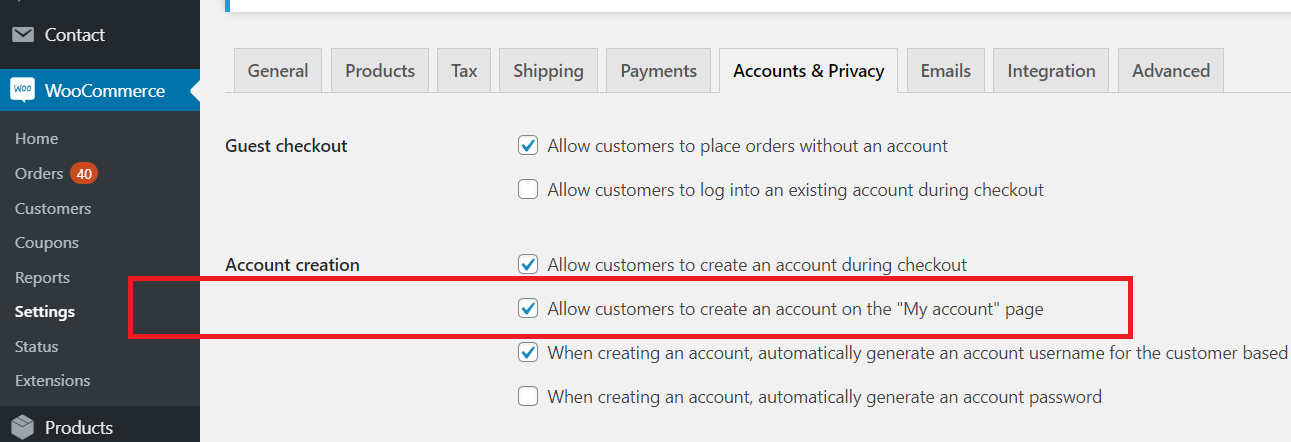
Right now you have only "Log in" enabled there. To also get Registration in that page, simply enable this setting:

In WooCommerce->Settings->Accounts->Allow customers to create an account on the "My account" page. It's this checkbox here:

5120002463.png

3)

If you don't want to use the My Account page, you can use a separate page by using one of our shortcodes described here:

https://b2bkingplugin.com/docs/how-to-completely-separate-b2b-and-b2c-registration-in-woocommerce-with-b2bking/

But we can't help with integration with this page  https://shop.echemco.com/log-in. This is a custom page of the theme, the only way to integrate it with B2BKing would be through custom development/coding.

I hope this helps, but let me know.

Kind Regards,

Stefan

Sign In