 16 Tickets
16
16 Tickets
16
Hello,
When I approve an account the customer does not get an email with a password.
If they are suppose to get a password is it a temporary password?
Thanks,
Ivy
 16 Tickets
16
16 Tickets
16
Hello,
When I approve an account the customer does not get an email with a password.
If they are suppose to get a password is it a temporary password?
Thanks,
Ivy
 2,762
2,762
Hello Ivy,
When an account is approved, the user receives an email notification with a message saying, "Congratulations, your account has been approved", but the password is not included.
The password is encrypted in the database and for WooCommerce security reasons the plugin is not able to access it.
The user would have to use the password they had set when they created the account initially, or look up the original email they received from the site with the password.
Kind Regards,
Stefan
16 Tickets
16
Hi Stefan,
Thanks, will have to check this out as my customer said he did not receive a password and he did not use a password as he registered as a business it did not give him the option to create a password with registration.
Thanks,
Ivy
2,762
Hi Ivy,
In WooCommerce->Settings->Accounts you can enable/disable the following setting: When creating an account, automatically generate an account password
If you disable it, in that case it will ask users to set a password when they register. So the simplest fix for your issue might be disabling that setting.
If that option is enabled, WooCommerce instead automatically generates a password and sends the user an email with that password. Make sure that in WooCommerce->Settings->Emails, the "New Account" email is enabled:
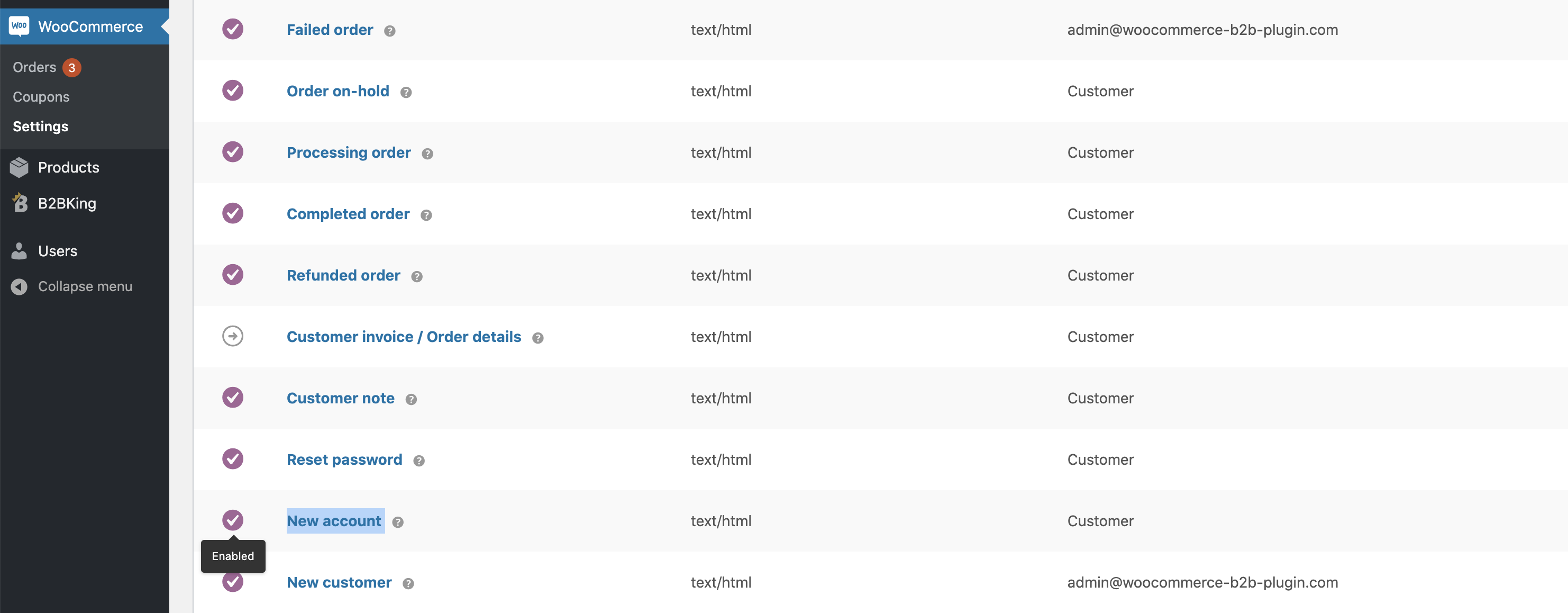
If that email is disabled that might explain why your user did not get it.
Another thing that happens sometimes is that emails get lost in SPAM/Filters - > in that case installing a free SMTP plugin often helps.
Kind Regards,
Stefan