 6 Tickets
10
6 Tickets
10
Is there a way for the user during registration to select the Group they want to be part of? I don't see how to include Group as one of the registration fields.
 6 Tickets
10
6 Tickets
10
Is there a way for the user during registration to select the Group they want to be part of? I don't see how to include Group as one of the registration fields.
 16 Tickets
16
16 Tickets
16
Hi Chuck,
I found that they can only choose if the are a business or an individual. The other groups that you create is up to you after registration.
The way I'm working is for business registration to be approved, that is when I add the customer to a group,
The individual registration do not need approval so they also really do not need to be in a group.
Hope this help in the meantime until you get a better answer from support.
Regards,
Ivy
6 Tickets
10
Hi Ivy,
Thanks for the reply. What you described is exactly what I found as well. But I was hoping the Group field could be added to the account/register page as a dropdown so users can select the group they feel best fits them. Rather than me picking a group for them after they register. Is there any chance the Group field can be added to the account/register page?
Thanks,
Chuck
16 Tickets
16
Hi Chuck,
I think the reason it works this way is because you have to decide in which group you would like your customer to be because of the rules and discount that you allocate to a rule.
The customer might choose a group that might get 30% discount because he feels he belongs to that group but you might feel he belongs to a group that gets 10% discount.
That is my opinion why I use the groups for different discount structures, and rules of what products is visible.
I also have different shipping to my groups.
Hope this make sense.
 2,762
2,762
Hi Chuck,
Thank you for purchasing the plugin,
When you first install the plugin there are 2 Registration Roles that are automatically set up. If you go to B2BKing->Registration Roles, you will see these are "Individual Customer" and "B2B (requires approval)".
These options are just sample options. You can create unlimited registration roles, and you can also rename roles.
For example, you can create a registration role for each group (by going to B2BKing->Registration Roles->clicking "Add New").
Here is a setup example to illustrate possibilities:
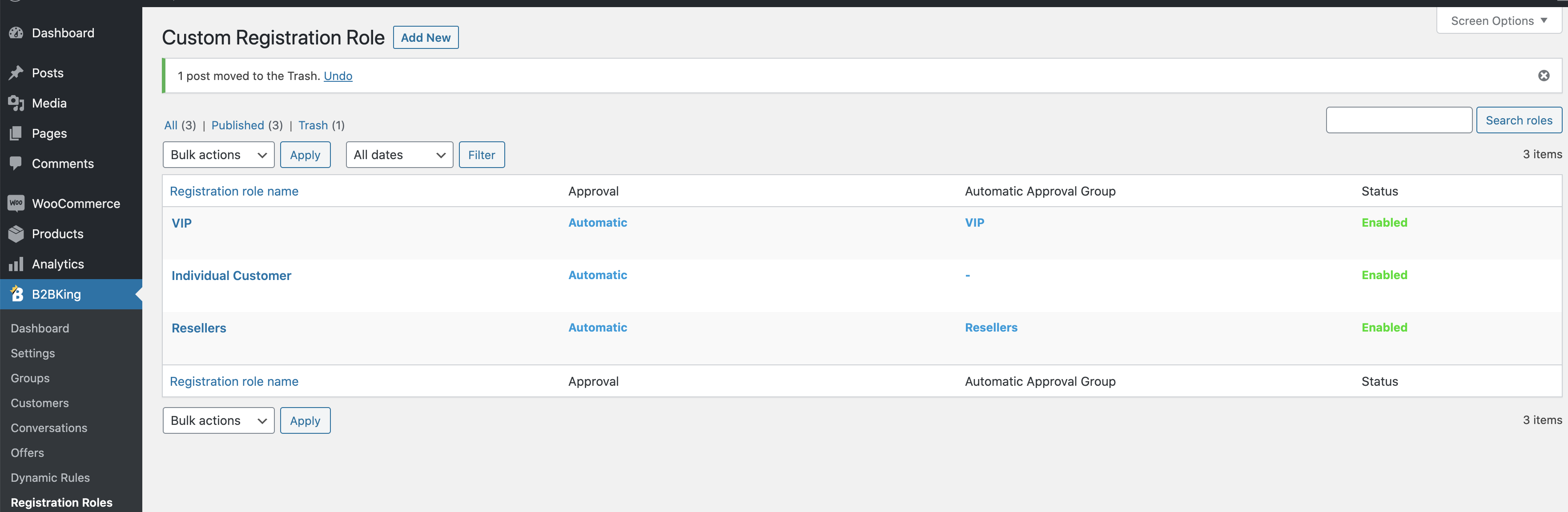
In the above example you have 3 options:
- Individual Customer - no automatic approval group - this means that the customer will go to the B2C group
- VIP - automatic approval group is VIP - the customer will automatically be assigned to the VIP group
- Resellers - automatic approval group is Resellers - the customer will automatically be assigned to the Resellers group
So to sum it up, if you want to allow users to decide which group they should be part of at registration, you should create a registration role for each group, and set the group as the automatic approval group.
I hope this makes sense but let me know if I can help,
Kind Regards,
Stefan
6 Tickets
10
Thanks Stefan. that makes sense.
I have another question. I have a Customer user type that can buy products and a Guest user type that I want to only see the products, but not be able to purchase products. How can I stop Guests user types from adding products to the cart and buying?
6 Tickets
10
Hi Stefan,
I have a request: Can you enhance your plugin to optionally show the Group dropdown field on the Registration page? My User Types and Groups don’t have a one-to-one relationship, so I don’t want to create all the combinations of possible User Types to match every Group. So if you could enhance your plugin to optionally display the Group dropdown on the registration page right after the User Type dropdown, then customers could select the Group themselves. Since customers can pick the User Type from the registration page, please allow them to pick the Group as well. This Group dropdown field on the registration page could be a 'Yes' or 'No' option that we select in the B2BKing admin as to whether or not to display the Group dropdown on the registration page. This would be extremely helpful!
Thanks,
Chuck
2,762
Hi,
1)
How can I stop Guests user types from adding products to the cart and buying?
Currently the plugin can do this by either hiding the price for guests, OR by setting up quote requests for guests. You can enable this functionality in B2BKing->Settings->Access Restriction->Guest Access Restriction by enabling either "Hide Prices" or "Replace prices with Quote Requests".
If you would like to do this, but for a category of logged in users (by guests we usually mean logged out), you can do it in B2BKing->Dynamic Rules by creating either a "Hidden Price" rule or "Replace Cart with Quote' rule.
2)
Regarding adding a group dropdown, I can definitely understand how that would be useful. We will consider it for future plugin updates.
Kind Regards,
Stefan
6 Tickets
10
Hi Stefan
1) Thanks for the info. I was referring to Guest as a special type of B2BKing User Type that is a registered user, but not yet approved to purchase our products. We sell medical products to businesses that require special approval beforehand. I should have explained I was not referring to guest in the traditional way of a non-logged in user.
2) Please keep me posted about adding the Group dropdown to the registration page. This is critical for our type of business.
Thanks,
Chuck