 6 Tickets
4
6 Tickets
4
Hi, We need more information in the quote form, how can we add more fields in quote form?
Thank you so much.
 6 Tickets
4
6 Tickets
4
Hi, We need more information in the quote form, how can we add more fields in quote form?
Thank you so much.
 2,762
2,762
Hi Marlyn,
I'm afraid the plugin doesn't have a built-in way to add custom fields in the quote form.
If you are open to custom coding and modifying the plugin, I can point you in the right direction for how you may customize it: there are changes needed to the HTML template, as well as changes in the PHP and JS functions that handle quotes. However we cannot do that kind of customization ourselves as part of support.
Just an idea: The simplest way to make some changes there would be to modify the text that says "Message" "Email" "Name" etc. You can do that easily with a translation plugin like Loco Translate and creating an English translation.
For example you could replace "Message" with "Phone, Address and Business Details"
Kind Regards,
Stefan
6 Tickets
4
thank u for the reply.
yes we can modify the text field for the quote form and kindly point us how to modify the plugin as we need one more field for the quote.
thank u for the help.
2,762
To modify the plugin and add an extra field:
Specifically, the relevant information for a developer is:
1) You can find the HTML TEMPLATE fields in class-b2bking-public.php, inside the b2bking_add_request_quote_button() function
2) The quote request is processed in public.js inside:
/* Request a custom quote START*/ // On clicking "Request a Custom Quote" button $('#b2bking_request_custom_quote_button').on('click', function(){
In public.js, add a row here:
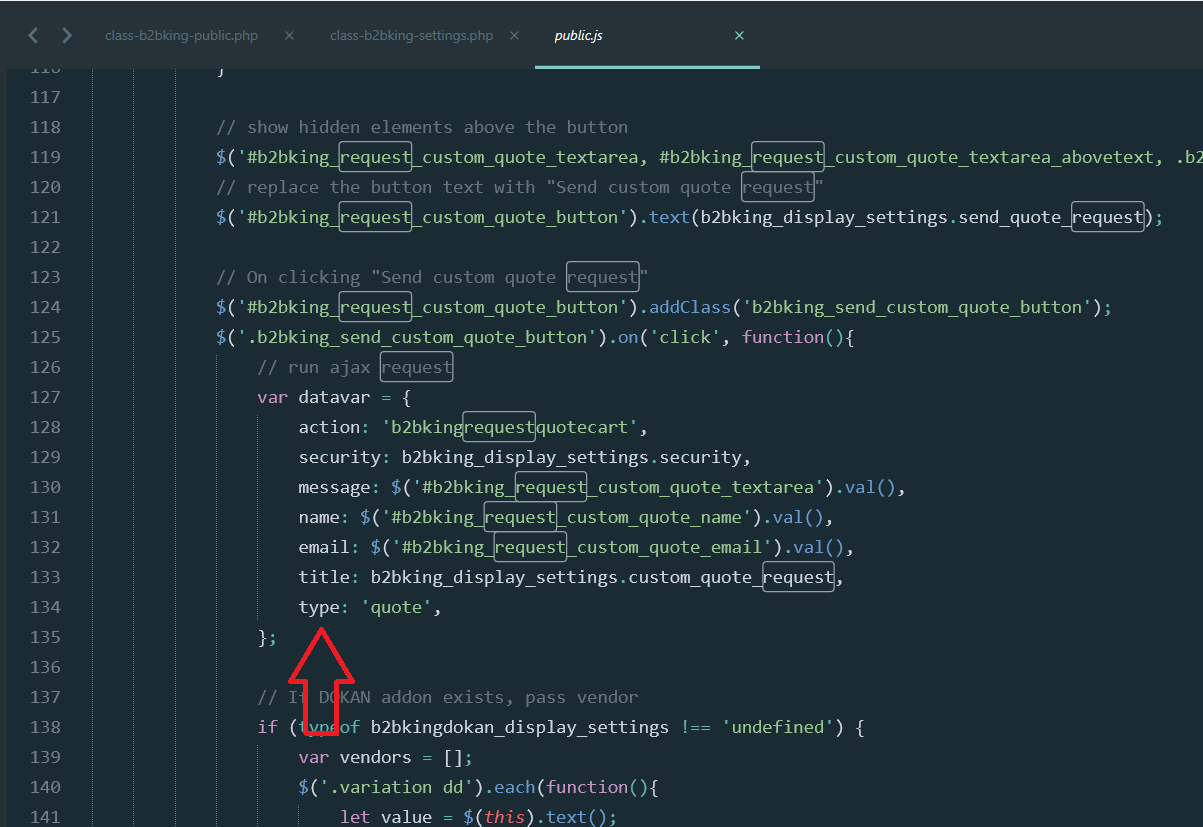
Basically you need to take the value from the field you added and pass it along to the ajax
if you add a row saying mycustomfield: $('#myfield').val()
in the AJAX processing function you will have $_POST['mycustomfield'] available with the value of your field.
3)
The ajax processing function is inside includes/class-b2bking.php inside the function b2bkingrequestquotecart(){
$myfield = sanitize_text_field($_POST['mycustomfield']);
You can then add that variable to the $message or anything else you need to do with it.
6 Tickets
4
had it edited based in your instructions and it works.
thank you Stefan <3
2,762
Glad to hear that!
You must also have some solid programming skills if you got that to work!
 4 Tickets
1
4 Tickets
1
Hi Marlyn. Is possible that you share your modified files? Thanks!