Public Ticket #2678451

Add more fields for Registration form for Guest

Closed
Comments
8 Tickets 6
Set Veasna started the conversation 6 years ago on February 2, 2021 at 8:02am

Dear Support team,

Hello, could you help me please?

I have 2 questions:

1. I want to have search by SKU in search box (every search box). Now available only in bulk order (ref: my attach file).

2. Registration for guest

I want to have below fields for registration form (how to do?):

-Fist Name*
-Last Name*
-Phone*
-Email address
-Address
-User Name*
-Password*
-Confirm password*

2,762
KingsPlugins replied 6 years ago on February 3, 2021 at 7:31pm

Hi Set,

Sorry for the delay in getting back to you, we are seeing a high volume of tickets at the moment.


1)

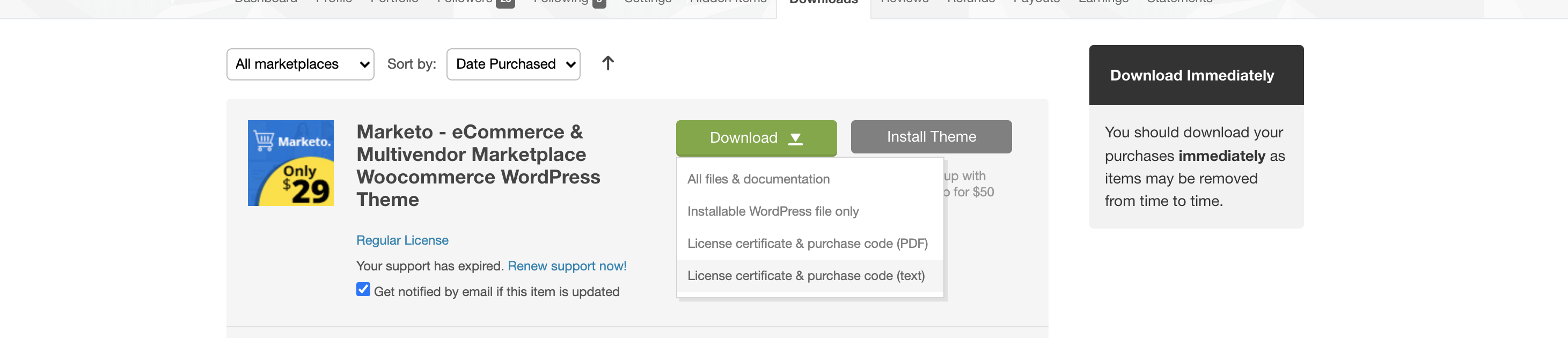
Can you please also send us your purchase code, so we can verify it and enter it into our database? You can get the purchase code by going to https://codecanyon.net/downloads

and clicking on Download->License certificate and purchase code. It looks like this:

5968399440.png


Regarding your questions:

2) To search by SKU in the main search box, this depends on what theme you are using. The search box there is not controlled by B2BKing.

Some themes will have a setting allowing you to enable SKU search there. For that, you would have to contact your theme's support team.

You can also try using this free plugin that may be able to do that for you: https://wordpress.org/plugins/ajax-search-for-woocommerce/


3) To enable those fields in the registration form:

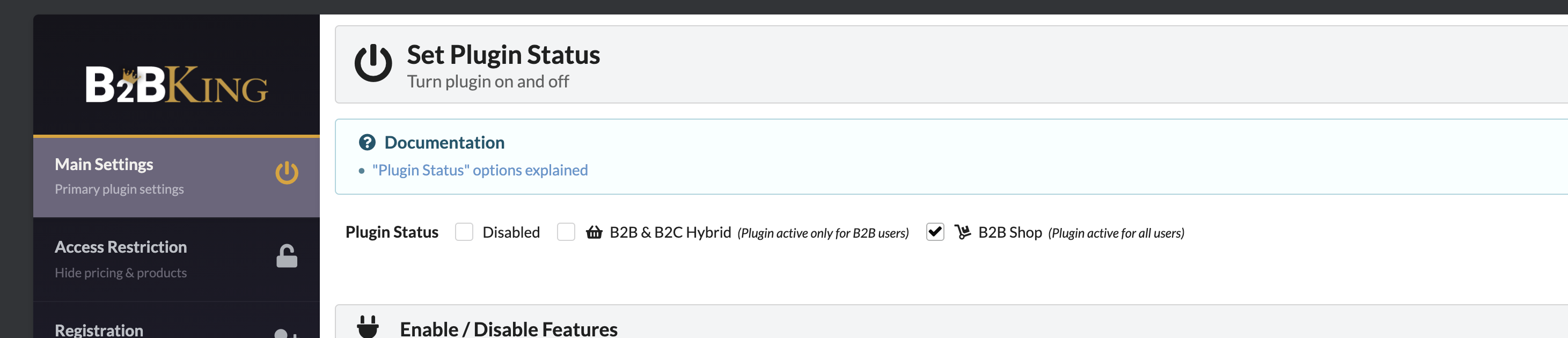
3.1) First make sure that B2BKing is enabled, by going to B2BKing->Settings->Main Settings-> and set the plugin in B2B mode / B2B&B2C mode:

5724423475.png

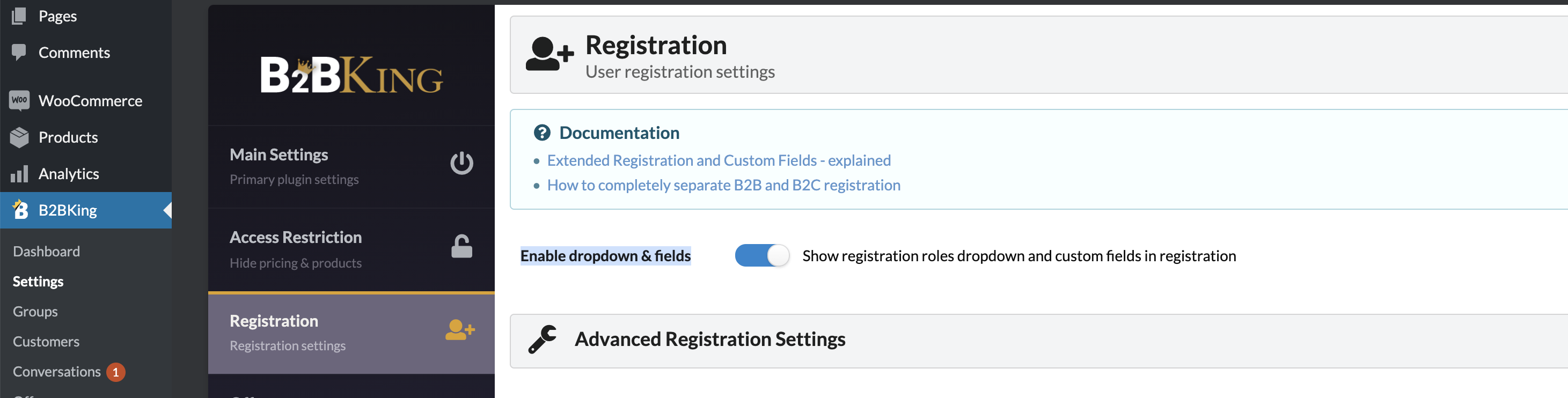
3.2) Then in B2BKing->Registration, you must enable "Enable dropdown & fields"

2035537512.png


Kind Regards,

Stefan

8 Tickets 6
Set Veasna replied 6 years ago on February 4, 2021 at 2:51am

Dear support team,

thank you for your reply.

But I want to have registration form for INDIVIDUAL CUSTOMER (currently have only email text box *my attach file)

so I want to have some fields for register for individual customer as below:

-Fist Name*
-Last Name*
-Phone*
-Email address
-Address
-User Name*
-Password*
-Confirm password*

2,762
KingsPlugins replied 6 years ago on February 6, 2021 at 4:58am

Hello Set,

Thank you for providing us with the code.


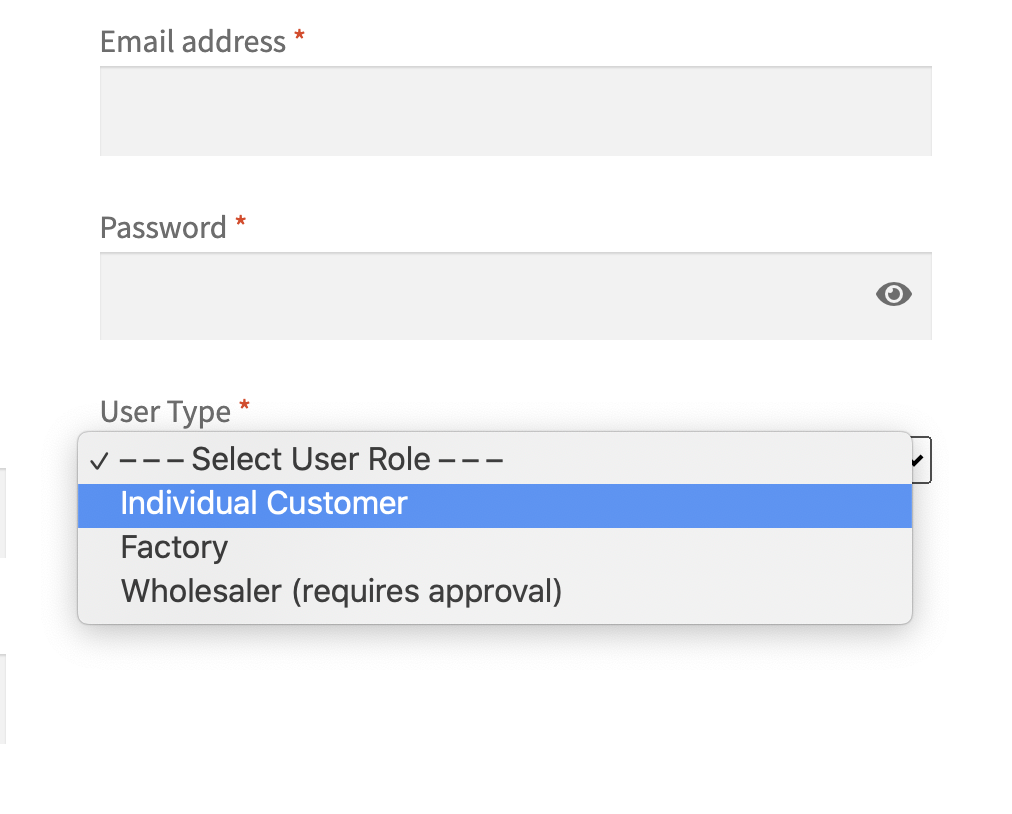
If you can see only email, it means B2BKing is not working there at all. So I am thinking that B2BKing must be disabled, or the setting for registration must be disabled. Normally you should see the User Type Dropdown:

4545996092.png


That is why I am saying to please check these 2 settings:

1) First make sure that B2BKing is enabled, by going to B2BKing->Settings->Main Settings-> and set the plugin in B2B mode / B2B&B2C mode:

5724423475.png

2) Then in B2BKing->Registration, you must enable "Enable dropdown & fields"

2035537512.png


I can also set this up for you directly in your site. If you would like to send us a temporary login to your site, I am happy to do that and enable the fields you mentioned in settings


Kind Regards,

Stefan

2,762
KingsPlugins replied 6 years ago on February 6, 2021 at 6:39am

Hi,

Thank you,

I see now that the dropdown is enabled. 


Next step is:

1)

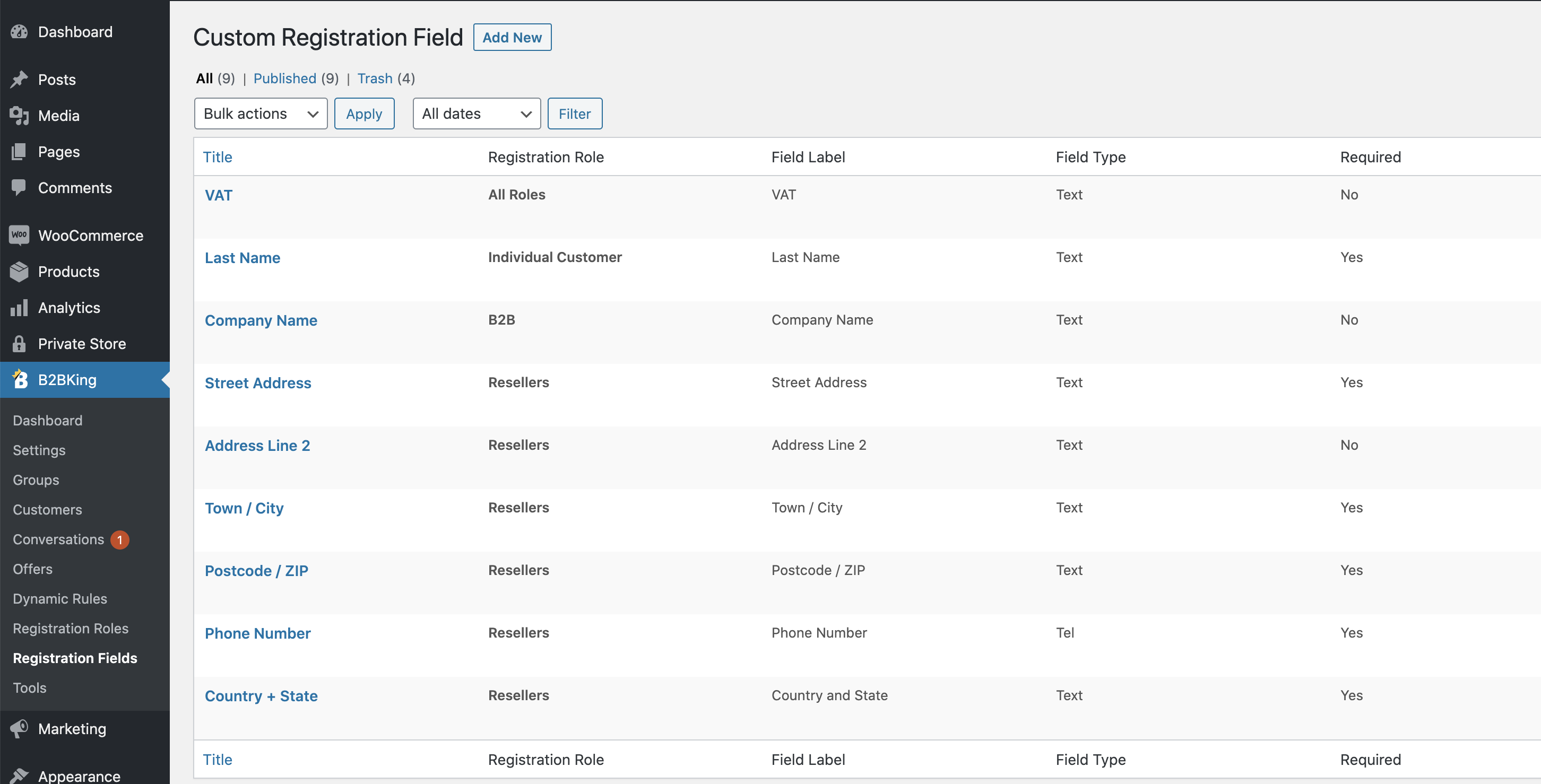
Please go to B2BKing->Registration Fields:

2374047369.png


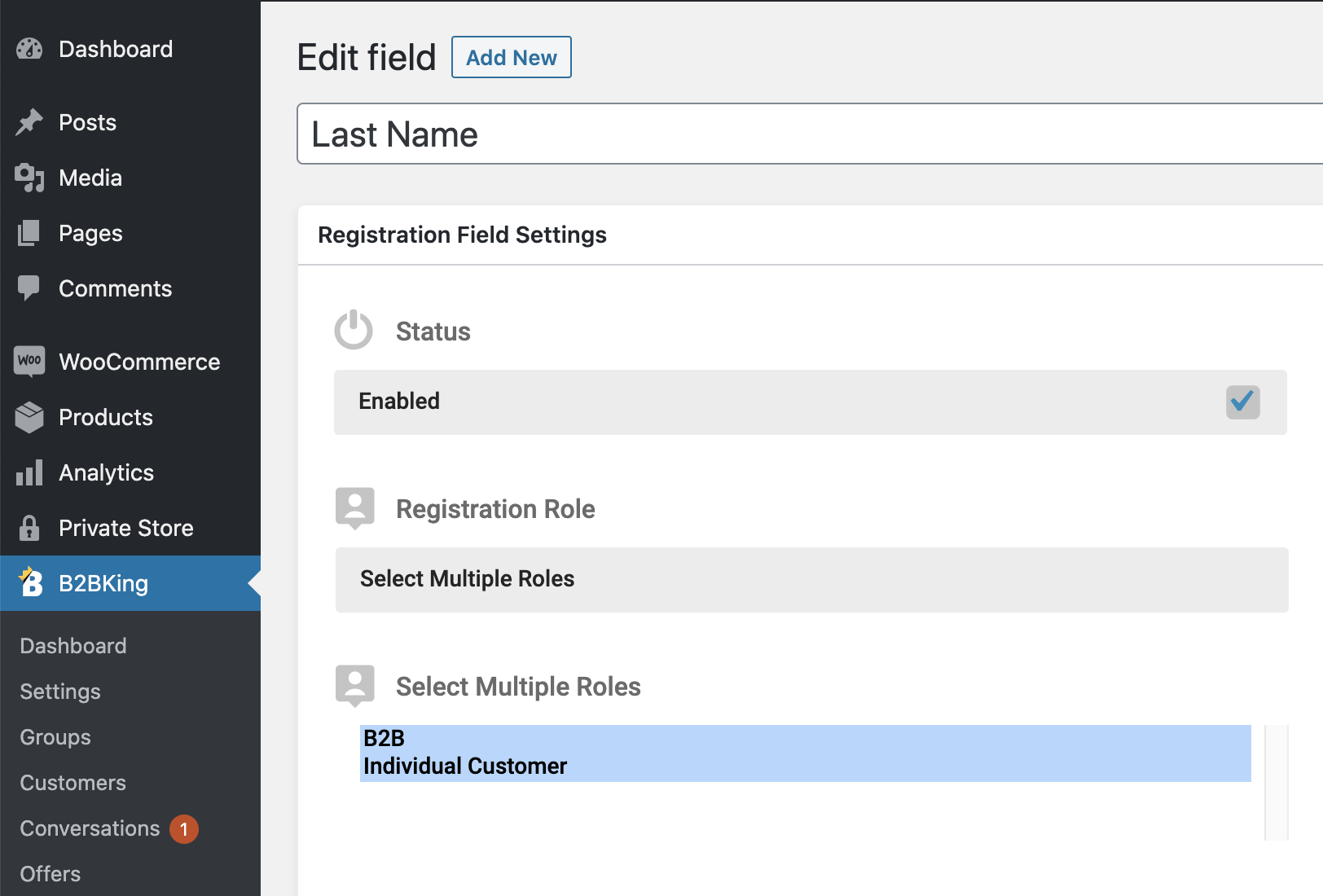
2) Click edit on every field you need for Individual User

You can control this here under "Registration Role":

1787802728.png


Under "Registration Role" you choose who will get this field.

You can set multiple roles so this field is for everybody, or just individual.


8 Tickets 6
Set Veasna replied 6 years ago on February 6, 2021 at 7:18am

Hello team,

sound good but

in my site here (Cambodia) most of my clients do not have email accounts so my registration form

no need email address text box.

and in your b2b king I cannot find field of password or username.

Can we have field like this in registration?

-User Name

-Password

-Re-type password

-Phone number

-First name

-Last name


Best regards,

Set Veasna

2,762
KingsPlugins replied 6 years ago on February 7, 2021 at 11:55am

Hi Set,

1) EMAIL

Email is controlled by WooCommerce settings, not B2BKing.

I searched right now but sorry, I find that it is not possible in WooCommerce to register without email. I can't find any setting or plugin that can do this in WooCommerce.

I think the problem is what happens if the user loses the password? they need email for password recovery. 


2) PASSWORD

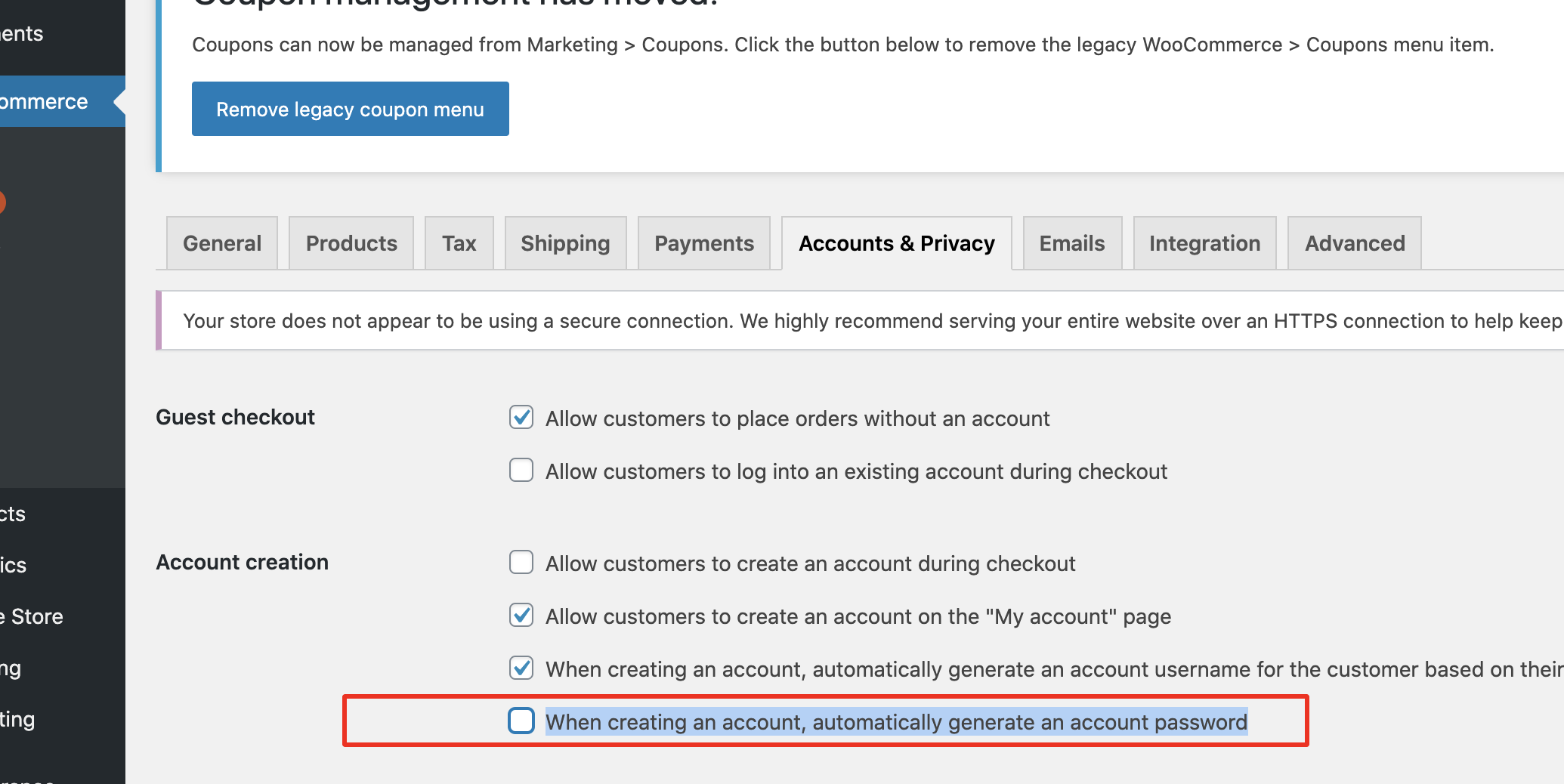
Go to WooCommerce->Settings->Accounts and DISABLE this option:

6399082744.png

You will get password in registration


Re-type password I think is not possible - I searched and cannot find such a setting / plugin.


Kind Regards,

Stefan

Sign In