Public Ticket #2686193

Edit Email content

Closed
Comments
4 Tickets 6
Catherine Russell started the conversation 6 years ago on February 9, 2021 at 1:33pm

My B2B accounts all require manual approval. I would like to expand on the text in the email that is sent to the person when they register their account - I would like to expand it with our working hours and some other info so they don't expect instant approval.

How / where can I edit this email? I don't see it in the woocommerce email list with the account approval email. 

Thanks


2

2,762
KingsPlugins replied 6 years ago on February 10, 2021 at 10:50am

Hi Catherine,

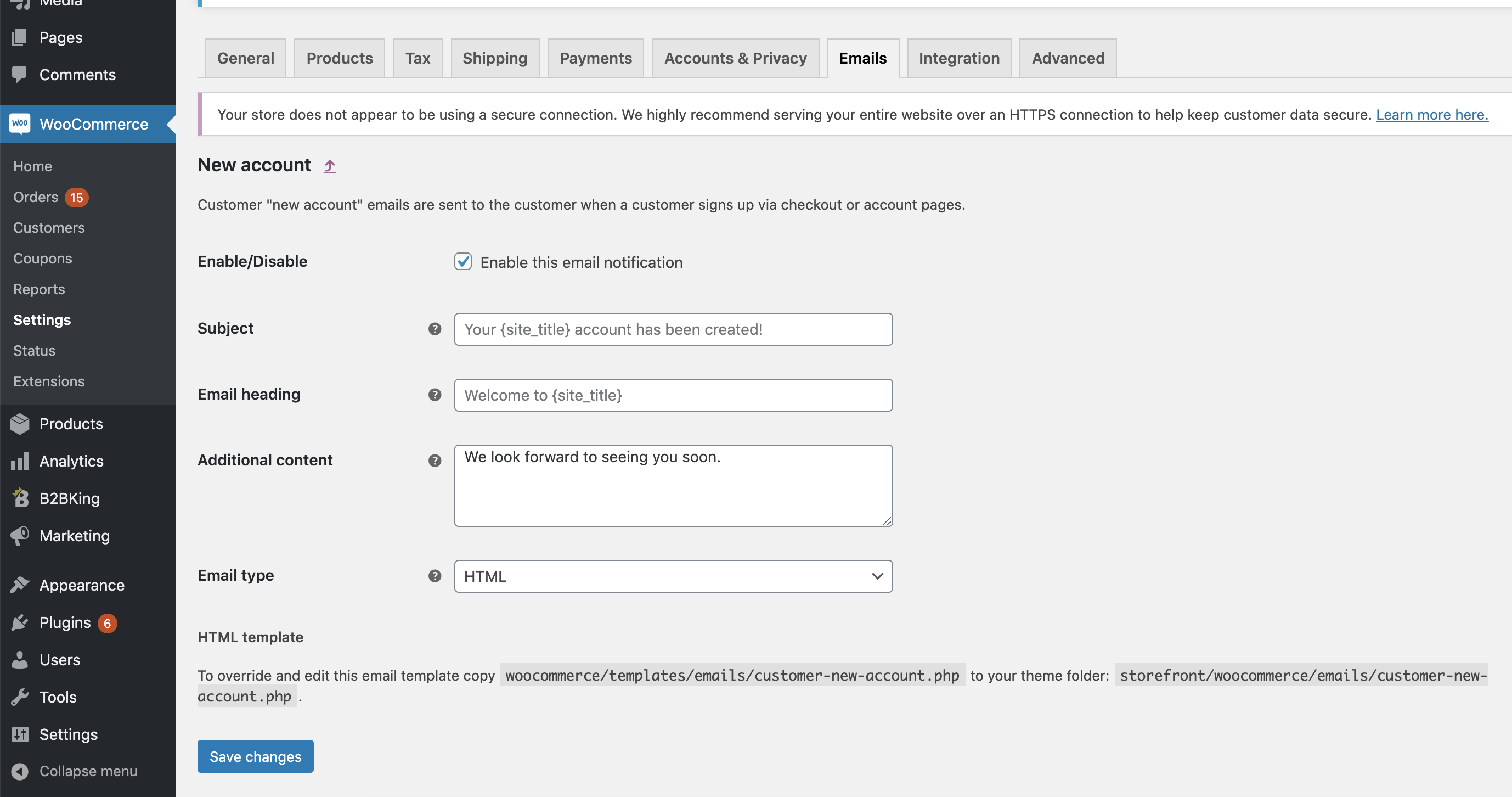
I think that's the "New Account" email, isn't it?

2404068970.png

You should see it in the list - that's a default WooCommerce email.

You can add text in the "Additional content" section there.


I hope I didn't misunderstand your issue,

Kind Regards,

Stefan

4 Tickets 6
Catherine Russell replied 6 years ago on February 10, 2021 at 11:18am

Hi Stefan

Yes seems that is the one but the text that is added by B2B King is not shown in that template. 

The text that is inserted at the end by your plugin is "Attention! Your account requires manual approval. Our team will review it as soon as possible. Thank you for understanding."

I want to extend / edit this please. It is not clear how to edit the template to change just this part as it is not specifically shown. Perhaps you could have this as a section in the config somewhere going forward. But for now where do I edit these lines?

Thanks


2,762
KingsPlugins replied 6 years ago on February 11, 2021 at 1:15pm

Oh, now I understand.

That text is added through a hook, because it needs to be sent only to b2b users that need approval - so it can't be part of the normal template.


One option is to translate that text with a plugin like Loco Translate - create an "English" translation and then you would be able to modify the text, even though we are not actually translating anything.


Or if you prefer not to do that, I can also add a filter hook there and then send you a php snippet to filter the text. Let me know please.


Kind Regards,

Stefan

4 Tickets 6
Catherine Russell replied 6 years ago on February 12, 2021 at 7:49am

Hi Stefan

Thanks - I would prefer not to add another plugin just for this so please send me the PHP snippet, that would be perfect. 

Cat

4 Tickets 6
Catherine Russell replied 6 years ago on February 17, 2021 at 8:09am

Hi Stefan, sorry so I need to replace the B2B King plugin with the zip you sent right as if it was an update? Sorry just checking. Thanks

2,762
KingsPlugins replied 6 years ago on February 17, 2021 at 7:15pm

Hi,

Yes, sorry, I should have explained that more clearly.

You would have to update the plugin as follows:

1) First deactivate/delete your current plugin version in your site

2) Then upload and activate the .zip in my previous message.

Once the plugin is updated, you can add the snippet to functions.php or to any snippets plugin. We also have a guide for doing that here:  https://b2bkingplugin.com/docs/how-to-add-a-snippet-php-or-js/

4 Tickets 6
Catherine Russell replied 6 years ago on February 26, 2021 at 8:27am

Hi

The quick order form is now no longer working - it doesn't update the total when the quantity field is completed.

Not sure if this is related to this snippet and update. 

Also the products are now showing SALE flashes even though a sale price is not set. This looks awful. 

Thanks

2,762
KingsPlugins replied 6 years ago on March 1, 2021 at 7:51pm

I tested the .zip I previously sent you but I'm not getting these issues.


Is the bulk order form issue happening with all products or only some? 


Regarding sale flashes, I doubt this would be caused by B2BKing or B2BKing alone. Sometimes the theme will control the flash there (e.g. Flatsome has a setting for this) - also sometimes the sale flash gets cached and appears incorrectly for users who shouldn't get it.


4 Tickets 6
Catherine Russell replied 6 years ago on March 2, 2021 at 10:39am

Thanks 

So the order form issue is coming from the Async Javacript plugin - can you tell me the scripts to exclude please? 

If I disable the Async plugin then the form works. 

The sale thing is happening because the system somehow thinks the wholesale price is a sale price - so the before and after are the same price but the first one is crossed out. I have hidden the sale flash in the theme but the slashed out price is still showing, which is confusing my customers. Is there any way to stop this? It is only since the update that this has happened. 

Incidentally I have totally separate products set up for wholesale, so these are not discounted versions of the original, so this sale behaviour should not be happening. 

I have updated WC to the latest version but it doesn't change anything on the display of the prices. 

Thanks


2,762
KingsPlugins replied 6 years ago on March 3, 2021 at 10:03pm

Thank you for the additional details,


1)

The script that controls the order form / order form calculation is public.js

It is found inside wp-content/b2bking-folder/public/assets/js/public.js

2)

8554367682.png

This kind of display shouldn't happen. In my experience, the most common situation where I see this is conflicts with other plugins, and in 90% of cases it is a conflict with discount plugins.


Please test with only B2BKing and WooCommerce activated and confirm if you still get this problem.


If you still get it, and the issue is not a conflict, can you please provide me with the following?

- a screenshot of your product page backend with all the prices for the product

- a screenshot of your dynamic rules and/or details of relevant rules

I want to try and replicate the issue locally.


Thank you for the help,


Sign In