 4 Tickets
1
4 Tickets
1
How i can add more fields to request quote form?
 4 Tickets
1
4 Tickets
1
How i can add more fields to request quote form?
 2,762
2,762
Hi Nacho,
Thank you for purchasing the plugin,
I'm afraid the plugin doesn't have a way to add fields to the quote form through settings. The only way to do that would be with custom coding. A developer familiar with WordPress/PHP should be able to do it.
Specifically, the relevant information for a developer is:
1) You can add fields with HTML in class-b2bking-public.php, inside the b2bking_add_request_quote_button() function
2) The quote request is processed in public.js inside:
/* Request a custom quote START*/ // On clicking "Request a Custom Quote" button $('#b2bking_request_custom_quote_button').on('click', function(){
In public.js, add a row here for your custom field:
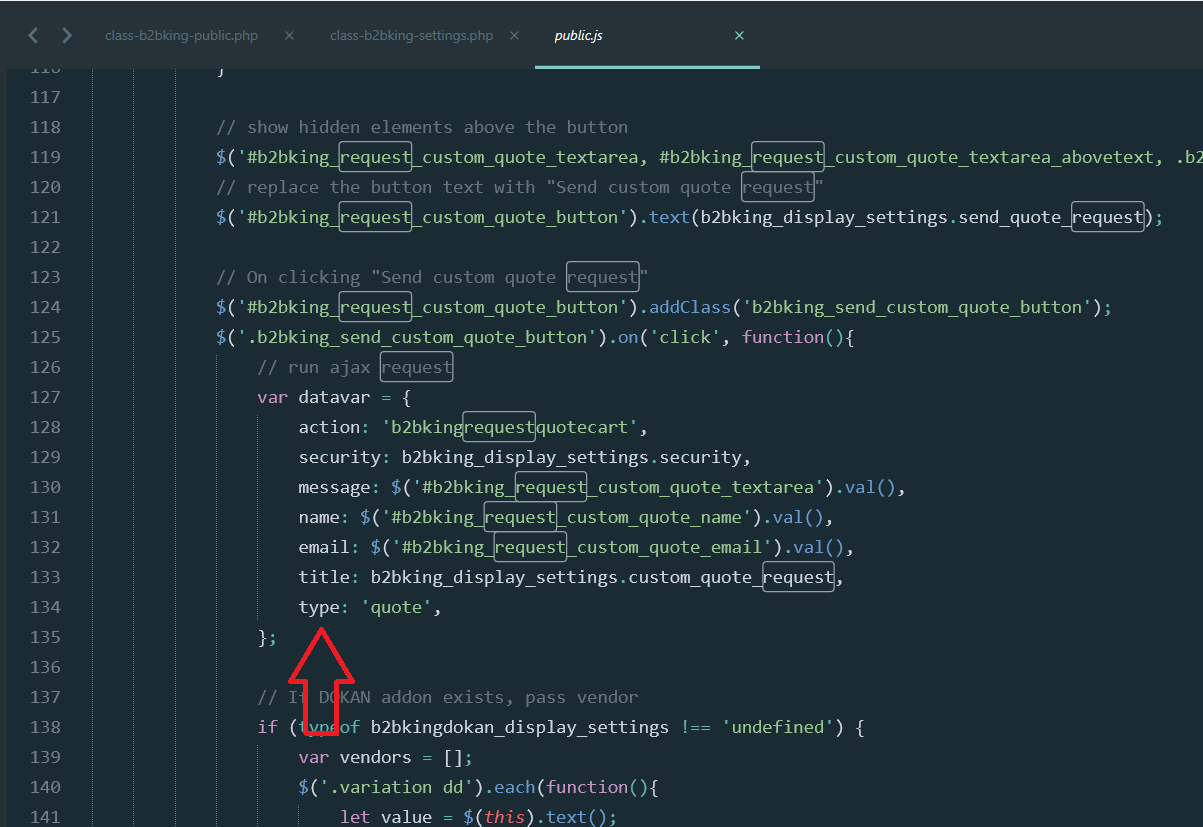
Basically you need to take the value from the field you added and pass it along to the ajax
if you add a row saying mycustomfield: $('#myfield').val()
in the AJAX processing function you will have $_POST['mycustomfield'] available with the value of your field.
3)
The ajax processing function is inside includes/class-b2bking.php inside the function b2bkingrequestquotecart(){
$myfield = sanitize_text_field($_POST['mycustomfield']);
You can then add that variable to the $message or anything else you need to do with it.
Kind regards,
Stefan