 17 Tickets
18
17 Tickets
18
Hi, Is it possible to add product images to the purchase list in the customer account?
Thanks
Darren
 17 Tickets
18
17 Tickets
18
Hi, Is it possible to add product images to the purchase list in the customer account?
Thanks
Darren
 2,762
2,762
Hi Darren,
Thank you for purchasing the plugin,
Our plugin doesn't currently have a setting for this. If you are open to customizing / modifying the plugin, I can look into it and share some relevant code if you'd like.
Kind regards,
Stefan
17 Tickets
18
Hi Stefan,
Code would be great if it can add product images into the purchase list. Would these images also show if the list is downloaded?
I want to use the purchase list to create a custom quote/list of products that can be emailed to a customer. With the images this would be better so they can see the product
Thank you for your time
Darren
2,762
Hi Darren,
1)
If you are open / familiar with doing plugin customizations, showing the thumbnail is not particularly difficult. The line of code that needs to be added to show the thumbnail is:
<img class="b2bking_offer_image" src="<?php echo wp_get_attachment_url( $productobj->get_image_id() ); ?>">
What will be more difficult actually is styling the purchase lists / order form in a way that also leads to a nice / responsive design.
We would like to add this ourselves to the plugin, at least as a setting that users can optionally enable. However, we don't have this ready yet - it needs some development time.
2)
If you want to add it to the downloaded csv, it can be done in class-b2bking.php inside the function b2bkingdownloadpurchaselist().
You can replace the function with
function b2bkingdownloadpurchaselist(){
        // Check security nonce.
        if ( ! check_ajax_referer( 'b2bking_security_nonce', 'security' ) ) {
              wp_send_json_error( 'Invalid security token sent.' );
            wp_die();
        }
        $listid = sanitize_text_field($_REQUEST['list']);
        $list_name = esc_html__('b2bking_purchase_list','b2bking');
        $list_name = apply_filters('b2bking_purchase_list_file_name', $list_name);
        header("Content-type: text/csv");
        header("Content-Disposition: attachment; filename=".$list_name."_".$listid.".csv");
        header("Pragma: no-cache");
        header("Expires: 0");
        $output = fopen("php://output", "wb");
        // build header
        $headerrow = array(esc_html__('Name','b2bking'), esc_html__('SKU','b2bking'), esc_html__('Quantity','b2bking'), 'Image');
        fputcsv($output, $headerrow);
        // parse list and for each line write data
        $list_details = get_post_meta($listid,'b2bking_purchase_list_details', true);
        $list_items = explode('|', $list_details);
        $list_items = array_filter($list_items);
        foreach ($list_items as $list_item){

            $item = explode(':', $list_item);
            $product_id = $item[0];
            $product_qty = $item[1];
            $productobj = wc_get_product($product_id);
            $product_title = $productobj -> get_name();
            $product_sku = $productobj -> get_sku();
            if (empty($product_sku)){
                $product_sku = '-';
            }
            $csv_array = array($product_title, $product_sku, $product_qty, wp_get_attachment_url( $productobj->get_image_id()));
            fputcsv($output, $csv_array);

        }
        fclose($output);
        exit();
    }
And you will get the following:
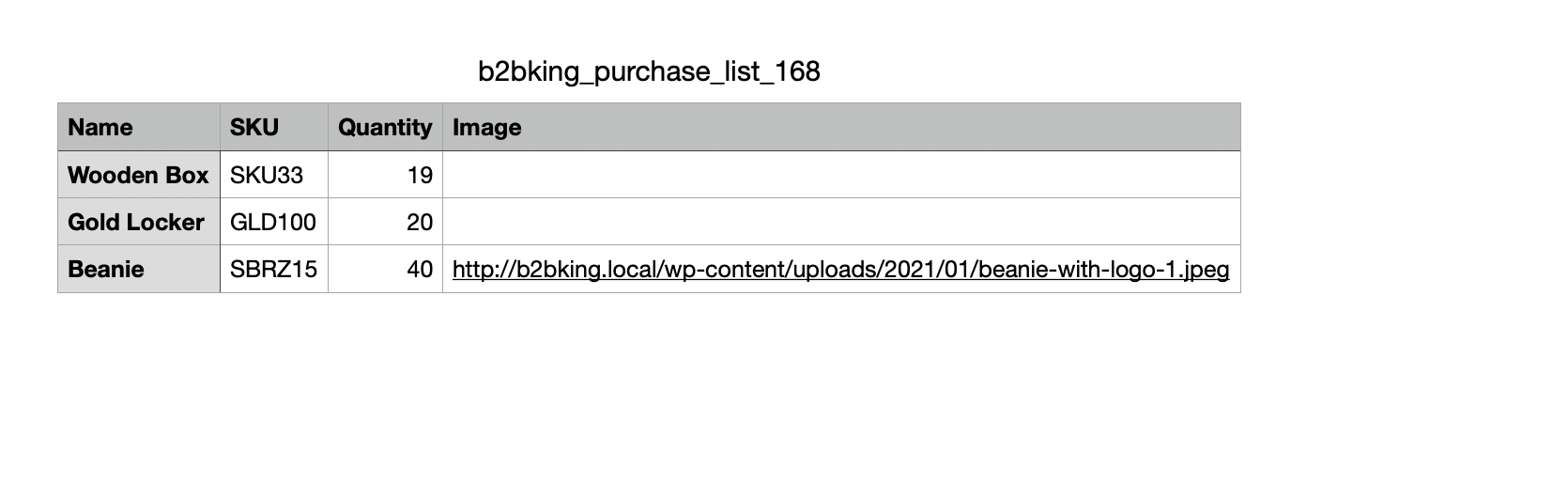
However I'm still not sure how we can add this to the main plugin in a way that makes sense - at the least we need to put some work into the layout designs.
Kind regards,
Stefan
17 Tickets
18