
Public Ticket #2788722

Administer Sub-Accounts

Closed
Comments
2 Tickets
Sam Vilhelmsson started the conversation 5 years ago on May 28, 2021 at 9:26am

Can we admnister our customer sub-accounts or can only they do it themselves.

We would like to be able to add sub-accounts to our clients main account, but we cannot do it?

And also, we would like the main account to be only a Company name, not have a private name, is this possible?

2,762
KingsPlugins replied 5 years ago on May 31, 2021 at 11:56pm

Hi Sam,


Generally speaking, you can administer and customer account or subaccount, by using a plugin such as Login as User: https://wordpress.org/plugins/login-as-user/ (this will allow you to login as any user).


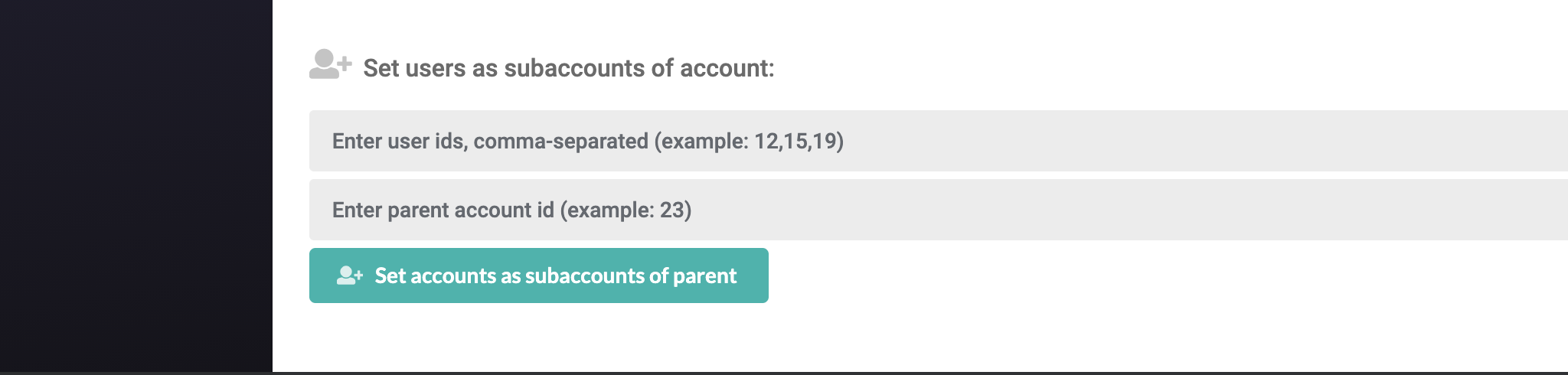
If you would like to add subaccounts to an account, there is also a faster way to do it. In B2BKing -> Tools -> Bulk Editor there is a Set Subaccounts tool:

6016569492.png

Here you can enter user IDs (to get a user's ID, you can go to Users->Click on the user->the number in the URL is the ID) , and connect them to a parent account.


I think technically it's not necessary for an account to have a private name / first name / last name, but this is not something our plugin can force or remove.


Kind regards,

Stefan

Sign In