Public Ticket #2799582

Multisite

Closed
Comments
6 Tickets 2
Kamil started the conversation 5 years ago on June 10, 2021 at 10:25pm

Hi, I am setting up a multisite subdomain for my client. 

He wants to direct wholesales to the subdomain "hurt.site.com" and there register wholesalers. 

The thing is that he wants them to view products on this subdomain. These are the same products that the individual clients see but with the rules for the wholesaler. 

How can I achieve it? 

2,762
KingsPlugins replied 5 years ago on June 10, 2021 at 11:24pm

Hi Kamil,

Thank you for purchasing our plugin,


Generally, there are 2 options for setting up a B2B+B2C Site:

Option 1) Use the same website (not a multisite). You configure B2BKing and set it to "B2B + B2C hybrid mode". When a user logs in, B2BKing checks if they are B2B or B2C and gives different rules/prices/options, etc for B2B users. In this setup, B2C users do not even know that B2B users have a different experience. Prices, rules, etc, are different only after login.


Option 2) Use a multisite as you describe with a subdomain. However, as far as I know, there is no way to use the same database in a multisite. This means the 2 sites are completely separate technically. In a multisite setup, you would  install B2BKing only in the B2B site (hurt.site.com) and set it to "B2B mode". If you want to have the same products, I think the only option is to use a SYNC plugin such as:

- https://codecanyon.net/item/woocommerce-multisite-product-sync/20137238

- https://woomultistore.com/

These plugins can also sync stock, so essentially they should make it act as a single site.


So basically, for your needs, Option 1) would be simpler, because it uses the same database. But if the client wants a subdomain, I think you may need to use a sync plugin. 


Kind regards,

Stefan

6 Tickets 2
Kamil replied 5 years ago on June 22, 2021 at 1:23am

Thank you for this detailed answer. 

I am setting up the site through the subdomain as the client requested and will use one of the sync plugins. 

I have set up the requirement for the users to register/login before seeing the shop/product page. 

Unfortunately when I try to test register myself I have a problem. System asks me to select type of the user but the dropdown list doesn't open. PLEASE HELP :) 

https://hurt2.ettito.pl/kategoria-produktu/bluzki/

6 Tickets 2
Kamil replied 5 years ago on June 22, 2021 at 1:34am

Ok I figured it out - need to create a group :) 

I had a small problem as there was an error the first time I tried creating the group. It's ok now

6 Tickets 2
Kamil replied 5 years ago on June 22, 2021 at 2:13am

Still with a problem.

I need to add custom fields to the wholesaler registration form. The sort order numbers don't work. I still get as first the email and selecting the type of the customer. I've put as 1st the Name and it's showing up as 3rd. 

Looking forward to hearing from you! 

2,762
KingsPlugins replied 5 years ago on June 23, 2021 at 2:32am

Hi Kamil,

The email and the User Type are outside our "Sort Order" system I'm afraid, so they are always at the top - not controllable via Sort Order.


If you want to modify the order of those, I can help write a custom JavaScript snippet for you site. For that, I would need a link to your registration page + please tell me where you want the email/user type to be.


Kind regards,

Stefan

6 Tickets 2
Kamil replied 5 years ago on June 29, 2021 at 1:04am

Hi Stefan,

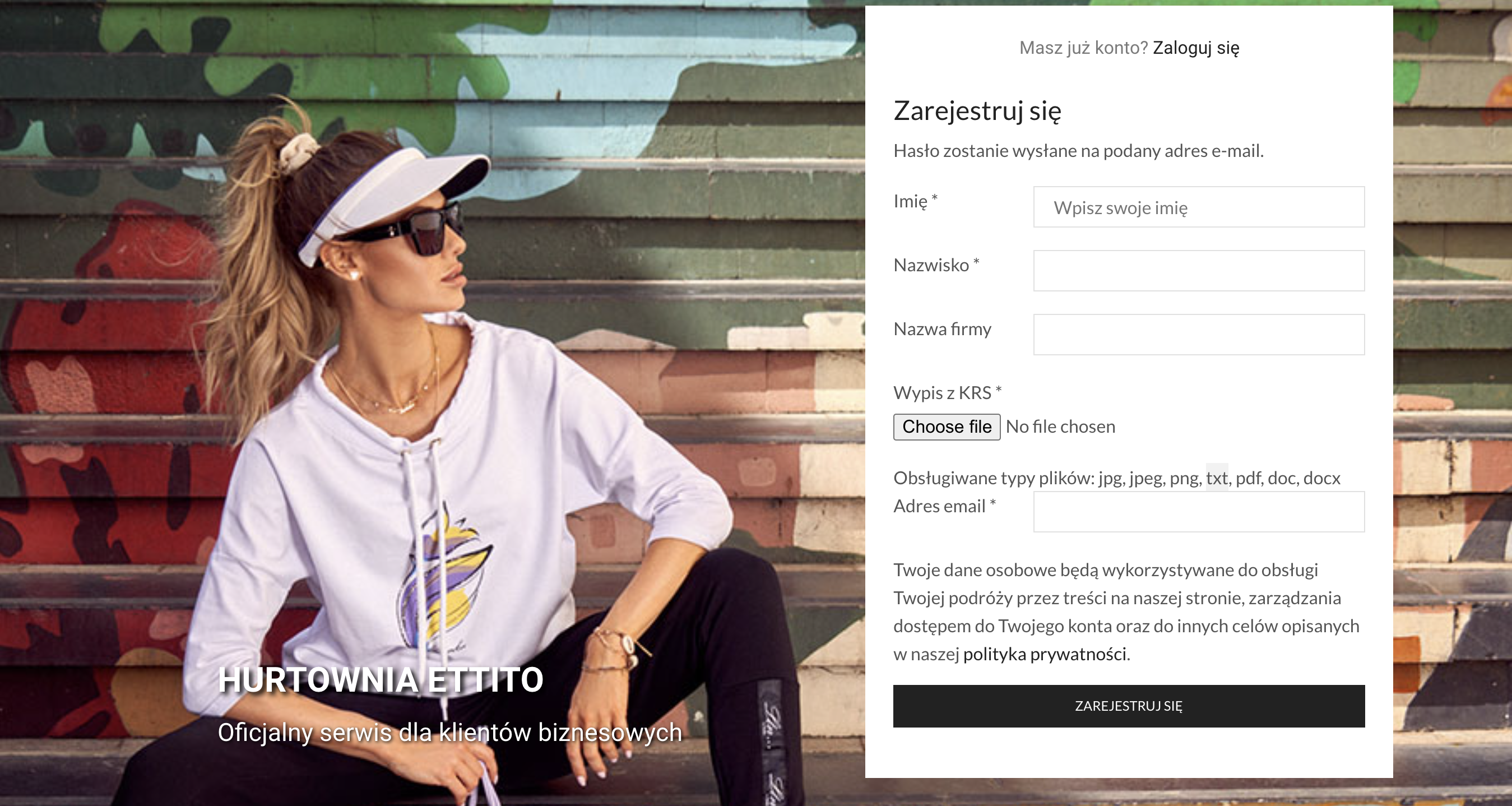
Please help with the snippet. I would need the following order. My page is hurt.ettito.pl which (if you are not logged in) should take you to hurt.ettito.pl/rejestracja

1. Imię (Name)

2. Nazwisko (Surname)

3. Nazwa firmy (Company name) - not required

4. Numer NIP (VAT number)

5. Wypis z KRS (Company registry files) - file upload

6. E-mail

7. Password 


Ideally I would like the labels to appear in 1 side (column) and fields to fill to appear just next to them on the right side. I have added a screenshot as an attachment. 

I will greatly appreciate help as my deadline is coming up tomorrow :) 

6 Tickets 2
Kamil replied 5 years ago on June 30, 2021 at 7:21pm

Hi! 

1. This I know, for now not needed - but thanks! ) 

2. Is this really needed? Anyone who would register in the subdomain hurt.ettito.com would be a wholesaler as default. Is there a way to disable it? 

3. Please provide a snippet for "file upload" text (2 column view). I will implement this view. 

4. I have enabled the TAX ID (in polish "Numer NIP") field but it does not appear in the form. It's good that you provided a screenshot because it shows it doesn't show up to you either. What I noticed is that the field loads in the site but then it gets hidden (somehow). I would love help with that.

THANKS FOR ALL THE SUPPORT! 

2,762
KingsPlugins replied 5 years ago on July 1, 2021 at 11:35pm

Hi,

2) You're right, now I understand what you mean. This dropdown can be simply hidden via CSS.

form.login .form-row, form.register .form-row.b2bking_registration_roles_dropdown_section{
    display: none !important;
}

3)

Effects:

6853197443.png


For CSS, please use the following (I made a small change from previously):

form.login .form-row, form.register .form-row {
    display: flex;
}
.woocommerce-form-row label {
    min-width: 125px !important;
}

Also, add a JS snippet:

jQuery('#reg_email').parent().detach().insertBefore('.woocommerce-privacy-policy-text');
jQuery('input[type=file]').parent().css('display','contents');

4) The reason tax ID does not show is that the VAT field is connected to country, but there is no country registration field added in your site. Normally the way this works is that VAT ID is hidden until the user chooses their country. Then, if the country matches VAT countries, the VAT ID field will show.

So to resolve this, please create a Registration field for "Country+State" or "Country". Once country is selected, VAT will also show during registration.


Kind regards,

Stefan

Sign In