 4 Tickets
https://www.miqos.com.my/my-account/
How user want to be regist as B2B? How to setup? Can you show? When I register it register to admin site.. I already create group of b2b user. But didn't show. How to fix that?
 4 Tickets
https://www.miqos.com.my/my-account/
How user want to be regist as B2B? How to setup? Can you show? When I register it register to admin site.. I already create group of b2b user. But didn't show. How to fix that?
 2,762
2,762
Hi Zaim,
In B2BKing there are:
-> Registration Roles = For customers to apply for registration
-> Groups = For admin to organize users
So for example, you can have 2 roles: Individual and Business. The customer applies to be a business. But you have 4 groups in the backend: small business, medium, big business, VIP, and you can give different prices, discounts, etc. The customer does not know what group you put them in.
In https://www.miqos.com.my/my-account/ you can see only registration roles. You can go to B2BKing -> Registration Roles -> Create more roles if you want.
Please see our documentation here for some details: https://b2bkingplugin.com/docs/extended-registration-and-custom-fields/
You can connect 1 role to a group if you want:
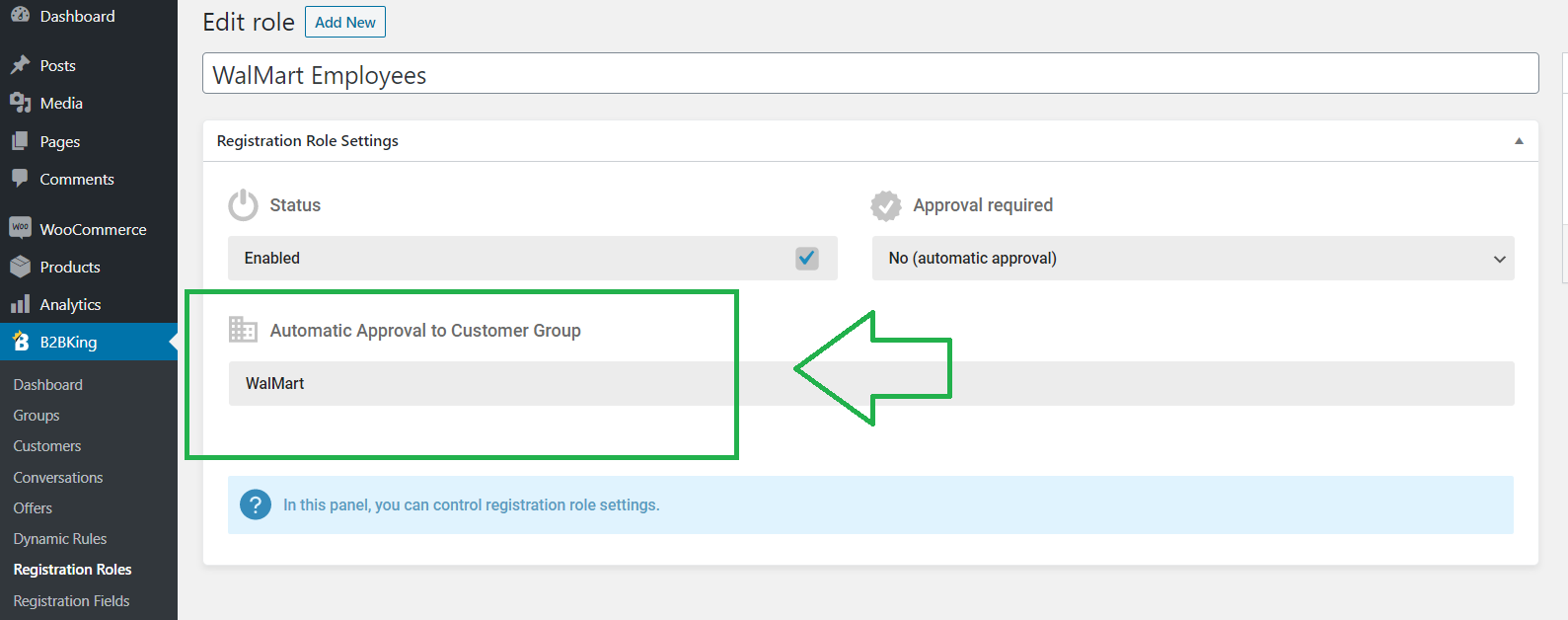
Let me know if that helps,
Kind regards,
Stefan
4 Tickets
How to make them know their Group if we create 4 Groups (small business, medium, big business, VIP). How can they choose for themselves?
2,762
If you want to have 4 groups, and allow users to choose for themselves, you need to create 4 corresponding Registration Roles.
The registration roles are the options in the registration dropdown.
You would go to B2BKing -> Registration Roles and create 4 roles, 1 for each group, and set "Automatic approval to customer group" to the Group you want.