 3 Tickets
3
3 Tickets
3
hello,
I'm trying to configure taxes, which should display in catalog with TAX for B2C and without for B2B, I tried as in documentation, but still prices for B2C are excluding TAX.
 3 Tickets
3
3 Tickets
3
hello,
I'm trying to configure taxes, which should display in catalog with TAX for B2C and without for B2B, I tried as in documentation, but still prices for B2C are excluding TAX.
 2,762
2,762
Hi there,
The way it works is that taxes are added by the WooCommerce plugin. What B2BKing does is it actually removes the taxes for your B2B users.
Have you already followed the WooCommerce tax configuration from the documentation? I'll copy-paste it below:
--------
Go to WooCommerce-> Settings-> Tax and set the following:
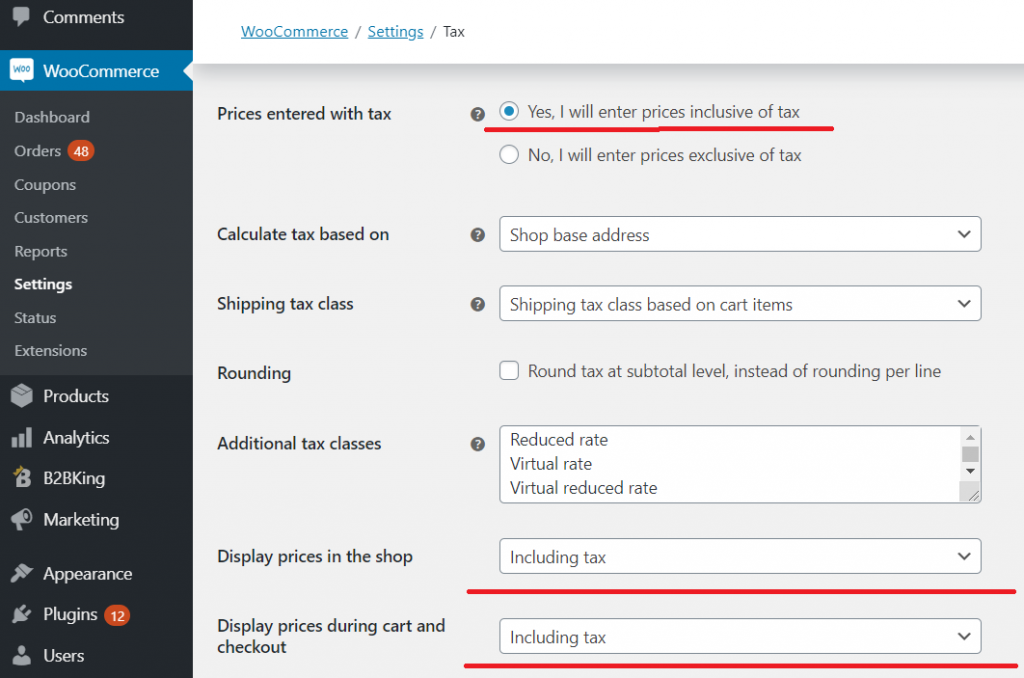 WooCommerce Tax Configuration
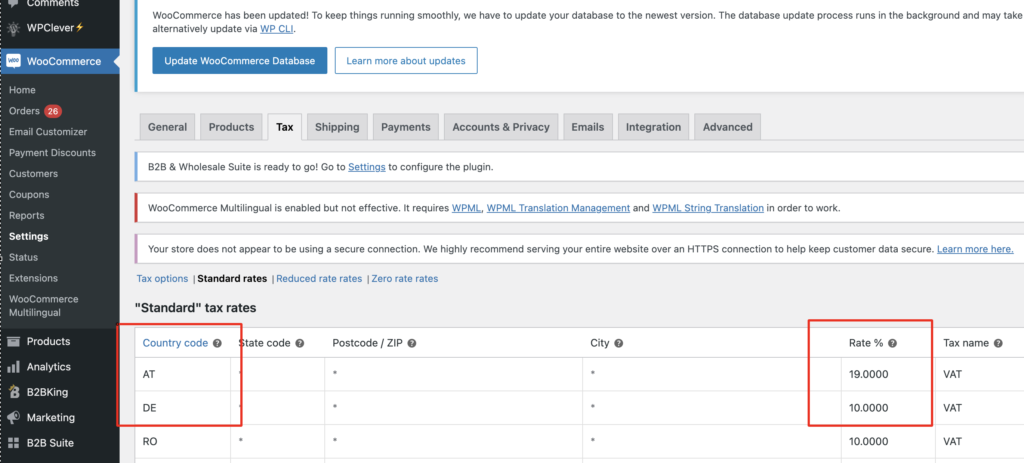
In WooCommerce->Settings->Tax->Standard Rates, make sure rates are set:
--------
Importantly: Please note that in the first image there is a setting called "Calculate tax based on". For example if that is set to Billing Address, users will not see tax until they choose a billing country in checkout.
Please make sure that standard rates are set for the country. Without rates set, B2C users will not get any taxes.
We are also happy to look into your configuration directly to troubleshoot the issue. For that, I'd need a backend login to your site or a staging clone site.
Kind regards,
Stefan
3 Tickets
3
this first row " Prices entered with tax " I selected " no, i will enter prices exclusivetax" becouse I imported 2600 products exclusive tax, the problem is fixed, it looks like prices works fine, exception tax for b2b also, thanks.
2,762
Glad to hear you got that to work, thanks for the update.
Have a nice weekend,