 1 Ticket
1
1 Ticket
1
Hi,
I would like to know how to load cost pricing and then for each tier add different markup ups. I have tried the raised pricing dynamic rule, however, the cost pricing is displayed.
How can I fix this?
 1 Ticket
1
1 Ticket
1
Hi,
I would like to know how to load cost pricing and then for each tier add different markup ups. I have tried the raised pricing dynamic rule, however, the cost pricing is displayed.
How can I fix this?
 2,762
2,762
Hi Chevan,
I am not sure if I fully understand, it would help if you can give an example or screenshot.
For example, if I have this product with a price of $1000

I can create a rule to increase the price with 20%,

And the price will become $1200:

Is this not what is happening? Or do you need it to work differently?
Kind regards,
Stefan
1 Ticket
1
Hi Stefan,
Hope you are well,
Here is my goal, the client wants me to set a cost price, and for each tier we need to add a markup, (raise the price) however if I do the cost price then on the product it shows the cost price(I do not want the cost price to the customer)
Can we do this?
I hope this helps.
Regards
Chevan
2,762
Thank you for explaining further,
I do not understand why the cost price would show to the customer. Perhaps you have different settings in your site for price or other plugins interfering.
I think you can simply enter the product regular price = the cost price.

In the above, the cost price (Regular price) = 1000.
You can create a rule to increase the price with 20% for a user
And the price will become $1200:
The customer does not see the cost price = 1000, they only see their price = 1200
Is it different in your site?
1 Ticket
1
Hi,
Please see attached, I need to use a cost price as regular price.
Is it possible for us to do a call?
Regards
Chevan
2,762
Hi Chevan,
Unfortunately we can only provide ticket-based support since our customers are in many different timezones.
In your screenshot, I see that you have a particular setting enabled. This setting is not compatible and it has to be disabled.
To do that, please go to B2BKing -> Settings -> Other -> and DISABLE " Show B2C price to B2B users."
Kind regards,
Stefan
1 Ticket
1
Thank you, this has been fixed,
Please can you advise on the following:
1 Ticket
1
Hi Stefan,
I would also like to know is we can give different user permission for different users?
Eg: 1 User per company to place and order? Others can view pricing but cant order?
2,762
Hi Chevan,
1) To change the name of purchase lists in the dashboard, we would recommend that you use a translation plugin such as Loco Translate. This can help you change any text in the plugin (even if you are not actually translating to another language).
You would need to install Loco Translate and create a translation in the language of your website (if your site language is en_US, create an en_US translation, and anything you change will overwrite the original wording).
You can see our guide here for how to use Loco with B2BKing : https://b2bkingplugin.com/docs/how-to-translate-b2bking-to-any-language-localization/
2) Permissions can only be set for subaccounts. Otherwise B2BKing does not have any such feature unfortunately.
If you wanted to have a customer that can view pricing but can't order, you would need to create a subaccount for them and uncheck the 'place order' permission.
( https://b2bkingplugin.com/docs/multiple-buyers-per-account-subaccounts/ )
Kind regards,
Stefan
1 Ticket
1
Hi Stefan,
Hope you are well,
Please can you explain how to exclude certain products from tiered pricing?
http://blu-tick.co.za/product-category/rewards-shop/ I need all these items to be standard across the board,
Please this is urgent.
Regards
Chevan
2,762
Hi Chevan,
Please give us more details about what you mean by 'tiered pricing' in this context.
By tiered pricing, we usually mean this table:
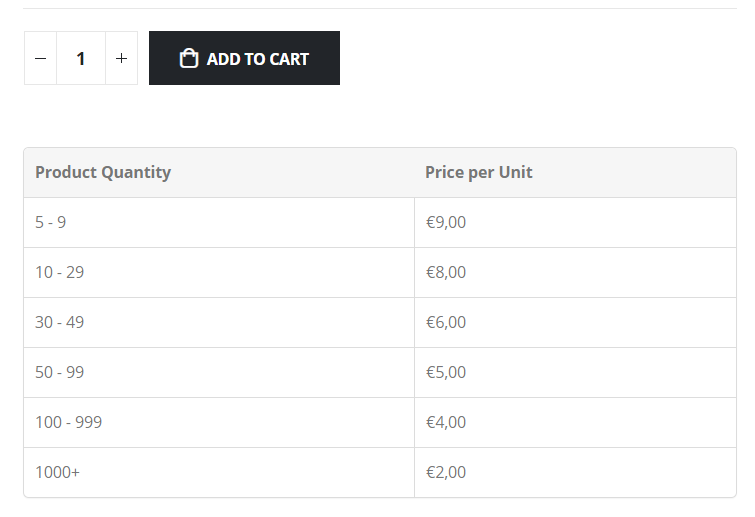
Do you have a 'Discount Percentage' rule and you want to exclude certain products?
If you have a discount rule, search here for 'Except':

There is a hidden option (beta) for 'All products except)':
Then you can choose products to exclude:

Kind regards,
Stefan
1 Ticket
1
Hi Stefan,
I think i mean dynamic pricing rules which I have set to "raise price" so in the woocommerce side under regular price, I have set that as the cost price, on the rewards shop https://blu-tick.co.za/product-category/rewards-shop/ I see that the dynamic pricing rules apply there. I need this category to be excluded from dynamic rule pricing.
2,762
The 'All products except' option unfortunately is only implemented for some rules right now, but not for 'raise price' rules.
I think you would need to modify your dynamic rule and manually select all categories, except the Rewards Shop category. For this to work correctly, products there must have only 1 category, rewards shop.
So I mean you would need to select all categories in the rule, except Rewards Shop:
 1 Ticket
1
1 Ticket
1
SO the other way around.. Okay let me try that and advise