 6 Tickets
13
6 Tickets
13
Hi there,
The Follow Button for the Store-Listing and Store-Page, currently only works on Chrome, it doesnt work on other browsers such as Firefox or Opera etc
Can you help me please
Thank you
 6 Tickets
13
6 Tickets
13
Hi there,
The Follow Button for the Store-Listing and Store-Page, currently only works on Chrome, it doesnt work on other browsers such as Firefox or Opera etc
Can you help me please
Thank you
6 Tickets
13
I just figured it out, you need to be logged in as a registered user to be able to Follow others
6 Tickets
13
How do I show how many followers the user has?
marketking()->get_total_followers($vendor_id); ??
Thank you...
 2,762
2,762
Hi there,
I've now made an update to the MarketKing Core plugin and I added a function for that.
You can use the following function:
marketking()->get_number_of_followers($vendor_id);
so for example,
echo marketking()->get_number_of_followers(7);
Kind regards,
Stefan
6 Tickets
13
6 Tickets
13
HI Stefan,
How about a function to count how many Products that one [$vendor_id] has?
eg.
marketking()->get_total_products($vendor_id);
Do you have a function like this?
Thank you again Stefan 🙏
2,762
You got it
Please update to the attached version manually (I'll upload that at a later time, so no worries, all is compatible with future updates).
To update manually, first deactivate and delete your existing version of MarketKing Core. Then upload and activate the attached version.
Function examples:
marketking()->get_vendor_products(4);
This returns an array of all product ids of the vendor with ID 4
But what you asked for is this:
marketking()->get_vendor_products(4, true);
This returns the total number of products (count) that the vendor with ID 4 has.
6 Tickets
13
Wow, great, got it thanks guys 👑👑👑🙏✌️
6 Tickets
13
Hi guys,
I would like to display the 'About' section that was entered in the Dashboard,
into the Single Product Page information, can you please provide the function for that?
Thanks guys
2,762
This message is private.
6 Tickets
13
Great, thanks guys
I would like to display the type of vendor in the Vendor Groups, to show on the Profile Page
Could you kindly provide the function?
Thanks guys
2,762
Hi there,
Do you mean that you want the name of the group of a vendor?
Can you use PHP code like this?
$group_name = get_the_title(get_user_meta($vendor_id,'marketking_group', true));
This will give you the group name if you have the vendor user ID.
Can you use the above?
Kind regards,
Stefan
6 Tickets
13
Hi Stefan! Awesome, thanks for this!
I just tested it on the Stores-List and it works! great!
However, on the Store-Page doesn't work tho, can you guide me please
Best regards,
Quin
6 Tickets
13
For some reason
get_the_title
part here doesnt work on Store-Page, it returns a blank value
however if I enter this:
$group_name = get_user_meta($vendor_id,'marketking_group', true);
returns the same value for both Stores-List and Store-Page
2,762
Hi Quin,
I wasn't aware that could be an issue - I think it probably has to do with the point where the function is called - maybe the function is not loaded yet, or it has to be in the WP loop or something like that.
Please try the following instead of get_the_title:
$post = get_post(get_user_meta($vendor_id,'marketking_group', true));
$group_name = $post->post_title;
6 Tickets
13
I see, ya I was trying to figure it out why...
This is working now, awesome stuff, thanks Stefan!
Best regards,
Quin
6 Tickets
13
Hi guys, I have a question here,
How do I modify the text and icon of "Add Product to My Store" ?
Could you kindly guide me to where I would go to change this?
Would it be in which PHP file and which folder and what name of the file I can go to, to make changes to it?
Thanks guys 🙏🙏🙏
2,762
This message is private.
6 Tickets
13
Hi Stefan,
Great! thanks for this, I will update it now
6 Tickets
13
This message is private.
2,762
Hi Quin,
1) There's currently no integration with this plugin. I think unfortunately it might be hard to get these to work well together. Probably would need custom coding.
There is a chapter here: "How to integrate a plugin": https://marketkingplugin.com/docs/developer-documentation-functions-hooks-custom-code-plugin-integrations/
But sometimes it can be easier and sometimes harder.
2) Generally any WooCommerce theme would also work with MarketKing. I think iBid should work fine as well.
3) To use WCFM with B2BKing, you would need to purchase 2 plugins: the full B2BKing plugin + the B2BKing for WCFM add-on. So it's not just the add-on alone. The add-on simply integrates the 2 but the main plugin is needed also.
If you use MarketKing with B2BKing, there is no need for the add-on because the 2 are already integrated. So you'd need just 1 plugin, the main B2BKing plugin.
4) Sorry, I am not sure if I understand.
You can use B2BKing in a multi-vendor site. The 2 plugins are fully integrated. You can read about the integration here: https://marketkingplugin.com/docs/wholesale-b2b-b2bking-integration/
Or are you asking about the registration system? The registrations of the 2 plugins are not connected.
Kind regards,
Stefan
6 Tickets
13
Hi Stefan, thanks for your clarification
1) I see, I had tried it with some other Auction plugin last night and it worked, I think it goes directly to the Wordpress system, but the vendor didnt get any email from the Auction plugin, but Im not sure if its the free version that didnt offer the notification system or not, Im going to purchase the Woocommerce Simple Auctions plugin and will let you know
2) Ok great, thanks for the clarification
3) I see, I thought I can get an B2BKing Add-on for MarketKing Multi-Vendor plugin,
I understand now, I have to buy the whole B2BKing Plugin to make it work with MarketKing Multi-Vendor
4) Sorry, what I meant was--
does B2BKing Plugin have a Multi-Vendor function?
as in many vendors can register?
or is B2BKing Plugin is only for 1 vendor only?
It is not a Marketplace like MarketKing Plugin, am I right?
Thanks Stefan 🙏🙏🙏
2,762
4) B2BKing is not a marketplace plugin - it has no multi-vendor functionality.
The purpose of B2BKing is to make the site better for business customers. Usually in most online shops, customers are retail (individual users), not businesses. But if you have business customers, B2BKing will add a lot of useful features:
- Invoice payment gateway - business customers can order and get an invoice they pay later
- Tiered pricing discounts (better prices when purchasing 50, 100, 1000+ items)
- Hide prices for logged out users
- Different prices for different users (E.g. you can have VIP users with better prices)
- Set carton / package quantities (products can only be purchased in quantities like 6, 12, 18, etc)
- Tax exemptions: businesses see prices excluding VAT
- Quote requests for specific products / quantities
etc
You can use MarketKing + B2BKing together. This will allow each marketking vendor to set wholesale prices, tiered pricing discounts, carton quantities for their products, each vendor will be able to respond to quote requests etc.
1) Thank you for the info about WooCommerce Simple Auctions. This is very useful.
I did some tests now also and I think they are mostly compatible, but probably I will need to make some adjustments
I see for example that when editing an auction product, the admin has these panels also:
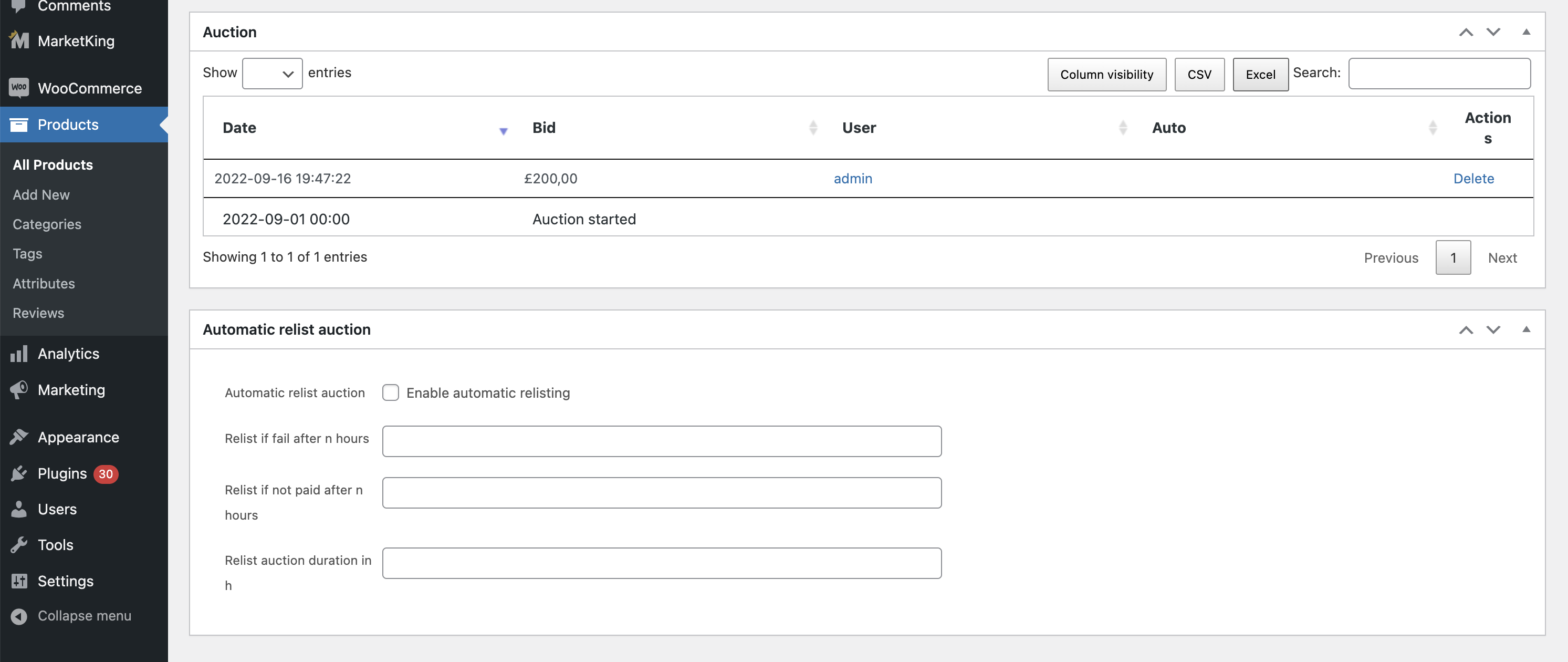
-> these panels are not available to the vendor (because I have not yet done a specific integration). I do not know how important they are.
I see also the vendor does not have a way to see the current bid price in the dashboard.
But these are just minor things I think - easy to fix - I do not know if there are any big problems.
If you find more information in your testing, please let me know. I am interested to do an integration for MarketKing, so I can advertise an Auctions module.
6 Tickets
13
4) I see, I get it now, thank you for clarifying that, had helped me alot in understanding both plugins
Yes the B2B Features available in B2B King is great, it is really what I need, together with the Multi-Vendor function, I guess would work really well!
I will definitely get the B2B King for the next projects to come!
Thank you for clarifying and your detailed explanations guys! 🙏🙏🙏
6 Tickets
13
1) I see, yes we really need this Auction function for this next project we are developing
Yes please work out how to integrate it to the Dashboard
From what I see is the settings for the Auction functions appears on the WooCommerce Dashboard as I had seen it the other day
But I havent checked it on the Vendors-Dashboard from MarketKing for each vendor to be able to make the settings and get notifications and make adjustments or other specific Auction type responses or actions.
That would be great if you could make it happen for Woocommerce Simple Auctions, as the iBid with WCFM/WC Lovers/Dokan and others I saw had recommended to use specifically Woocommerce Simple Auctions (and I will be purchasing this one as well 😊 to try it out and make it work with MarketKing)
I will be in touch with you shortly as I run into some things that I cant work out or need your help to integrate it with MarketKing
Yes definitely for marketing the MarketKing it would be great! You will expand your market for developers needing the Auction Multi-Vendor functionality
Again, thanks guys, thanks Stefan, you guys rock! keep up the great work!
Best regards,
Quin
2,762
Many thanks for your feedback!
I'll be trying to integrate this Auctions plugins as soon as possible - would be a great addition to MarketKing,
I will let you know when I have this ready,
Hope you have a great week,
2,762
This message is private.