Public Ticket #3121197

Sales King Sales Agents

Closed
Comments
3 Tickets 4
kkoraysimsek started the conversation 4 years ago on September 8, 2022 at 4:42pm

hello, when the sales advisor is ordering with his own account, I want the sales advisor option to be added to the payment screen and to select himself from there. Thus, the ordering process for the customer will be shortened in time. Also, can you set the customer advisor selection box in the payment form so that only customer representatives can see it? Can you share the code for this with me? I'm sorry for my bad english.

2,762
KingsPlugins replied 4 years ago on September 8, 2022 at 8:08pm

Hi there,

Thank you for purchasing our plugin!


1)

"hello, when the sales advisor is ordering with his own account, I want the sales advisor option to be added to the payment screen and to select himself from there"

Do you mean when the agent places the order using the 'Shop as customer' button?

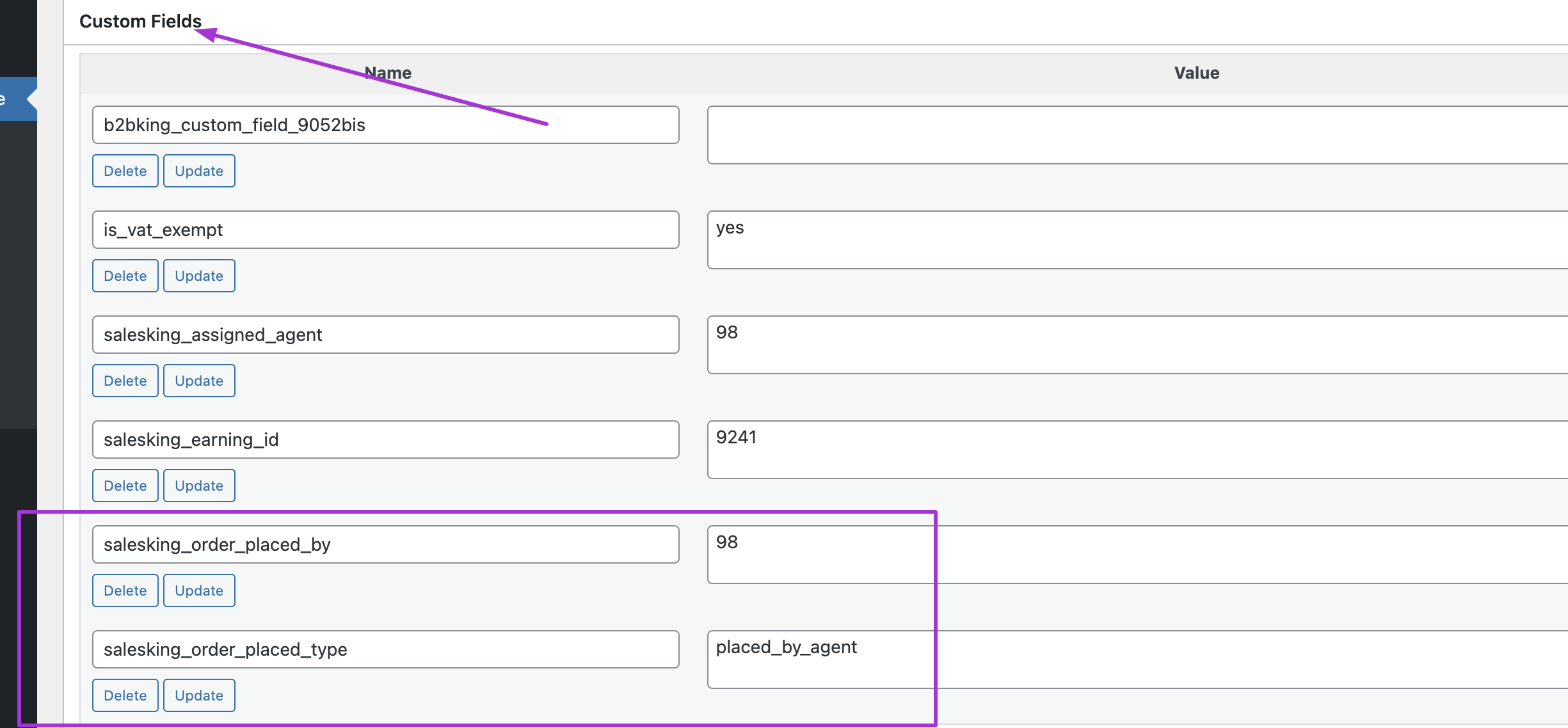
If the agent places the order this way,  you can see the following when you edit the order:

5144775350.png

Here you can see the order was placed by an agent, and that the agent's user ID is 98.


2)

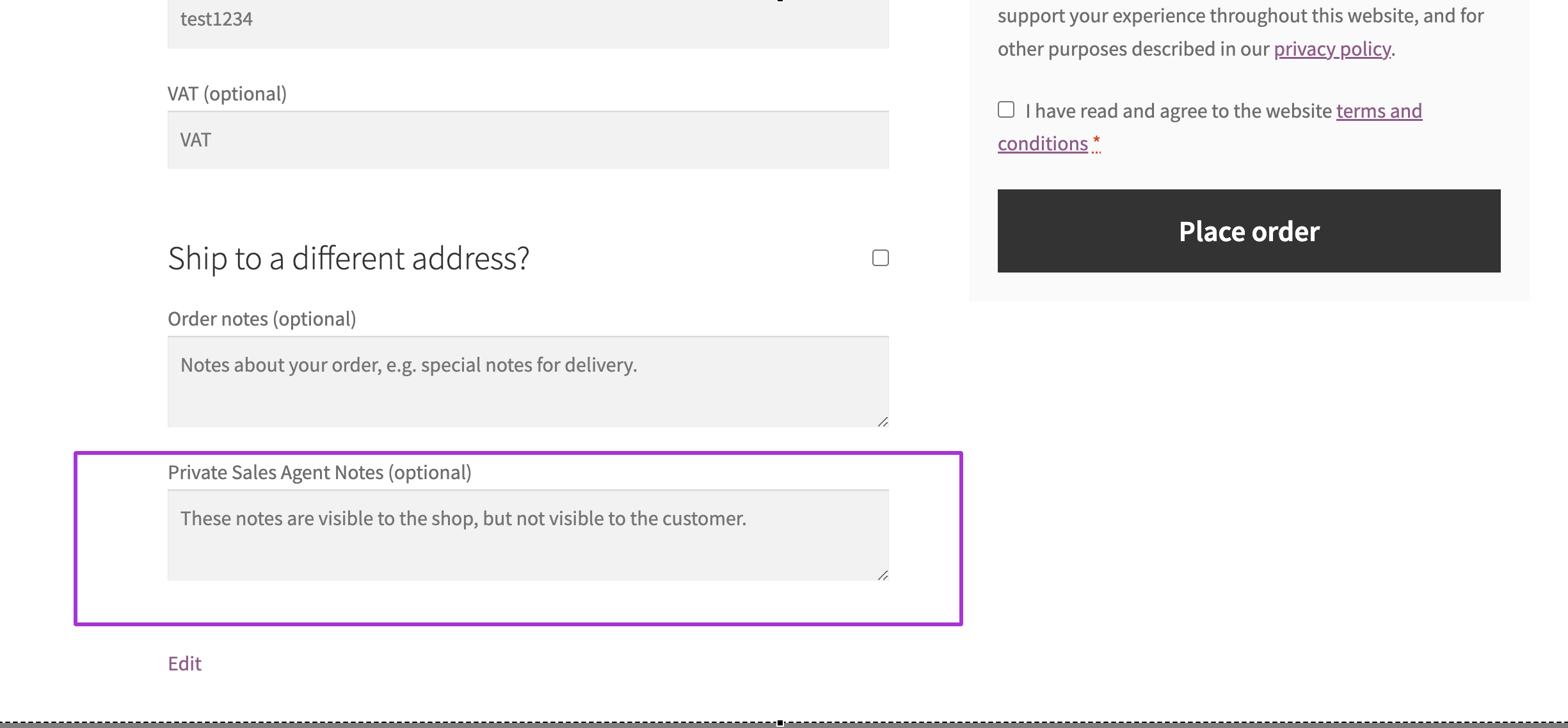
Also, can you set the customer advisor selection box in the payment form so that only customer representatives can see it? 

When an agent shops for a customer, by using the 'Shop as customer' button, on the checkout page,

1212941206.png

This box here 'Private Sales Agent Notes' is only seen by the agent. Only the agent and the website admin will see this information.


Kind regards,

Stefan


3 Tickets 4
kkoraysimsek replied 4 years ago on September 8, 2022 at 8:27pm


hello stefan, thank you for your reply. but i think i didn't explain my problem.

The problem is that adding a new customer in the agent dashboard seems long because both the added customer is not visible immediately (it can be seen by taking the page back and forth. This may be due to cookies.) and e-mail is required for each customer. instead I mean;

The agent will place an order with his own account, enter the customer information on the payment page (in this way, he will not have to write a new e-mail all the time.) and will choose his own name from the "Agent selection" option that will be added to the payment screen for the commission to be assigned to him. In this way, the system will be accelerated in orders given 20-30 pieces per day. otherwise the system is running slowly. Actually the solution is just this;
"Agent selection" will be added to the payment screen and only people logged in as agents will be able to see it. I hope I was able to explain

In addition, when the agent changes the basket amount, he/she should be able to receive all the + part as commission. how can we do this?

Thank you for your help, I did a lot of research and I chose you because of your support system. Thank you.

3 Tickets 4
kkoraysimsek replied 4 years ago on September 8, 2022 at 8:38pm

hello stefan, thank you for your reply. but i think i didn't explain my problem.

The problem is that adding a new customer in the agent dashboard seems long because both the added customer is not visible immediately (it can be seen by taking the page back and forth. This may be due to cookies.) and e-mail is required for each customer. instead I mean;

The agent will place an order with his own account, enter the customer information on the payment page (in this way, he will not have to write a new e-mail all the time.) and will choose his own name from the "Agent selection" option that will be added to the payment screen for the commission to be assigned to him. In this way, the system will be accelerated in orders given 20-30 pieces per day. otherwise the system is running slowly. Actually the solution is just this;
"Agent selection" will be added to the payment screen and only people logged in as agents will be able to see it. I hope I was able to explain

In addition, when the agent changes the basket amount, he/she should be able to receive all the + part as commission. how can we do this?

Thank you for your help, I did a lot of research and I chose you because of your support system. Thank you.

3 Tickets 4
kkoraysimsek replied 4 years ago on September 8, 2022 at 8:53pm

I have one more idea.
A non-mandatory field should be left on the payment page. Agent code should be written here, not optional. (so that independent customers do not choose an agent.) Thus, the agent will be able to place an order as a guest user without the need to be online and receive the commission. This will speed up the process a lot.

3 Tickets 4
kkoraysimsek replied 4 years ago on September 9, 2022 at 4:43pm

Thanks for everything, it works. Now I need to edit 2 more things.

1-) The agent should be able to change the order amount while ordering with his own account. does not change now.

2-) when the agent places an order with his own account; The agent should be able to see the name and surname information entered in the order form, not the user name, as the orderer in the dashboard sales or earnings menu. If you can do these things, I will be the happiest person in the world.

I'm adding images as 1 and 2.

3 Tickets 4
kkoraysimsek replied 4 years ago on September 9, 2022 at 5:07pm

I'll try this when you're done with the website. I have one last request, Stefan.

When the agent places an order; The commission must qualify while the order is in the "in preparation" status. so when the agent adds an order; He should see his commission earnings without waiting for the order to be completed and he will be happy and his performance will increase.

Because I was also an agent before. Seeing the commission amount as soon as you place the order will increase your performance.

3 Tickets 4
kkoraysimsek replied 4 years ago on September 9, 2022 at 6:20pm

Okey stefan we are 3 problem :(

1-) Although all options are correct, when the agent places an order with his/her own account; commission is not working as it should. When he sells the 60$ product for 120$, he should earn 12$+60$=72$, while the system gives a 10% commission (the correct one is 20% commission + 100% commission). He appears to have earned $12 dollars. I shared all the stages in 1 2 3 4 5 6 pdf page.

2-) I need to remove the manage order option on my earnings screen. ( pdf page 7)

3-) the agent name must be the username. ( I think everything has changed with the previous update. Agent name should be username. not Name surname. ( pdf page 8)


update: i checked again. When an order is placed without adding to the price, the commission rate works correctly. (20% commission that I have determined works.) The problem starts when the price is added.

3 Tickets 4
kkoraysimsek replied 4 years ago on September 10, 2022 at 4:15am

Stefan, thanks for your help, help me build my dream panel. I need another code. I need code to delete my earnings table, description below dashboard and customers text in store static table.

2,762
KingsPlugins replied 4 years ago on September 12, 2022 at 10:44pm

Hi again,

Sorry for any delay in getting back to you, we don't usually work during weekends so it adds a bit to our response time,


1) I checked the issue with the commission. I think I found the problem - I think it was only happening when the agent is ordering with this own account.

I believe it's solved now and I updated the SalesKing plugin on your site. Can you check and let me know please?


2) This can be removed by adding this snippet

add_filter('salesking_show_actions_my_earnings_page','__return_false');


3) It can be done with this snippet:

add_filter('salesking_top_right_display_name', function($val, $user){
    return $user->user_login;
}, 10, 2);


4) To remove 'My Customers' from the menu:

add_filter('salesking_dashboard_menu', function($menu){
  unset($menu['customers']);
  return $menu;
}, 10, 1);

Kind regards,

Stefan

1
3 Tickets 4
kkoraysimsek replied 4 years ago on September 13, 2022 at 3:16am

sorry i couldn't think of not working on the weekend.

Thanks for your help it works fine. It looks like we've come to an end. I will ask for one last code. I mentioned it below, but I think you missed it.

I want to remove the explanation under the dashboard, my customers section in the Store Statistics table, and the Recent Earnings table. Is this possible ?

thanks Stefan.

2,762
KingsPlugins replied 4 years ago on September 13, 2022 at 1:25pm

Glad if I can help,

To remove those elements, the easiest way would be with this snippet:

add_action('salesking_dashboard_head', function(){
    ?>
    <style type="text/css">
        .nk-content.salesking_dashboard_page .nk-block-des {
            display: none;
        }
        .salesking_dashboard_page .col-xxl-12 {
            display: none;
        }
        .salesking_dashboard_page .nk-store-statistics .item:nth-child(2) {
            display: none;
        }
    </style>
    <?php
});
1
3 Tickets 4
kkoraysimsek replied 4 years ago on September 13, 2022 at 2:44pm

"I believe it's solved now and I updated the SalesKing plugin on your site. Can you check and let me know please?"

Can you also send the uploaded installation file? to stand in reserve. Thank you.

3 Tickets 4
kkoraysimsek replied 4 years ago on September 13, 2022 at 3:09pm

super ! We brainstormed and developed a new version! :D

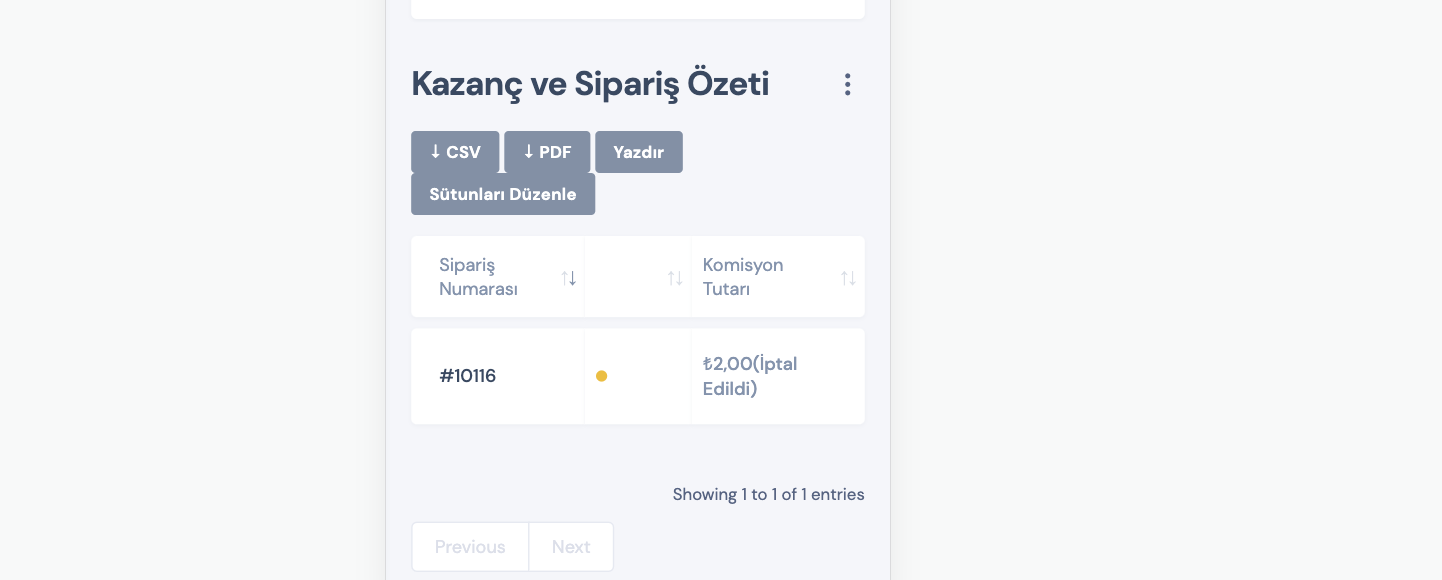
There is another place that has been overlooked. I stated in the picture. Can we make it appear as username? not by name and surname.

2,762
KingsPlugins replied 4 years ago on September 14, 2022 at 9:10pm

Hi there,


My other message with the update was related to this:

There is another place that has been overlooked. I stated in the picture. Can we make it appear as username? not by name and surname.

While I was writing that, the other message about the mobile view issue came in, and I did not see it.


Regarding that:


1) I see this problem only happens with the Flatsome theme. I tried with the Storefront theme for example but the issue does not happen.

So I believe Flatsome is doing something different when updating the Cart on mobile, but it's very hard to know what it is,

I have sent a message to the Flatsome team to ask them if they can help.


2) I checked but I can see the tables:

7955880329.png

Do you mean that the tables don't have the entire information?

Yes, the tables are made smaller so the information can fit.


If you want to show everything, you can add this CSS code snippet:

@media screen and (max-width: 750px) { 
.tb-col-hide, .tb-col-mb, .tb-col-sm, .tb-col-md, .tb-col-lg, .tb-col-xl, .tb-col-xxl, .tb-col-xs, .tb-col-mb {
    display: table-cell !important;
}
}


Kind regards,

Stefan

3 Tickets 4
kkoraysimsek replied 4 years ago on September 14, 2022 at 11:34pm

I found these. does it work for you?


<?php
/**
 * Flatsome Cart refresh extension
 *
 * @author     UX Themes
 * @category   Extension
 * @package    Flatsome/Extensions
 * @since      3.6.0
 */

/**
 * To be enqueued refresh script.
 */
function flatsome_cart_refresh_script() {
global $extensions_uri;
$theme   = wp_get_theme( get_template() );
$version = $theme->get( 'Version' );
wp_enqueue_script( 'flatsome-cart-refresh', $extensions_uri . '/flatsome-cart-refresh/flatsome-cart-refresh.js', array( 'jquery', 'flatsome-js' ), $version, true );
}

/**
 * Add extension script if on cart page.
 */
function flatsome_add_cart_refresh_script() {
if ( is_cart() ) {
add_action( 'wp_enqueue_scripts', 'flatsome_cart_refresh_script' );
}
}

add_action( 'wp', 'flatsome_add_cart_refresh_script' );

3 Tickets 4
kkoraysimsek replied 4 years ago on September 14, 2022 at 11:36pm

Flatsome.behavior('cart-refresh', {
  attach: function () {
    if (!jQuery('.cart-auto-refresh').length) {
      return
    }
    var updateCartButton = jQuery('button[name=\'update_cart\']')
    var updateCart = null

    jQuery('.woocommerce-cart-form').find('.cart_item .qty').on('change', function () {
      if (updateCart != null) {
        clearTimeout(updateCart)
      }
      updateCart = setTimeout(function () {
        updateCartButton.trigger('click')
      }, 1200)
    })
  }
})

3 Tickets 4
kkoraysimsek replied 4 years ago on September 16, 2022 at 1:54pm

We solved the problem with a special developer on the Upwork site. Details are available on the word page for your information. I also sent the required file to flatsome support. I hope they add this in the next update.

Sign In