 1 Ticket
1
1 Ticket
1
I would wish to know if I can get the ability to activate product variation on the free plugin or I must buy the paid version
 1 Ticket
1
1 Ticket
1
I would wish to know if I can get the ability to activate product variation on the free plugin or I must buy the paid version
1 Ticket
1
Also would wish to know if I can be able to disable some product categories from the vendors options to limit them from adding products to some categories
 2,762
2,762
Hello Samuel,
Thank you for getting in touch,
The free version of MarketKing currently only supports simple products. For product variations, you would need the pro version.
Yes, you can restrict what categories vendors can add products to. To do this, you can go to MarketKing -> Vendor Groups, and configure "allowed categories" for each group of vendors: https://prnt.sc/KPNCUl3k-HyP
Let me know if I can help with anything, or if you have any questions,
Kind regards,
Stefan
1 Ticket
1
Hello, Thanks.
It helped, I bought it.
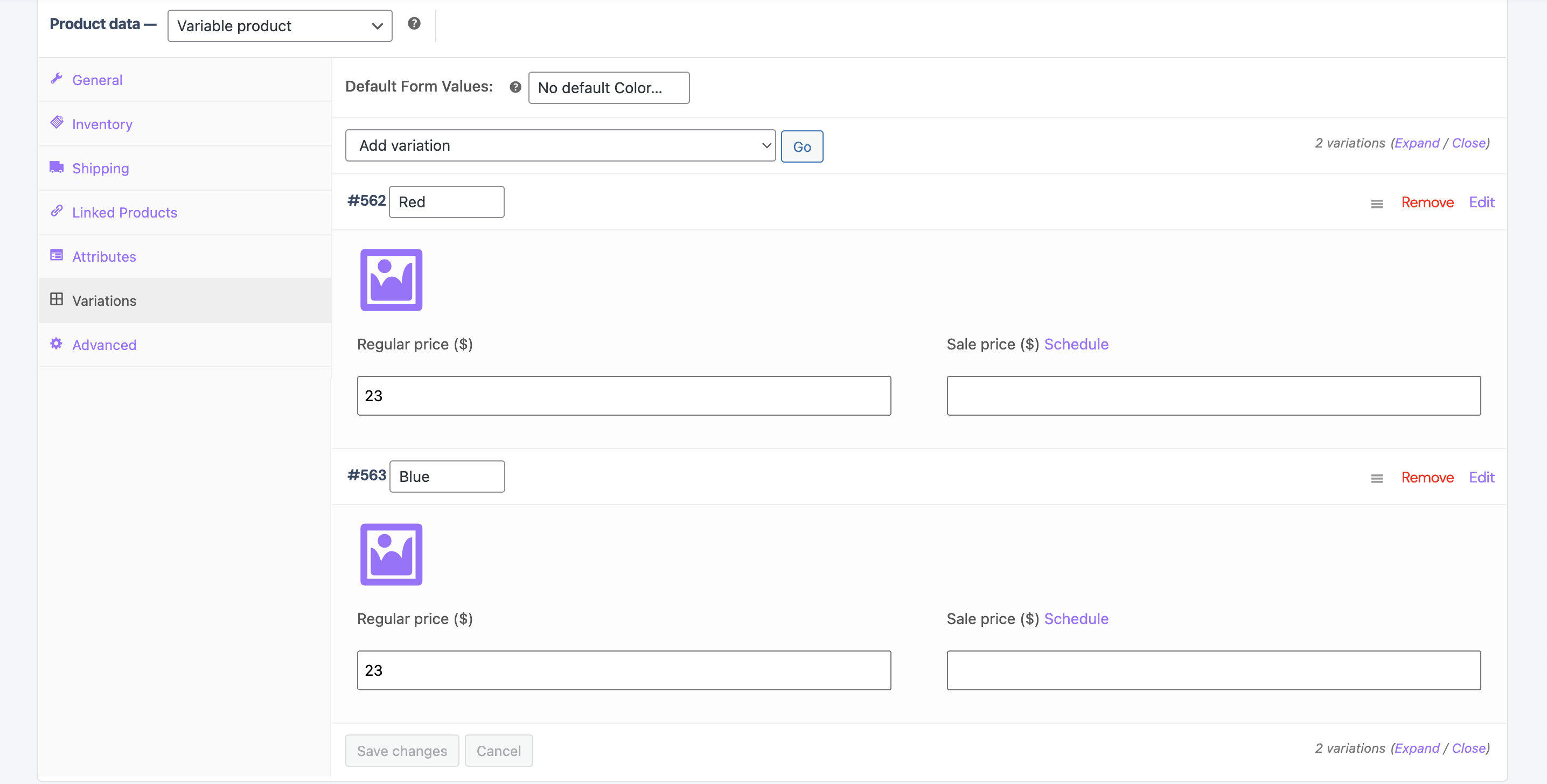
Can you help clean the options in the product variation choices like this?
1 Ticket
1
Just provide the image and price for the vendors.
2,762
Hi Samuel,
Thank you for purchasing our plugin,
You could hide those elements by adding this PHP code snippet to your site:
add_action('marketking_dashboard_head', function(){
    ?>
    <style type="text/css">
        p.form-row.form-row-full.options {
            display: none !important;
        }
        .woocommerce_variable_attributes .data > p:nth-child(2) {
            display: none !important;
        }
        .woocommerce_variable_attributes .data > div:nth-child(6), .woocommerce_variable_attributes .data > div:nth-child(7), .woocommerce_variable_attributes .data > div:nth-child(8), .woocommerce_variable_attributes .data > div:nth-child(9) {
            display: none !important;
        }
    </style>
    <?php
});
A PHP snippet can be added to functions.php, or by following our guide here: https://b2bkingplugin.com/docs/how-to-add-a-snippet-php-or-js/
When I add that to my site, this is the result:
Kind regards,
Stefan
1 Ticket
1
Thankyou, It worked percectly.
Kindly help me disable the options:
Status, Pricing, Inventory, Shipping, Downloadable products.
It's quite overwhelming my clients.
1 Ticket
1
Also disable Inventory, and shipping options here
1 Ticket
1
Also how do I limit every vendor to seeing only the pictures he has uploaded,
I solved this, thanks.
2,762
Hi Samuel,
I modified the snippet I previously sent you to also hide those additional elements.
Please replace the snippet with this new one:
add_action('marketking_dashboard_head', function(){
    ?>
    <style type="text/css">
        p.form-row.form-row-full.options {
            display: none !important;
        }
        .woocommerce_variable_attributes .data > p:nth-child(2) {
            display: none !important;
        }
        .woocommerce_variable_attributes .data > div:nth-child(6), .woocommerce_variable_attributes .data > div:nth-child(7), .woocommerce_variable_attributes .data > div:nth-child(8), .woocommerce_variable_attributes .data > div:nth-child(9) {
            display: none !important;
        }
        optgroup[label="Status"], optgroup[label="Pricing"], optgroup[label="Inventory"], optgroup[label="Shipping"], optgroup[label="Downloadable products"], .inventory_options, .shipping_options {
            display: none !important;
        }
    </style>
    <?php
});
Kind regards,
Stefan
1 Ticket
1
Thankyou,
It worked magical.
How do I remove vendor information tab in the product page?
2,762
Glad to hear that worked : )
To remove that tab, you can add this PHP code snippet to your site:
add_filter('marketking_show_vendor_product_page','__return_false');A PHP snippet can be added to functions.php, or by following our guide here: https://b2bkingplugin.com/docs/how-to-add-a-snippet-php-or-js/
1 Ticket
1
Worked perfectly, thanks a tone.
I realized the vendor page is limited to showing only 12 products, can you help me remove the limit to show all the products the vendor is selling?
1 Ticket
1
Or is there a way to load more with Ajax, or pagination to see more products in a vendors page, since it's only showing 12 products?
2,762
Glad that's working : ) Yes, by default the limit is 12, but it can be modified by adding this PHP code snippet to your site:
add_filter('marketking_default_products_number', function($limit){
       $limit = 10000;
       return $limit;
}, 10, 1);
A PHP snippet can be added to functions.php, or by following our guide here: https://b2bkingplugin.com/docs/how-to-add-a-snippet-php-or-js/
The above code sets the limit to 10000 products which I think should solve it.
1 Ticket
1
Thankyou big-time for the continued support.
I would wish to be the first one to know when you activate the sidebar showing the active product categories in the vendor page.
Or if you have a solution around it, kindly guide me.
That's the only thing I've not ticked in my checkbox.
Your system is the best in existence, keep up with the good job.
2,762
Glad to help : )
What exactly do you mean by sidebar? Are you looking to show vendors how much commission % they receive for each category? Or can you give me an example please?
1 Ticket
1
Here, on the products, have a right sidebar showing product categories.
As on the second screenshot.
2,762
Thanks for clarifying!
I'm not aware of a specific method to show a sidebar, but you can show a category dropdown, as mentioned here: https://marketkingplugin.com/docs/how-to-enable-search-and-filter-by-text-category-tags-etc-on-vendor-stores/
That can be done with this plugin: https://wordpress.org/plugins/woocommerce-products-filter/
It will add a search in the top left corner, where products can be sorted by category, by tag, and also searched by title: 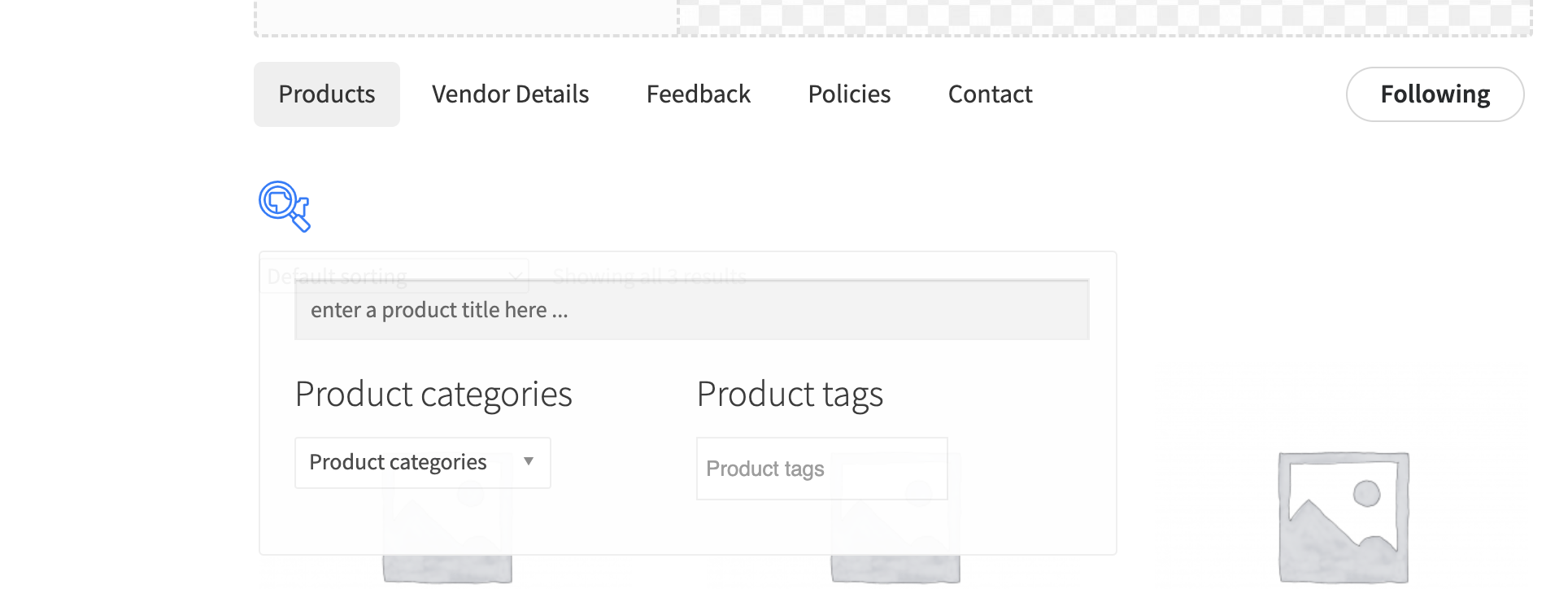
1 Ticket
1
Hello, I fixed that,
Kindly give me a code to show related products in the product page to show products from the same vendor.
1 Ticket
1
Hello, Kindly give me a code to restrict showing relate products from the same vendor in the product page
2,762
Hi Samuel,
I understand that you're like to restrict the products shown on a page as related to only the same vendor's products.
I tried writing a code snippet that does that.
Here is the code:
add_filter('woocommerce_related_products', 'marketking_restrict_related_same_vendor', 9999, 3);
function marketking_restrict_related_same_vendor( $related_posts, $product_id, $args ){
    global $post;
    if ($post){
        if (isset($post->ID)){
            $post_id = $post->ID;
            $vendor_id = marketking()->get_product_vendor($post_id);
            foreach ($related_posts as $key => $relatedid){
                if(marketking()->get_product_vendor($relatedid) != $vendor_id){
                    unset($related_posts[$key]);
                }
            }
        }
    }
    return $related_posts;
}
A PHP snippet can be added to functions.php, or by following our guide here: https://b2bkingplugin.com/docs/how-to-add-a-snippet-php-or-js/
Kind regards,
Stefan
1 Ticket
1
Hello, Thankyou.
Though for some reason, It's not working on themerchlist.com
2,762
Hi Samuel,
It may be that you are using a "related products" feature / widget that does not support the hook in that snippet.
It's hard to know more without looking at the site and how the site creates the related products section.
Would you be able to share a backend login to your site / staging site with us, so we can look into it?
Kind regards,
Stefan