
Public Ticket #3330999

Translations

Closed
Comments
6 Tickets 4
Mārtiņš started the conversation 4 years ago on March 23, 2023 at 1:27pm

Hey! 

We have set up Woocommerce store with Woodmart theme using Loco translate and Polylang for translating site for our client.

There are several strings we seem not to be able to translate. Moust important ones beeing registration field labels and placeholders. They show up on loco PO files, but translating them seem to not take effect. 

Than there are several random strings accross front end interface that wount just translate. 

2,762
KingsPlugins replied 4 years ago on March 23, 2023 at 8:38pm

Hello Mārtiņš,

Thank you for purchasing our plugin!


Regarding registration fields, if you are translating to a single language, the way to translate it is by going to B2BKing -> Registration Fields, and editing each field and editing the label and placeholder here: https://prnt.sc/Pp6jzC8_jCSz


Regarding a translation to multiple languages at the same time using Polylang:

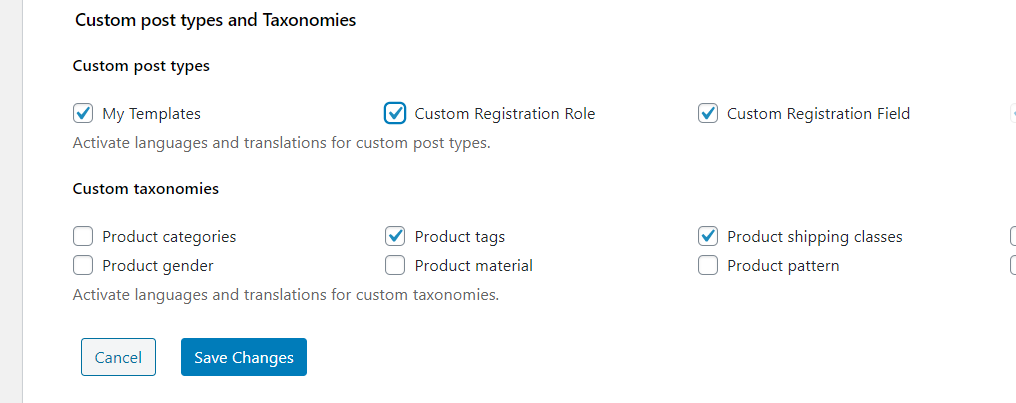
You would need to enable the plugin's custom post types in Polylang>Settings:

7893397498.png

Now when you go to B2BKing -> Registration Fields you can see translations in the right side column.

4700544498.png

To configure it for all fields you have to click on a field and add a translation in the top right corner.

7767158430.png


Than there are several random strings accross front end interface that wount just translate. 
Some strings can be found in B2BKing -> Settings -> Language in the backend. If you cannot find those there, please let me know what you are trying to find and I will check.


Kind regards,

Stefan

Sign In