Public Ticket #3356843

STRIPE CONNECT

Closed
Comments
2,762
KingsPlugins replied 3 years ago on April 26, 2023 at 12:12pm

Hi there,

Thank you for purchasing our plugin:

To get the LIVE/TEST Client IDs for Stripe Connect: 

1) Login to https://dashboard.stripe.com/dashboard

2) Click on https://prnt.sc/mDvQMKrZ7r-9

3) Click on https://prnt.sc/X0HCzUJLVSxF

4) Scroll down the page, and here you can find the live or test more client ID: https://prnt.sc/12PlktL-4ZsA

5) You can switch between TEST/ LIVE by clicking here: https://prnt.sc/E23yHbMiUrq5

Regarding registration, I am not sure if I understand. You can setup registration by going to MarketKing -> Settings -> Registration. We have a guide here about it: https://marketkingplugin.com/docs/vendor-registration-approval/

You can choose to use a separate page or add it to My Account:

7700068168.png

Kind regards,

Stefan

17 Tickets 8
shimamura replied 3 years ago on April 26, 2023 at 12:58pm

thank you for your help.

I have applied to Stripe for permission to use Stripe conect.

I didn't know i needed permission

Is permission also required for the vendor's Stripe account too?


2,762
KingsPlugins replied 3 years ago on April 26, 2023 at 1:55pm

I believe that yes, each vendor will need to register with Stripe (provide ID, documents etc), and only then will be able to sell via Stripe Connect.

1
17 Tickets 8
shimamura replied 3 years ago on April 27, 2023 at 4:09am

I don't think it makes sense

Platforms need to create a stripe account.
and Application for STRIPE CONNECT must be made to Stripe.

Vendor only needs to create a Stripe account. No need to apply for stripe connect.

Do you meet with this way of thinking?

another question
Can platform users also register as Vendor?

2,762
KingsPlugins replied 3 years ago on April 27, 2023 at 10:10pm

Yes, Vendors would only need a Stripe account, not to apply to Stripe Connect themselves. Sorry, I probably did not express myself clearly enough.


Regarding registration, do you mean if existing users (customers) can apply for a vendor account? This is possible if you enable this setting:

4410507916.png

(Existing Users Can Apply) in MarketKing -> Settings -> Registration.

17 Tickets 8
shimamura replied 3 years ago on April 28, 2023 at 10:47am

Hello

It seems to have worked.

Another question.
About the comminssion.

Changed comminssion to percentage 10%.

I tested it and found that if you sell a product for 100 yen, you will get a 90 yen commission.
It was displayed on the dashboard when it took.

Is this my translation error?

17 Tickets 8
shimamura replied 3 years ago on April 28, 2023 at 11:07am

another quation

I want to set different shipping rates for each vendor
Are there such modules?

If there is, please point me to the explanation page.

2,762
KingsPlugins replied 3 years ago on April 29, 2023 at 3:26am

Hi again!

(1)

"Changed comminssion to percentage 10%.

I tested it and found that if you sell a product for 100 yen, you will get a 90 yen commission. It was displayed on the dashboard when it took."

This is for the the admin's commission:

5045544554.png

So if you set it to 10%, it means the admin will get 10% and the vendor will get 90%.

(2) Regarding shipping, you can enable 'Advanced Shipping' in MarketKing -> Modules:

6811514838.png

More info at https://marketkingplugin.com/docs/advanced-shipping-module/

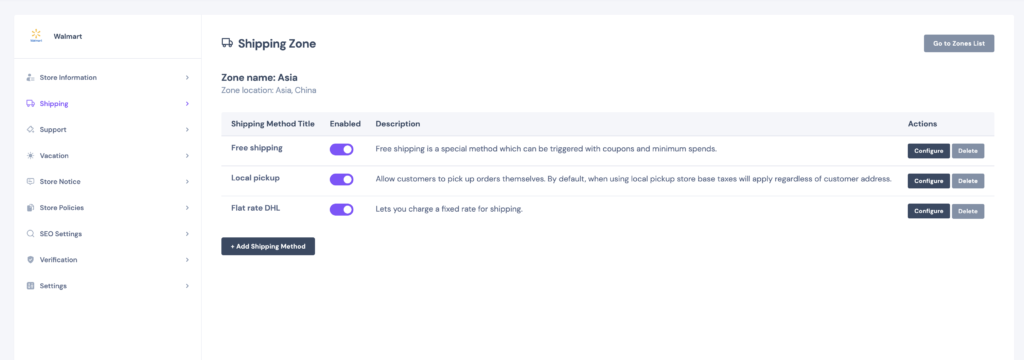
Each vendor can then configure shipping methods in the vendor dashboard -> Settings -> Shipping:

Screenshot-2022-03-27-at-22.57.24-1024x360.png

1

Sign In