 1 Ticket
Hi, is it possible to set a commssision percentage say 50%. Then the agent can create coupons up to 50%. If he creates a coupon of 20% then he earns 30%. Or if he creates a coupon of 10% then he earns 40%?
 1 Ticket
Hi, is it possible to set a commssision percentage say 50%. Then the agent can create coupons up to 50%. If he creates a coupon of 20% then he earns 30%. Or if he creates a coupon of 10% then he earns 40%?
 2,762
2,762
Hi Aditya,
Thank you for getting in touch,
Yes, that is possible with the plugin.
To achieve that, you can go to SalesKing -> Settings -> Commission Calculation and enable the setting "Take out discounts from agents' commission".
With this setting, when an agent gives a discount, it's taken from their commission (so if they have 50% commission and give 20% discount, they will earn 30%).
Let me know if I can help with anything, or if you have any questions,
Kind regards,
Stefan
1 Ticket
Hi, I have a couple of more pre-sale questions
1. Can an agent see this dashboard with woocommerce, products & sales king settings? We don't want them to see this

2. Can an agent make a withdrawal himself? If not, how will he inform us that he wants to withdraw his earning?
3. Orders are not showing up on the agent's dashboard in your demo. Can you check what is wrong?
https://www.loom.com/share/27a89d6c1c694738a7240ae2bfe1caec
2,762
Hi again,
(1) It is not possible for agents to see those backend areas.
It is only possible in the demo because we want to allow easy access to demo pages, both backend and frontend for testing.
(2) Currently there's no specific withdrawal feature, but agents can create a new Message by clicking on the 'Compose' button in the Agent Dashboard -> Messages: https://prnt.sc/LtQxHT0ZphJS
(3) There are 2 different features here:
- the agent "assigned" to an order to manage that order
- earnings (commissions) the agent has earned.
In your video, this is the agent assigned to that order
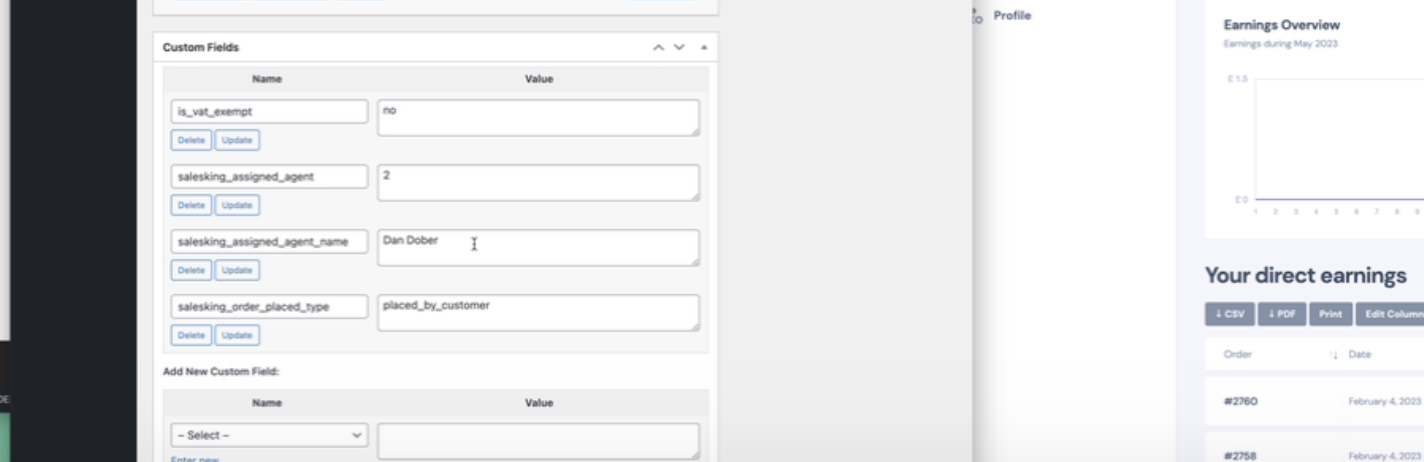
It can also be seen here:
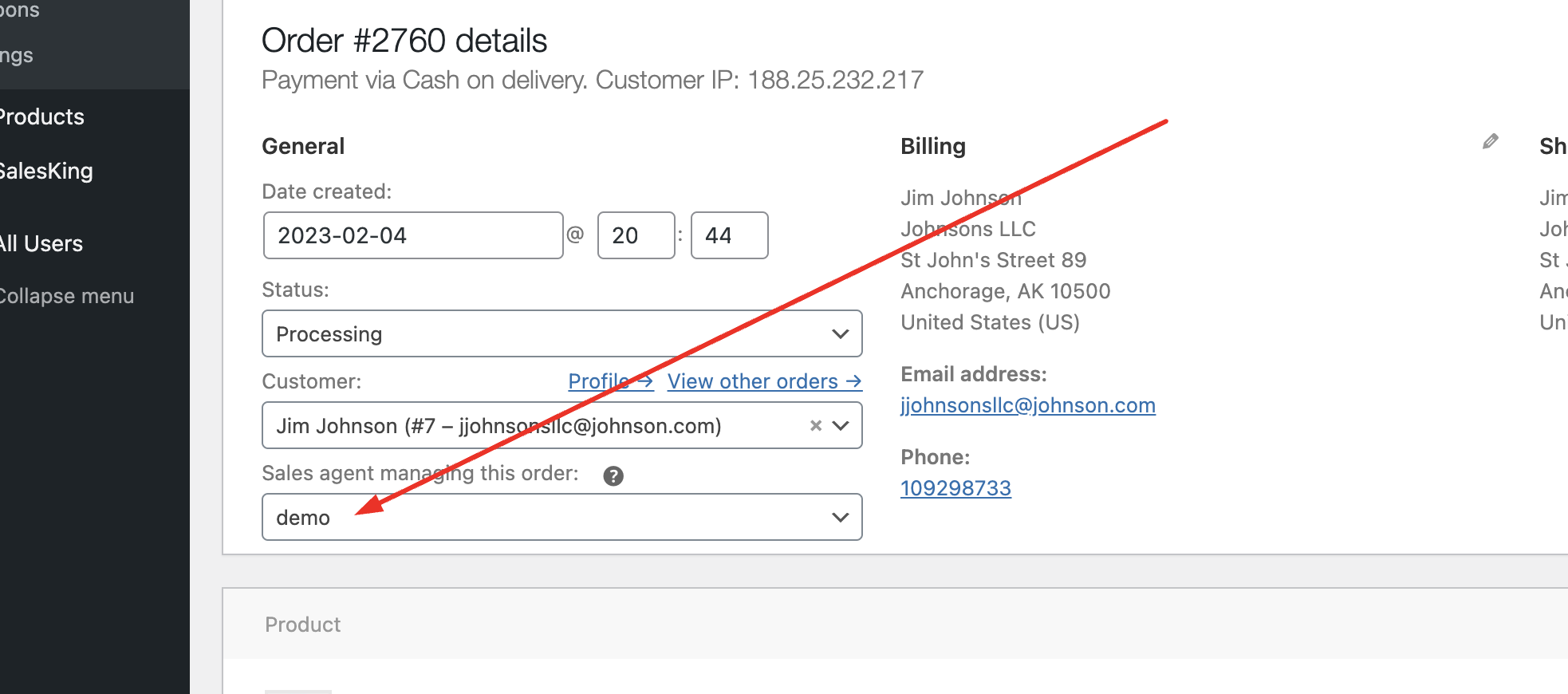
This feature gives the ability to an agent to check that order, view details, etc. But it does not mean that agent has earnings / commissions for that order. So it does not show on the Agent dashboard Earnings page.
For example:
- A business wants to have agents that talk with customers on the phone and can check their orders (customer service reps), but it does not mean the agent has commissions for the order.
So these are different features for different business models, depending on what is needed.
I hope that makes sense,
Kind regards,
Stefan
1 Ticket
Hi Stefan,
(3) We don't want agents for managing orders. We want only affiliates to sell our products and always earn a commission when their affiliate link or their coupon is used.
How to set this in the settings?
2,762
This can be set by going to SalesKing -> Settings -> Agent Capabilities and disabling this setting:
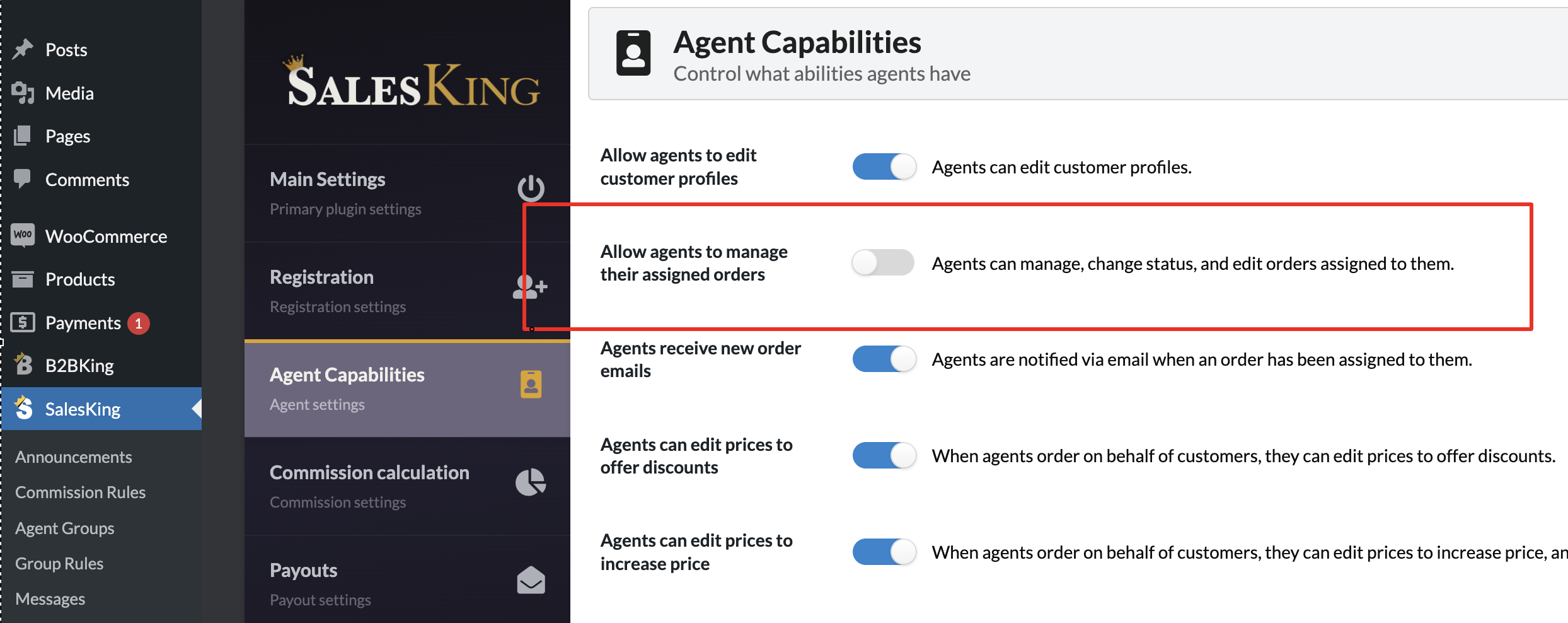
(allow agents to manage their assigned orders)
With this disabled, agents will still earn a commission when their affiliate link/coupon is used (but will not manage orders).
1 Ticket
On your demo site, coupons are not working.
https://www.loom.com/share/86481291814348e1b01f5a381dd91cd9
2,762
Thanks for reporting it - it looks like there was an error on the site when you tried. I tried to replicate this now but am not able to.
In any case, this is not related to the SalesKing plugin, as it has no features affecting this.
1 Ticket
Hi, either there are bugs on your demo site or the plugin itself. I placed 1 order here but this is showing 2 in agent's dashboard.
From admin, it is showing 1 only on woocommerce.
https://www.loom.com/share/a8064bfc708f419f9d806d9ff65f3b0b
1 Ticket
Hi, could you please provide an update?
2,762
Hi again,
Thank you for the video and feedback,
1) The issue where earnings were calculated multiple times should be solved now, there was a demo problem,
2) Regarding the calculation in your video where 25% commission was applied instead of 20%:
- Our plugin does not take out coupons from the agent's commission, not even if "Take out discounts from agents' commission" is enabled. This setting only affects the case when the agent edits the price directly in cart.
Kind regards,
Stefan
1 Ticket
Hi, I've one more question. I tried to record a payout but it's not working. Here's a video
https://www.loom.com/share/d19e9d7e14a643d9b2f6f12a596936fc
1 Ticket
Also, my first question in this thread was if it's possible that agent can give a coupon from his commission. You mentioned that it's possible. Can you read the first 2 comments in this thread and let me know please?
1 Ticket
Hi Stefan, awaiting to hear back from you.
1 Ticket
Still waiting. Been 5 days now.
2,762
Hi again,
I apologize, it looks like I made a mistake in my original message and confused the features.
I double-checked now and this feature to take out the discount from commission only applies when the price is edited directly in cart, it cannot work with coupons.
Again, my apologies for the confusion.
Kind regards,
Stefan
1 Ticket
Okay, can you pls respond to this also?
Hi, I've one more question. I tried to record a payout but it's not working. Here's a video
https://www.loom.com/share/d19e9d7e14a643d9b2f6f12a596936fc
2,762
I checked that now but I cannot replicate that issue in my tests.
Please try it in Incognito mode / in a new browser window.
It may be because the demo was updated recently, and you may have some cached assets in your local browser.