Public Ticket #3392771

Product Visibility & Plugins Not being Compatible

Closed
Comments
2,762
KingsPlugins replied 3 years ago on June 14, 2023 at 7:03pm

Hi Casey,

Thank you for purchasing our plugin,

It seems to me like there may be a misconfiguration of the product visibility feature of B2BKing. Normally we advise to follow our guide here: https://b2bkingplugin.com/docs/faq-product-visibility-is-not-working-how-to-set-up-product-visibility/

I would suggest you take these steps now:

1) Enable product visibility

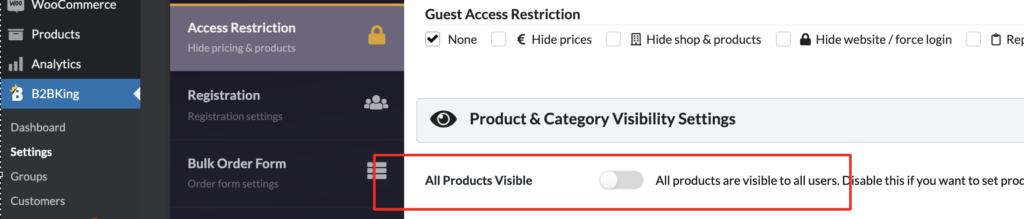
Go to B2BKing->Settings->Access Restriction and disable the "All products visible" setting. It should look like this:

image-1-1024x219.png
2) Set all categories to be visible:

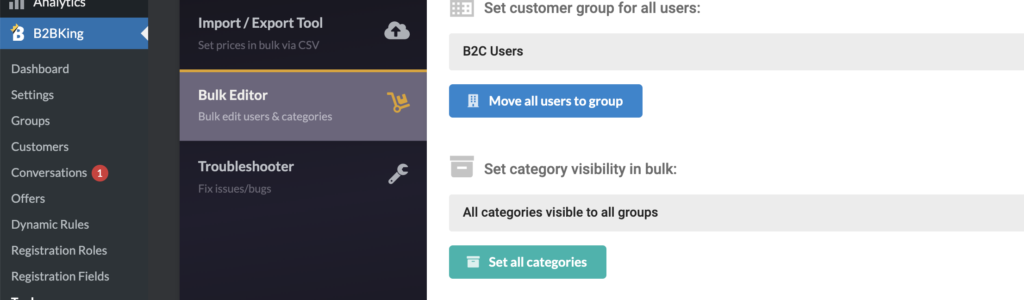
Go to B2BKing->Tools->Bulk Editor and choose "All categories visible to all groups" and click on 'Set all categories':

image-7-1024x300.png

Now all products should be visible to all users. You can now go to each category or product category and disable it for logged out users where needed.


If you run into any issue, we are also happy to configure this for you directly on your site. We would need a backend login to the site or to a staging clone site,

Kind regards,

Stefan

1 Ticket
Casey replied 3 years ago on June 17, 2023 at 4:35pm

Neither of these listed fixes worked. I really think there is a plugin incompatibility.  I deactivate Pro and I can see all of my items without being signed in.   I need some items to be hidden to retail customers and customer that are not logged in.


Other Plugins I am using  WooCommerce Wholesale Prices, WPBakery Page Builder

2,762
KingsPlugins replied 3 years ago on June 18, 2023 at 6:52pm

I am not aware of any conflict with the 2 plugins you mentioned,


If you go to edit any product via the site's backend, and scroll down to the visibility area, what do you see here?

8252485158.png

Here you can see a list of groups / users that have access to the product, according to your current configuration.

If 'Guest Users (Logged Out)' is not in the list, then there's some misconfiguration - for example the product is part of a category that is hidden. 


You can also change each product to manual and set its visibility directly instead of using category visibility:

6012205546.png


We can also review your configuration directly if you would like, 


Kind regards,

Stefan

Sign In