Public Ticket #3437402

Coupons

Closed
Comments
34 Tickets 17
Tallal Salahe started the conversation 3 years ago on August 15, 2023 at 7:48pm

hi
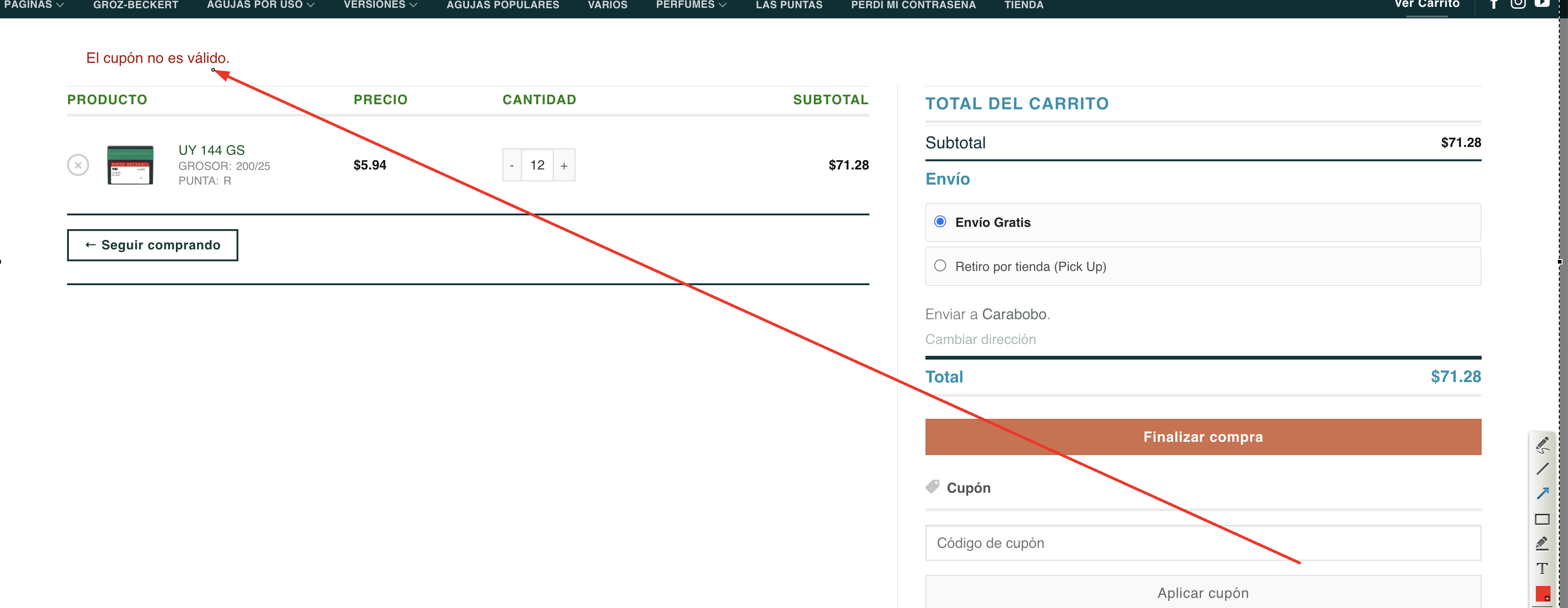
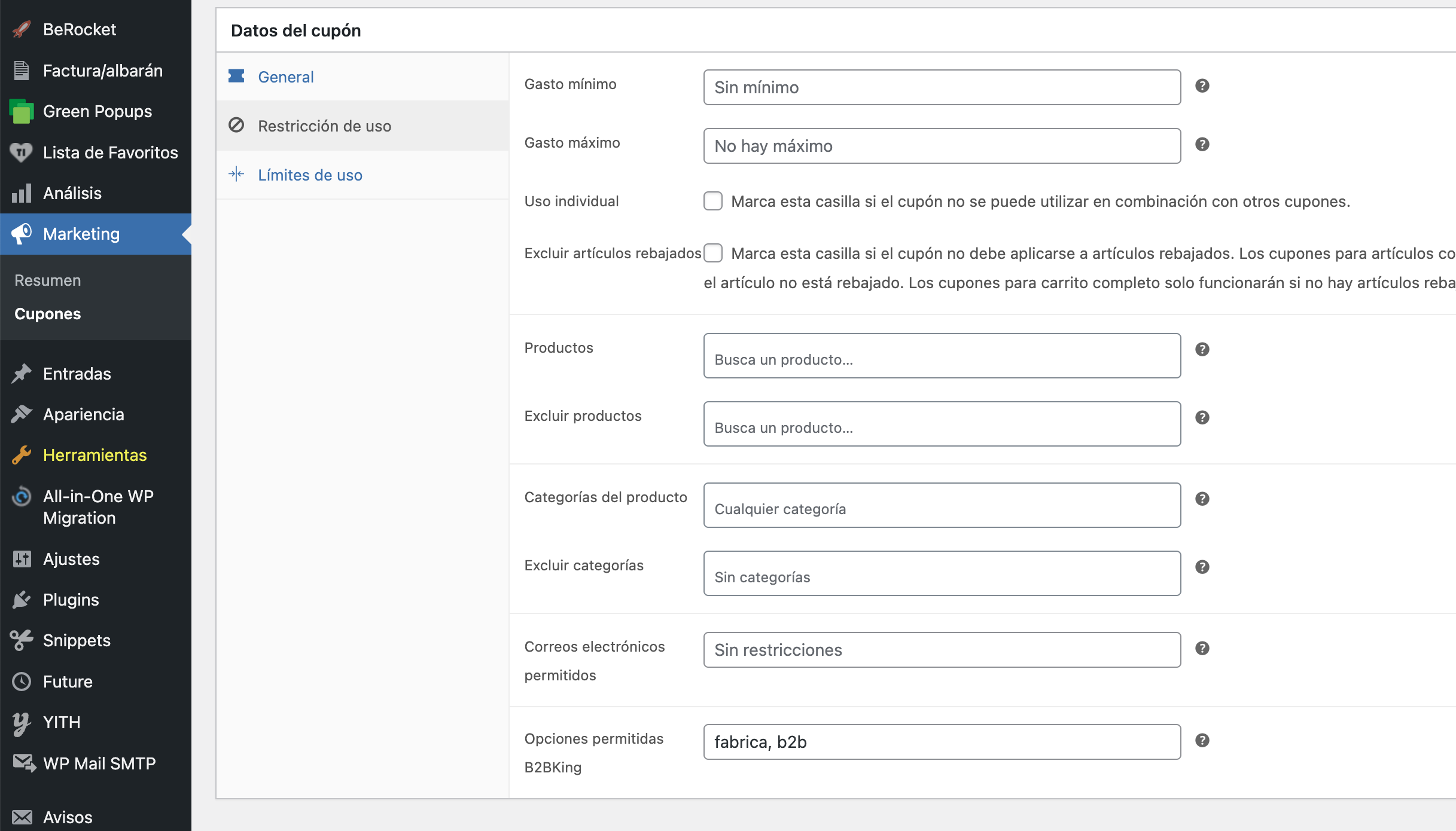
There is a malfunction of the restrictions in the Usege coupons, that happens in my page where I use: Advanced Coupons from Rymera Web, but I also tried it in your demo https://demo.b2bkingplugin.com / , and the Usege Restrictions are not taken into account, I restrict by email or by B2c for example and the coupon applies to anyone. Of course, that was my experience. Maybe I'm wrong, but it's good to review. I have the B2BKing pro. thank you

34 Tickets 17
Tallal Salahe replied 3 years ago on August 16, 2023 at 7:49pm

Hi Stefan

SOS SOS SOS

something very strange happened to me, when deactivating B2BKing
the page (Wordpress)  gave me a fatal error, Critical, and now my stage cannot be accessed, and I have no way to enter. I'll see what I can do, but I'll let you know to take that into account, and when I have the Stage back online I'll let you know here.

Thanks


2,762
KingsPlugins replied 3 years ago on August 16, 2023 at 7:55pm

Hi again,

I'm sorry to hear that, I do not know what happened there causing the error.

If you can share cPanel or FTP access we can work to resolve that directly.

34 Tickets 17
Tallal Salahe replied 3 years ago on August 16, 2023 at 7:58pm

HI 

it´s in the Stage , I´m calling the host manager ask him to give me access to the database so I can delete the B2BKing plugin folder.

When I have access I will let you know

Thank you appreciate your offer to help

Tallal.

1
34 Tickets 17
Tallal Salahe replied 3 years ago on August 16, 2023 at 8:35pm

HI

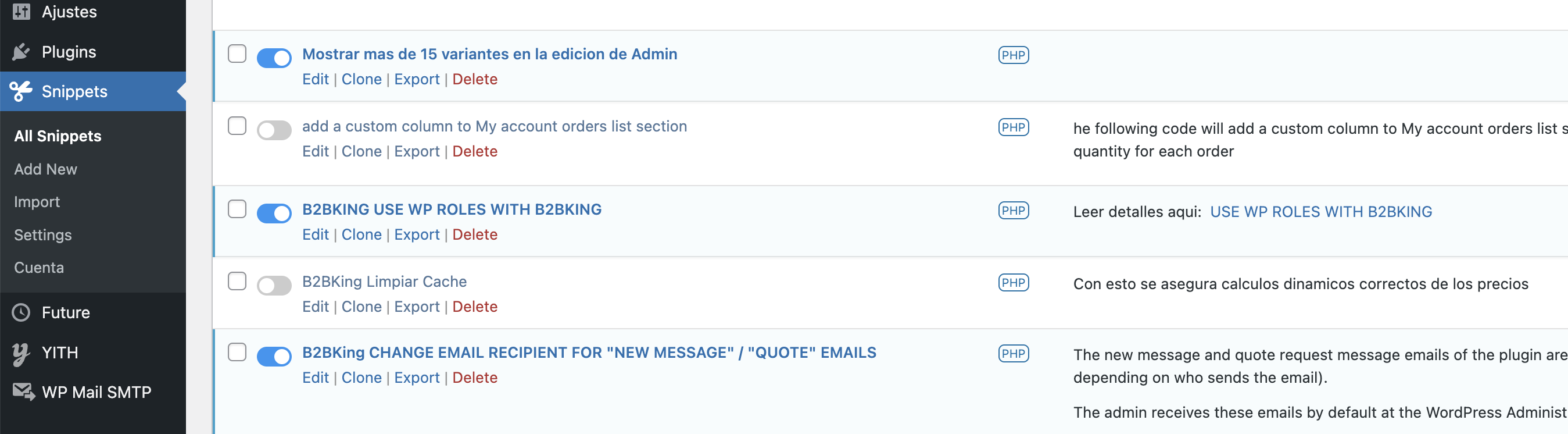
Attached where the error appears, it seems to be a snippet, I suspect that it is the one that clears the B2Bking cache

The image does not look very good, because it was sent to me by WhatsApp

When arranging access to the STAGE, I'll let you know, I already created a user for you, I already sent you the information in another message here. in case you want to check.

But I see that it is a very interesting and fatal error, that it is worth finding out what happened

Best Regards

Tallal

34 Tickets 17
Tallal Salahe replied 3 years ago on August 17, 2023 at 1:30am

Hi Stefan

I already got and fixed the error, and it was in the snippet that cleared the B2Bking cache.
I went into the database with phpmyadmin, and just disabled that snippet, and everything came back fine.
And I think that the error was generated because when I deactivated the plugin B2BKing Pro, the snippet triggered.  and since that snippet  has a (CALL ) to  B2BKing pro that was deactivated, then it generated the fatal error.
So every time I want to disable b2bking, I first have to disable that snippet,

The snippet:
b2bking()->clear_caches_transients();
require_once B2BKING_DIR . '/admin/class-b2bking-admin.php';
B2bking_Admin::b2bking_calculate_rule_numbers_database();

Unless you guys can figure out why dynamic rules (like tiered pricing) don't apply to prices unless I have that snippet activate, to clear cache every time.

I already installed and activated the version of the plugin B2Bking 4,708 that you sent me, but the coupon remains the same, and it does not recognize user or b2bking restrictions.
Maybe it's the plugin I have installed: Advanced Coupons by Rymera Web.
Please, if you can recommend me a coupon plugin that you know is 100% compatible with B2BKing and has the benefits of my current plugin.

Thank you

Best Regards

Tallal.

2,762
KingsPlugins replied 3 years ago on August 17, 2023 at 7:34pm

And I think that the error was generated because when I deactivated the plugin B2BKing Pro, the snippet triggered.  and since that snippet  has a (CALL ) to  B2BKing pro that was deactivated, then it generated the fatal error

That makes sense, I believe that yes, that is probably what happened.


Regarding coupons, I tried this now on the site but it seemed to work for me.

I set the coupon "aaa" to B2B-only:

8498019529.png


When added as B2C it shows the error:

2012376708.png


Right now I see on the site that the "B2BKING limpiar cache" snippet is inactive:

6836964836.png

The price seems to change in my tests, please see this quick video I took: https://www.loom.com/share/65d75496529b407a8af6f758cf1a7343?sid=27c9ff49-50e9-42cc-9523-27738e7339b4

Am I looking at a different thing?

It also seems to change on the cart page: https://www.loom.com/share/4bd95e4148c848049114e59ae793fcc2?sid=c39ab073-c3fe-465d-ba15-865aaf16ade3

34 Tickets 17
Tallal Salahe replied 3 years ago on August 18, 2023 at 3:08am

About:

[Right now I see on the site that the "B2BKING limpiar cache" snippet is inactive] :

MAybe it's work in the stage becouse I upgrade to 4708, but in my live page it will not work with out the snippet,

here I record in Loom (it's my first time in loom) so sorry it's not profesional 

https://www.loom.com/share/b3fb112e9b504dbb8b0800599aa4fb08

Any way After you publish the update officialy, I will try again and be in contact with you

And the samo for the coupon.

Thank you very much

Tallal. 


1

Sign In