 14 Tickets
12
14 Tickets
12
Hello the Bulk Form option isn't available under my accounts for Woocommerce. I have enabled it under the B2Bking dashboard.
 14 Tickets
12
14 Tickets
12
Hello the Bulk Form option isn't available under my accounts for Woocommerce. I have enabled it under the B2Bking dashboard.
 2,762
2,762
Hi there,
Something to note is that our plugin only adds those elements for B2B users. If this is the issue, then you would have 2 ways to resolve it:
- Either set the plugin to B2B shop, to enable it for everyone: https://prnt.sc/MD769foBWIMY
- Or go to the user profile and set the user to be part of a B2B group: https://prnt.sc/YyZbfrbDKcFt
If that's not the issue, another explanation could be the use of a custom my account page or a plugin such as "YITH My Account Customizer". In that case, we would need to add the endpoints of B2BKing to that plugin.
Let me know if the above can help,
Kind regards,
Stefan
14 Tickets
12
Okay how would I create a B2B Account Page with the relevant areas like:
Purchased Listed, Conversation, Subaccounts and Bulk Order quick links.
Thank You
14 Tickets
12
Would I be able to create 2 seperate my account pages one for B2C and one for B2B?
2,762
It is also possible to have 2 separate my account pages. To do that, you would need to:
1. Add the shortcode [b2bking_b2b_registration_separate] to a new page. This will be the B2B My Account page
2. In B2BKing->Settings->Registration-> choose the page in 'Separate My Account Page for B2B Users'
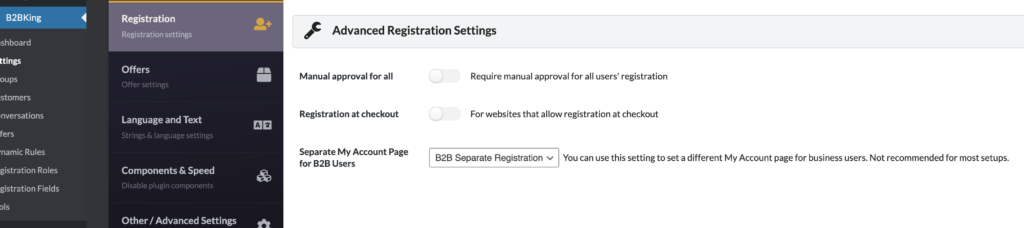
B2B users would be sent to this page, whereas B2C users would be sent to the other page.
14 Tickets
12