 9 Tickets
1
9 Tickets
1
How can I add a custom column to show a meta field to customer dashboard ?
 9 Tickets
1
9 Tickets
1
How can I add a custom column to show a meta field to customer dashboard ?
 2,762
2,762
Hi Gennaro,
I'd be glad to assist,
Just to confirm, are you specifically looking to add a column here to the "My Customers" page, on the agent dashboard?
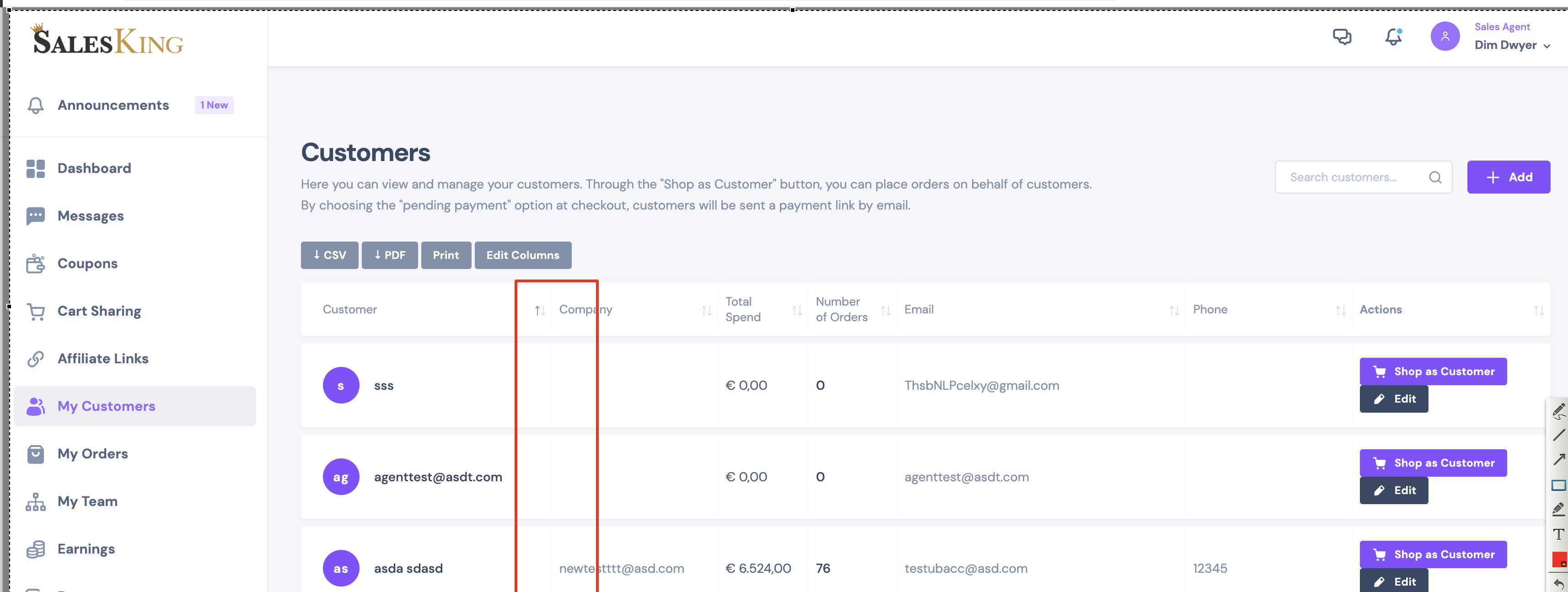
Or on what page? it would help if you can please share a screenshot.
Kind regards,
Stefan
9 Tickets
1
Exactly, this page
2,762
Thank you for clarifying,
To achieve this, please add the following PHP code snippet to your site:
https://pastecode.io/s/2k832368
In the code, the following 2 elements should be edited:

The first one is the title of the column.
The second one is the name of the meta field / meta key. (you should replace custom_meta_key with the field you're looking to display).
Let me know if you run into any issues.
9 Tickets
1
Only now i had the chance to test your code, and it seems is not working as expected, as you can see from the screens I added your code to add the salesrep column, please note that I'm using also
add_filter('salesking_load_customers_table_ajax','__return_true');
in the grid seems is not moving the total spent values in the right column. I can see in the CAMILLA ROSSI ROW the correct value for my attribute (salesresp) POLLIO, and when the page loads I see the error: DataTables warning: table id=salesking_dashboard_customers_table - Requested unknown parameter '7' for row 0, column 7. For more information about this error, please see http://datatables.net/tn/4
2,762
This message is private.
9 Tickets
1
This message is private.
2,762
When AJAX is used, unfortunately ordering is no longer supported in the tables.
The search should still work but it can only search emails / usernames. This is currently the expected behaviour - the AJAX query is already complex and we cannot add search for all fields without significantly affecting performance.
9 Tickets
1
This message is private.
2,762
The changes have already been merged with our main codebase. Therefore you can update to all future plugin updates without losing any functionality.
9 Tickets
1
I don't understand if I have to reactivate the disactivated plugin and update or I can delete it and continuing to use the zipped plugin
2,762
Right now, please delete the deactivated plugin, and use the zipped plugin.
In the future, when we release new plugin updates, you can update to the new ones - they will include the changes in the zip so you will not lose it.