 1 Ticket
Hi, is there a feature to show/hide "Affiliate Links" in the settings? I couldn't find such a feature on the demo page.
My account is affiliate link and I don't plan to use the products affiliate link fields!
 1 Ticket
Hi, is there a feature to show/hide "Affiliate Links" in the settings? I couldn't find such a feature on the demo page.
My account is affiliate link and I don't plan to use the products affiliate link fields!
 2,762
2,762
Hi there,
Thank you for getting in touch,
This is possible through settings, in SalesKing -> Settings -> Main Settings. There are a few options to disable features at the bottom of the panel.
You can see my screenshot here: https://prnt.sc/qyPbLHS7aOsA
Let me know if I can help with anything, or if you have any questions,
Kind regards,
Stefan
1 Ticket
Thank you.
I am testing ranks commissions for sales representatives. I created 2 groups. Group change according to order totals works. However, I could not fully understand how the calculation is made.
Silver group > 20% commission - Total sales: $5000
Gold grub > 30% commission - Total sales: $10,000
If an agent in the silver group has a total order value of $5001 dollars, the gold group will be charged 30% commission, correct? Orders between $1 and $5000 will be charged 20%, correct?
2,762
Hi again,
(1)
You can have different commission rules based on order value if you would like.
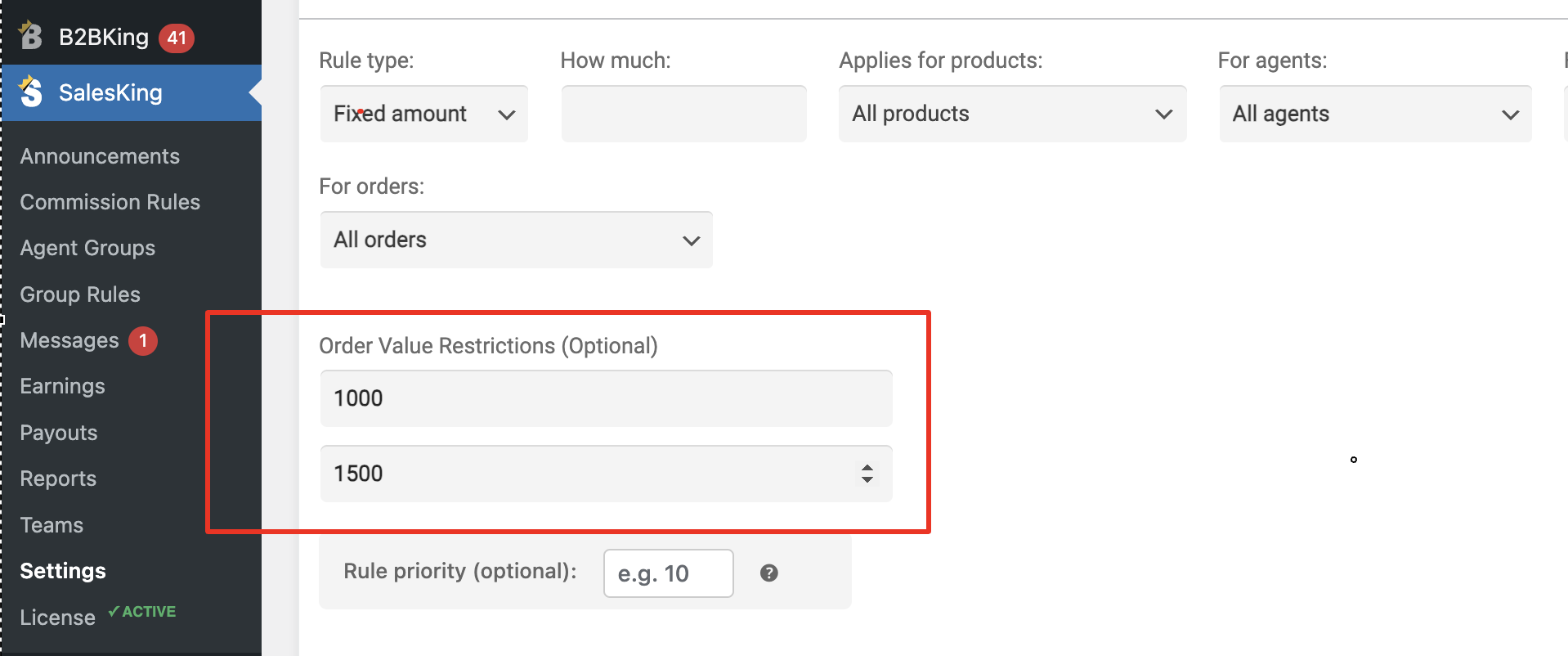
For example you can have 3 commission rules:
Rule 1 for orders $100-1000: 10% commission
Rule 2 for orders $1000-1500: 15% commission
Rule 3 for orders $1500+: 20% commission
This is achieved with order value restrictions in the commission rules:
(2)
Group rules do not affect the calculation itself.
Group rules simply move agents from one group to another.
For example if you set a $5000+ minimum to be moved to group Gold, then the plugin will count each order. After say 20 orders, an agent reaches the minimum and is moved to the other group. Then you can have different commission rules for each group.
These group rules can help agents reach certain ranks.
You can indeed have 2 groups, Silver and Gold, with 20% and 30% commission respectively.
During the first order of the customer, if the order is $5001, the agent is originally in the Silver group, so it would be 20% commission initially. The group rules are calculated *after* the order is processed.
 0 Tickets
Thank you very much for the answer.
There is 1 more thing I want to learn about the affiliate link.
When a guest visits the site using the affiliate link, if there is cookie blocking, how is the guest's account or order associated with the "Sales Representative" or is it associated? I tested this on the demo page. However, if there is a cookie block, it is not associated. Do you have a suggestion about this?
2,762
For a logged in user, the user itself is associated tot he agent, so that would still work,
For a logged out user, then yes this feature works through cookies. If something blocks the cookie, the feature would no longer work correctly.
I think the only other option would be that the logged out user adds a coupon of the agent - that would also work to associate them.
0 Tickets
Can I query based on the custom meta of a "sales agent" user?
Example: If this user is an agent, if this user is in the agent group
{cf_salesking_agent} = {true}
{cf_salesking_group} = {groupID} as
2,762
Yes, that can work.
The key that SalesKing uses to hold the agent group is 'salesking_group'.
To check if a user is an agent or not, you just need to check that 'salesking_group' is not empty and does not have the value 'none'.
For reference, this is our internal function:
function is_agent($user_id){
        $agent_group = get_user_meta($user_id,'salesking_group',true);
        if ($agent_group !== 'none' && !empty($agent_group)){
            return true;
        } else {
            return false;
        }
    }
So if the agent has a salesking_group that is !== 'none' and not empty, that user is a valid agent.