 4 Tickets
Hi, I'd like to remove the order total column, how can I do?
 4 Tickets
Hi, I'd like to remove the order total column, how can I do?
 2,762
2,762
Hi there,
I understand that you'd like to remove that column on the agent dashboard 'Orders' panel.
To achieve this, the best way would be to modify the .PHP template of the orders dashboard page. All dashboard templates can be modified this way. We have a guide here:
https://b2bkingplugin.com/docs/how-to-edit-salesking-dashboard-page-templates/
Basically, it would be needed to copy the orders.php template to your child theme, to wp-content/themes/your-child-theme/salesking/orders.php
Then you can modify the template per your needs there. Specifically you can delete the order total column:
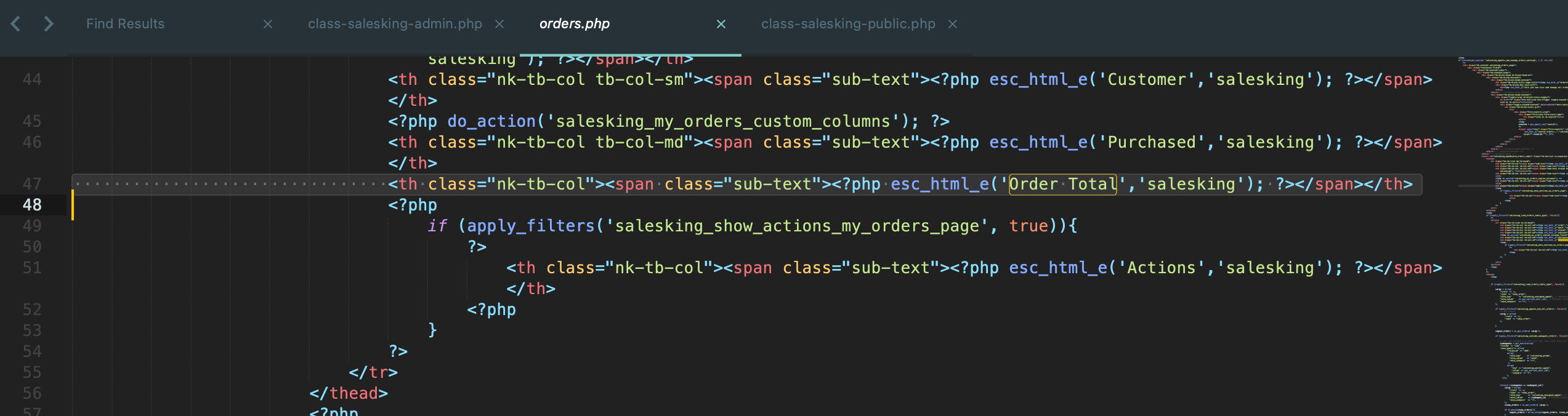
Kind regards,
Stefan