Public Ticket #3621788

Variant

Closed
Comments
11 Tickets 1
Jim started the conversation 3 years ago on April 5, 2024 at 12:28am

Is there a sum of variant button that is a global?  We have a category setup in dynamic pricing but the rule does not apply to the entire category only to single products. 

If I have a $1 off for cloths if ordering 5 or more.. and someone buys 2 shirts and 3 socks they are not getting the discount because they didn't order 5 of the same.

11 Tickets 1
Jim replied 3 years ago on April 5, 2024 at 1:04am
1525485733.png

Same category one product gets the discount because it is multiple products - They should both get the discount cause the total count is above 2 in the same category

2,762
KingsPlugins replied 3 years ago on April 5, 2024 at 11:03am

Hi Jim,

Normally tiered pricing is applied to each product individually.


There are 2 main options that come to mind if you'd like to apply it for a category:

(1) You could make tiered pricing use the total cart quantity. For that, you can add this PHP code snippet to the site:

add_filter('b2bking_tiered_pricing_uses_total_cart_qty','__return_true');

If this is added, then the tiers are activated based on the total quantity purchased, so basically any product purchased contributes toward the tier quantity.


(2) If you need it specifically for a category, but not all site products, I think the best option would be to create a discount rule. 

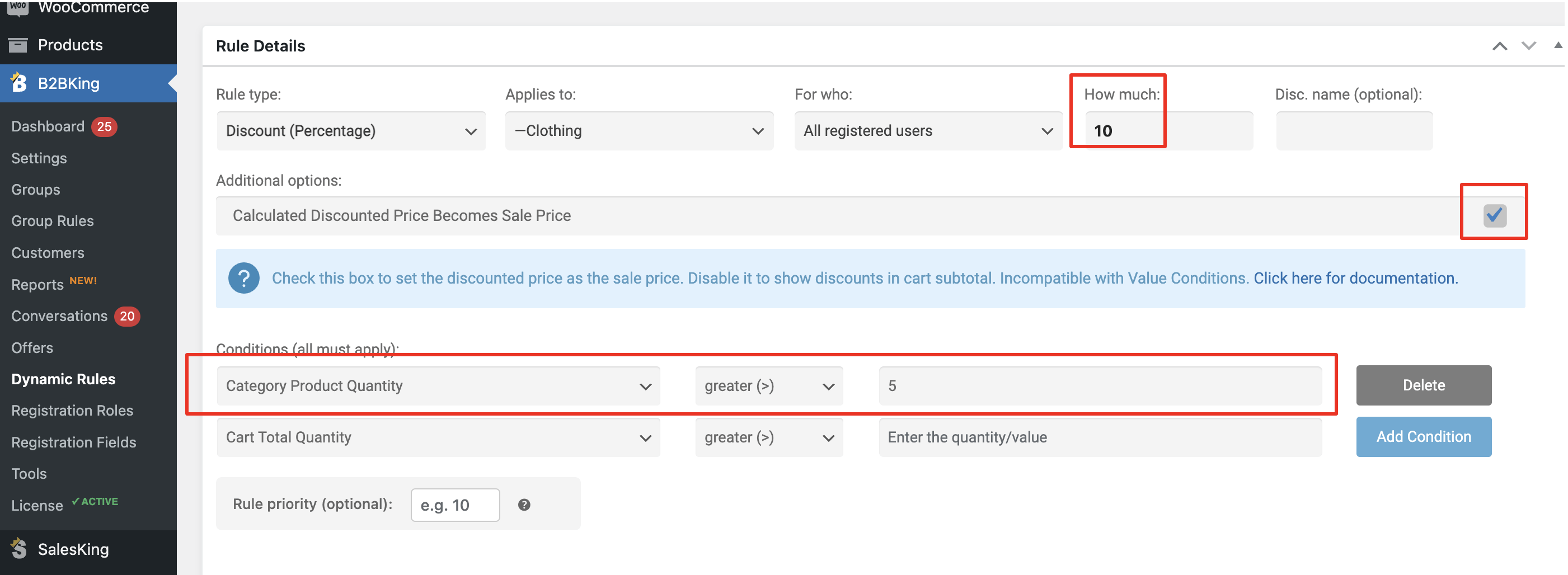
For example the following rule applies a 10% discount to the Clothing category items, if the quantity purchased from that category is 6+

4791683421.png


Let me know if any of that can help,


Kind regards,

Stefan

11 Tickets 1
Jim replied 3 years ago on April 5, 2024 at 12:46pm

Would this snippet apply to the entire cart or only products that meet the criteria?

We have tags that are powder and tags that are capsules. 

Using Tag Powder in a table - will that apply only to that tag?

If we have both powder and capsules in the cart I want to make sure it does not apply to both.  Capsules are a different discount than powder.

2,762
KingsPlugins replied 2 years ago on April 7, 2024 at 5:08am

That code snippet makes tiers count the entire cart quantity.


It may be possible to write a custom code snippet that checks if a product has a specific tag and counts all products with that tag. How many tags do you have that you need this applied for? What happens if a product has multiple tags at once?


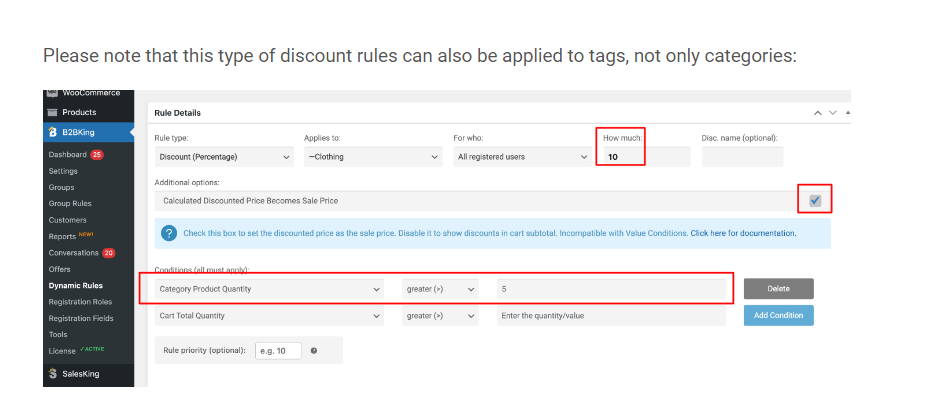
Please note that this type of discount rules can also be applied to tags, not only categories:

4791683421.png


11 Tickets 1
Jim replied 2 years ago on April 7, 2024 at 3:43pm

Since we have different products and different tables needed we cannot have a total cart discount.  The discount has to be able to apply to "powder" category, tag or attribute.  We have at least 5 different categories with 10 products each with a unique ID.


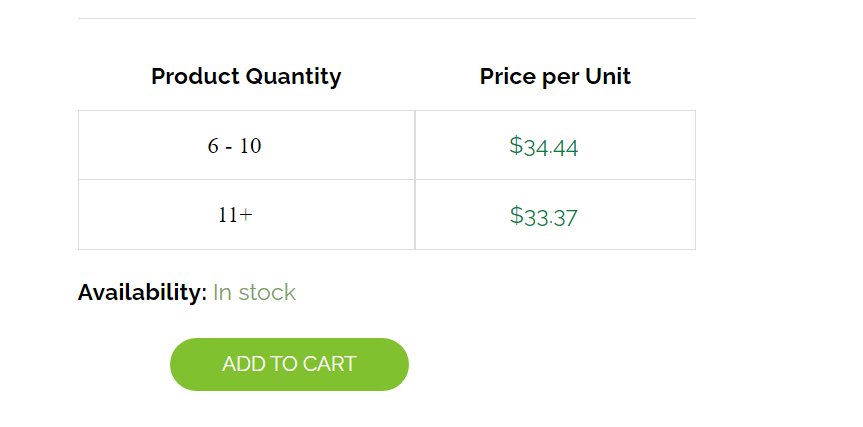
We also need a table displayed on the product like this.

9285126413.png
11 Tickets 1
Jim replied 2 years ago on April 7, 2024 at 3:45pm
If we did this method would it create a table. 

It would also make sense to have the "how much" below by each QTY, this way we can create multiple rules and not just one price.

5994551812.png
11 Tickets 1
Jim replied 2 years ago on April 8, 2024 at 2:21pm

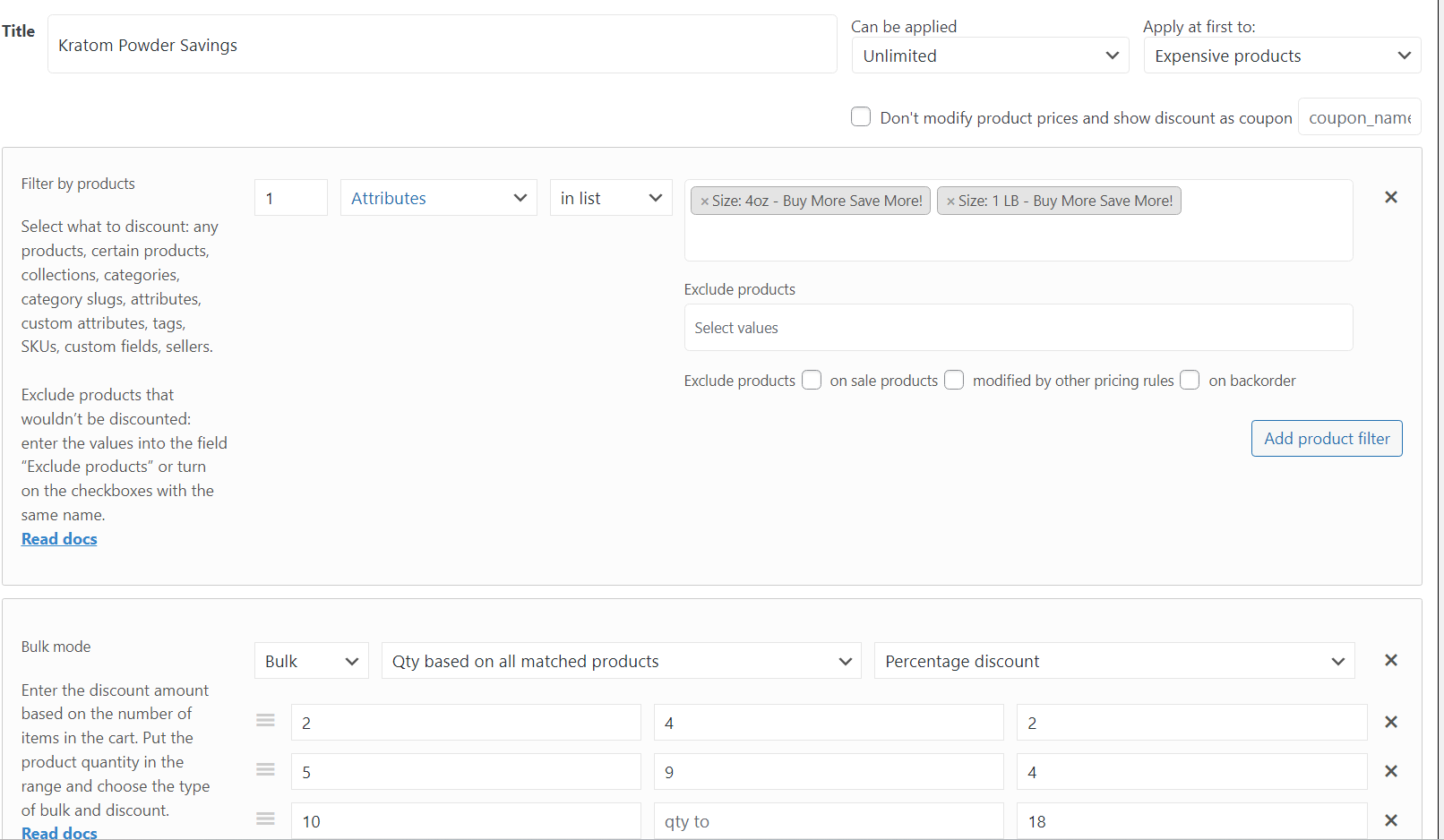
This is the setting we had in dynamic pricing (different plug).  Used Attributes to give the total discount but still able to display a table. 


5072072545.png
2,762
KingsPlugins replied 2 years ago on April 13, 2024 at 6:00pm

Thank you for the extra details,

I think this could be solved if B2BKing had a checkbox/switch in tiered price rules that would control whether the quantities are measured separately or together for the products selected.

(right now there's only the option to have them measured separately for each item).

This is something we are interested in adding, but we would need at least a few weeks to be able to work on adding this in the next update.

In the meantime, discount dynamic rules do not create a table. To have a table, it would be needed to set a 'custom info table' for each product with that information.

Sign In