
Public Ticket #3718072

Bulk Grid Product Add To Cart Floating Button Bug

Closed
Comments
4 Tickets
Talha started the conversation 2 years ago on September 4, 2024 at 6:00pm

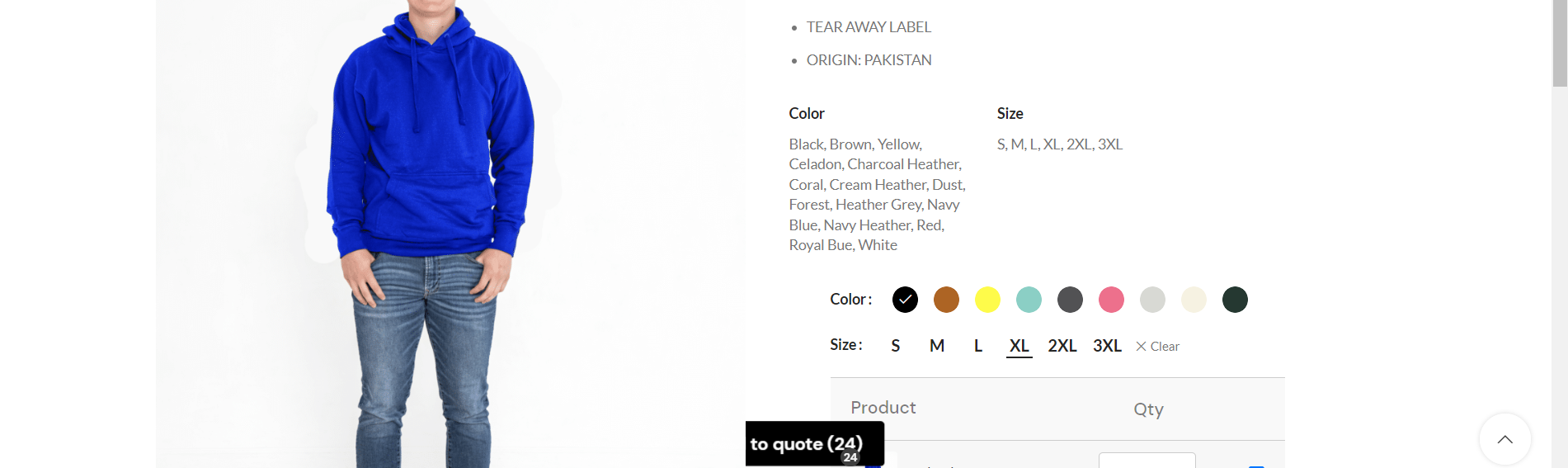
The Product Variation bulk order form add to cart button has a floating attribute that is activated when the add to cart button is not in the view. This causes to overlap with other elements on the screen. 
6547068530.png

In order to recreate this, the add to cart button must be active, this is also an issue in mobile where it shows up really ugly.

2,762
KingsPlugins replied 2 years ago on September 5, 2024 at 11:13am

Hi there,

It does look like there is a bit of a styling conflict. Normally that button should be on top of all other elements, but here it looks like it's partially behind the image.


I believe we can make a change here, either to bring that button to the very top (on top of other elements), or just hide it completely if you prefer it. Please let me know what you'd prefer here.


It would help if you can please share a link to your site / a page where we can see this issue, so we can also test on mobile and see what's happening there.


Kind regards,

Stefan

2,762
KingsPlugins replied 2 years ago on September 9, 2024 at 1:41pm

Thank you for clarifying,

(A) To completely disable the floating button, you can add the following CSS to your site:

#b2bking_cream_add_selected.floating {
    display: none !important;
}

(B) Or if you prefer to show the button, but just alter the z-index to make it show on top, you can add this CSS:

button#b2bking_cream_add_selected {
    z-index: 9999 !important; 
}

These can be added to any area that supports CSS. On most sites it can be added to Appearance -> Customize -> Additional CSS / Extra CSS.


Kind regards,

Stefan

Sign In