Public Ticket #3732345

Need more field on the API

Closed
Comments
1 Ticket
Emir started the conversation 2 years ago on September 25, 2024 at 6:19pm

Hi,

I would like to know if it's possible to add more field in the API directly, I'm a dev and would be able to help also for this.

At the moment, I would like to know if we can add the vendor on the /products path, and how can I create an order easily through WooCommerce API. Thank you !

2,762
KingsPlugins replied 2 years ago on September 26, 2024 at 1:12am

Hi Emir,

Thank you for purchasing our plugin,


-> Regarding adding fields: It would help if you can please give more details here on what you are trying to achieve. 

Are you looking to control fields in the registration form via API?


-> Regarding adding the vendor to the /products path, can you clarify, are you using the WC API v3?

e.g. https://example.com/wp-json/wc/v3/products/794

And do you want to be able to read the vendor ID from here?


-> To create an order via API, I believe you can simply follow the regular instructions here https://woocommerce.github.io/woocommerce-rest-api-docs/#create-an-order

To set the vendor of the order, you need to set the following order meta data:

'_post_author' must be set to the vendor user ID, e.g. '_post_author' = '123'. 

I believe you can set this here in the order creation call: https://prnt.sc/z8oZ2A2tSuIj


Kind regards,

Stefan

1 Ticket
Emir replied 2 years ago on September 26, 2024 at 1:31pm

Hi !

Thank you for your quick answer,

(Using WC 3 API)

No, our purpose it's to progressively using a custom front end and using your system as backend, we would like to show all products, order with API only.

-> Regarding adding the vendor to the /products path, can you clarify, are you using the WC API v3?

Yes exact ! I would like to be able to retreive the Vendor data (if it's only it's fine, if we've all the information of the vendor, then, it would be awesome)

-> To create an order via API, I believe you can simply follow the regular instructions here https://woocommerce.github.io/woocommerce-rest-api-docs/#create-an-order

Yes ! We're using WooCommerce for a while now, but with your plugin (Which is awesome) order creation is a little bit tricky, in what I understand, we'll need to create a composite order and create sub order for each vendor, I'm working on it to find the good way, I'll make a little documentation when I'm done with it, we're still testing.

2,762
KingsPlugins replied 2 years ago on September 30, 2024 at 3:32pm

Thank you for clarifying,

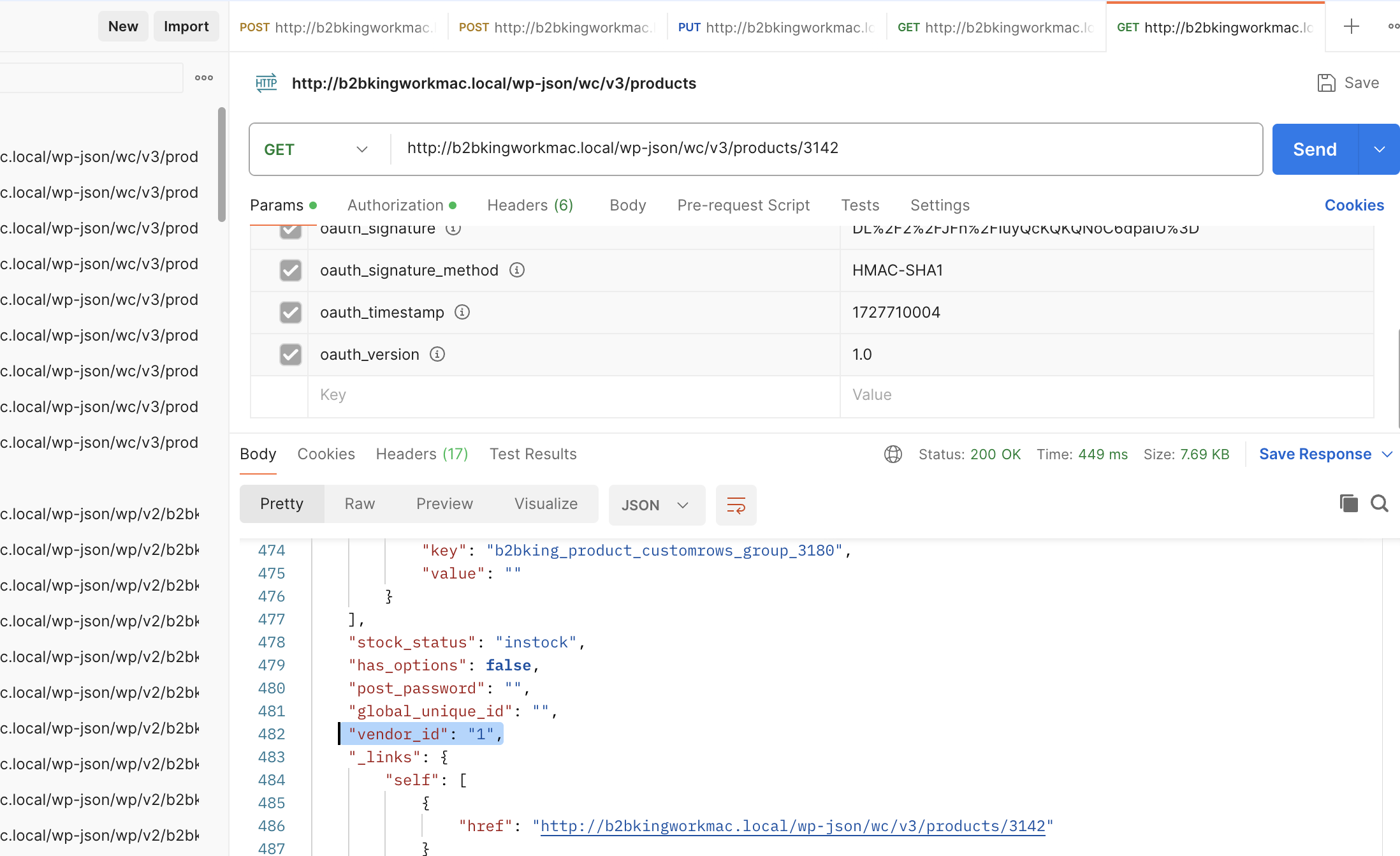
To add the vendor_id and vendor store name to the wc v3 api products path, you can add this PHP snippet to the site:

add_filter( 'woocommerce_rest_prepare_product_object','get_vendor_product_new', 10, 2);
function get_vendor_product_new($response, $product) {

  	$author = get_post_field( 'post_author', $product->get_id() );
    $response->data['vendor_id'] = $author;

    if (function_exists('marketking')){
    	$vendor_name = marketking()->get_store_name_display($vendor_id);
    	$response->data['vendor_name'] = $vendor_name;
    }

    return $response; 
}


I tested this on my local test site and for example I can see the vendor_id in the response as follows, so I believe this is working:

7020772014.png


Regarding composite orders: Just to explain the rationale behind this a bit:

The problem was around what happens when an order has multiple (2 or more) vendors. We cannot make the customer pay 2 separate times / 2 separate orders, as it is not a good experience for the customer.

Therefore we have the customer pay only 1 time, for a normal order ("composite"), and then we split this order.

If this is difficult to achieve the same way in your setup, you could also just prevent the customer from purchasing from multiple vendors at the same time - we can share a snippet for that. And then you could just create regular orders without having to worry about this.


Sign In