Public Ticket #3733597

How to hide in dashboard one of menu element for specific user role

Closed
Comments
9 Tickets 2
Lukasz started the conversation 2 years ago on September 27, 2024 at 11:28am

Hi i have sales agents and some of them has second user role "can-have-subagents" and I want to show the "Subagents" menu will be shown only for sales agent have "can-have-subagents" user role.

Could You help me please ?

2,762
KingsPlugins replied 2 years ago on September 29, 2024 at 10:01am

Hi Lukasz,

I believe that you're referring to the "My Team" tab / menu item on the agent dashboard, is that right?


I believe you can achieve it, by adding this PHP snippet to your site:

add_filter('salesking_dashboard_menu_items', function($menu) {
    $user = wp_get_current_user();
    if ( ! in_array('can-have-subagents', (array) $user->roles)) {
        unset($menu['team']);
    }
    return $menu;
}, 10, 1);

add_filter('option_salesking_enable_teams_setting', function($val){

	$user = wp_get_current_user();
	if ( ! in_array('can-have-subagents', (array) $user->roles)) {
	    $val = 0;
	}

	return $val;
}, 10, 1);


It should remove 'My Team' for any users that do not have that role.


Let me know if that can solve it for you,

Kind regards,

Stefan

9 Tickets 2
Lukasz replied 2 years ago on December 11, 2024 at 7:33am

Hi, this snippet (is is active) it's turned off 'TEAM" in plugin settings and no-one can see "my team menu tab: can You help me with it ? 

2,762
KingsPlugins replied 2 years ago on December 11, 2024 at 10:17pm

Ah, my mistake, there was an issue in the snippet. I corrected it and tested it now on my local site - it seems to work in my tests and I can see the Team area correctly in the backend.

New version:

add_filter('salesking_dashboard_menu_items', function($menu) {
    $user = wp_get_current_user();
    if ( ! in_array('customer', (array) $user->roles)) {
        unset($menu['team']);
    }
    return $menu;
}, 10, 1);

add_filter('option_salesking_enable_teams_setting', function($val){
	if (is_admin()){
		return $val;
	}
	$user = wp_get_current_user();
	if ( ! in_array('customer', (array) $user->roles)) {
	    $val = 0;
	}

	return $val;
}, 10, 1);


I also see My Team in the agent dashboard.

Here for this to work, it's important that the slug of the role is "can-have-subagents". My concern is that it could be something else like "wp-role-can-have-subagents", or "can_have_subagents" with underscors, etc.

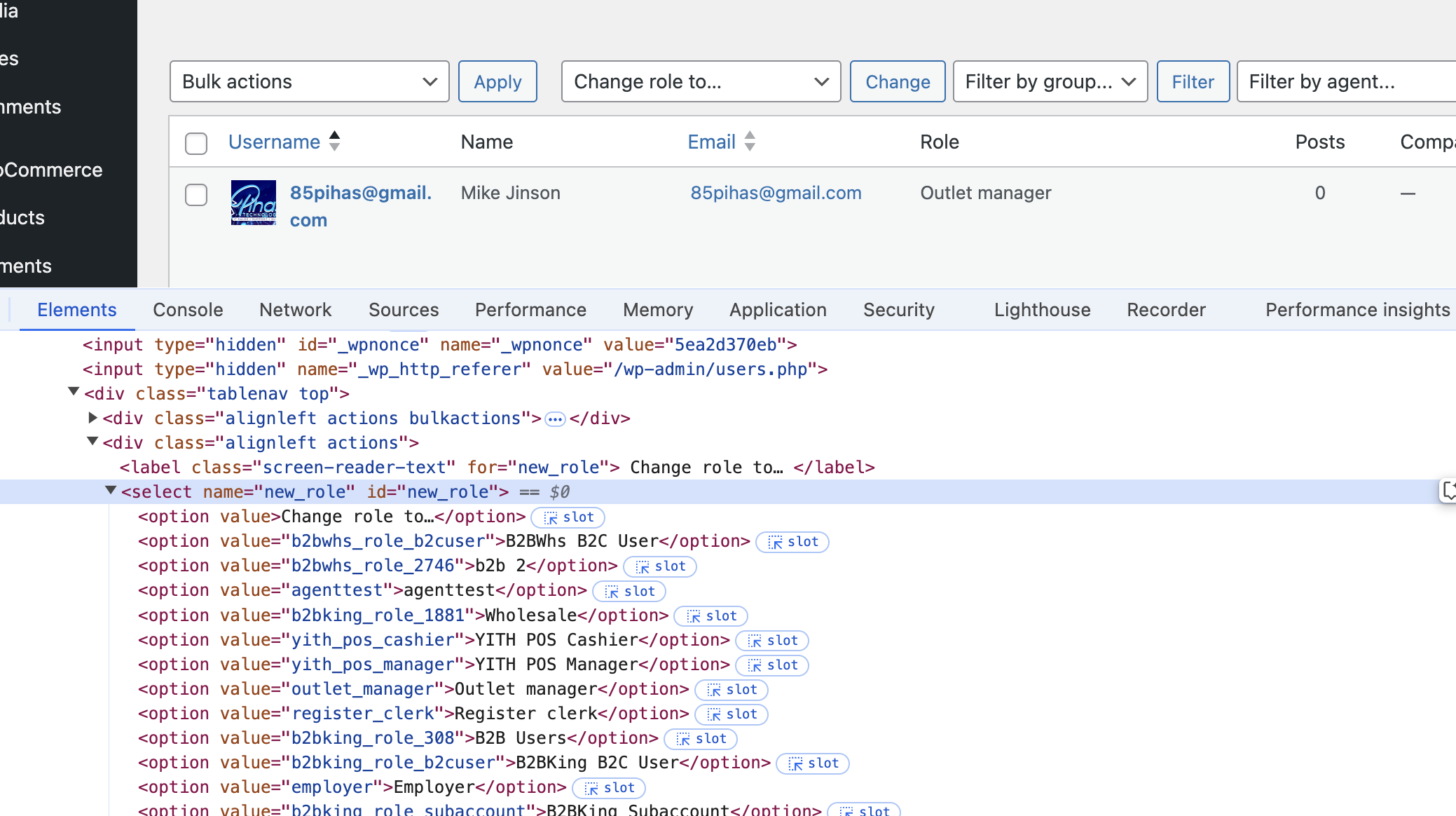
One way to check the role slug is to go to the Users page and right click -> inspect the roles dropdown, looking at the option values:

9873201854.png

(for example here we have a role named Wholesale, but its slug is 'b2bking_role_1881").


Let me know if it works for you now,

Sign In