 7 Tickets
2
7 Tickets
2
I activated the importer module but it looks like im not able to import in self created fields in ACF. Is that an ACF pro feature or am I missing something.
 7 Tickets
2
7 Tickets
2
I activated the importer module but it looks like im not able to import in self created fields in ACF. Is that an ACF pro feature or am I missing something.
7 Tickets
2
another question regarding this importer. Would need to disable a lot of fields in there so vendors dont make mistakes. How easy is its to only show about 10 columns in the importer?
 13 Tickets
3
13 Tickets
3
I need this too
 2,762
2,762
Hi there,
Glad to assist,
-> Regarding disabling specific fields, just to let you know: our plugin already tries to disable / remove / sanitise the input of vendors, so that they cannot make significant mistakes.
For example if vendors enter the IDs of products that belong to other vendors, enter more products than max, enter options they are not allowed (e.g. tags, upsells etc), the plugin will automatically adjust the import process.
You can further remove options from the dropdown by using this code snippet and editing / adding to it:
add_filter('marketking_available_options_import', function($options, $vendor_id){

			unset($options['type']); // remove type
			unset($options['upsell_ids']); // remove upsells etc

			return $options;
		}, 10, 2);
You would need to enter the slug of each option (e.g. Upsells has the slug upsell_ids)
To view the slugs of each option, the simplest way may be to inspect the dropdown and check the "value" field for each option:
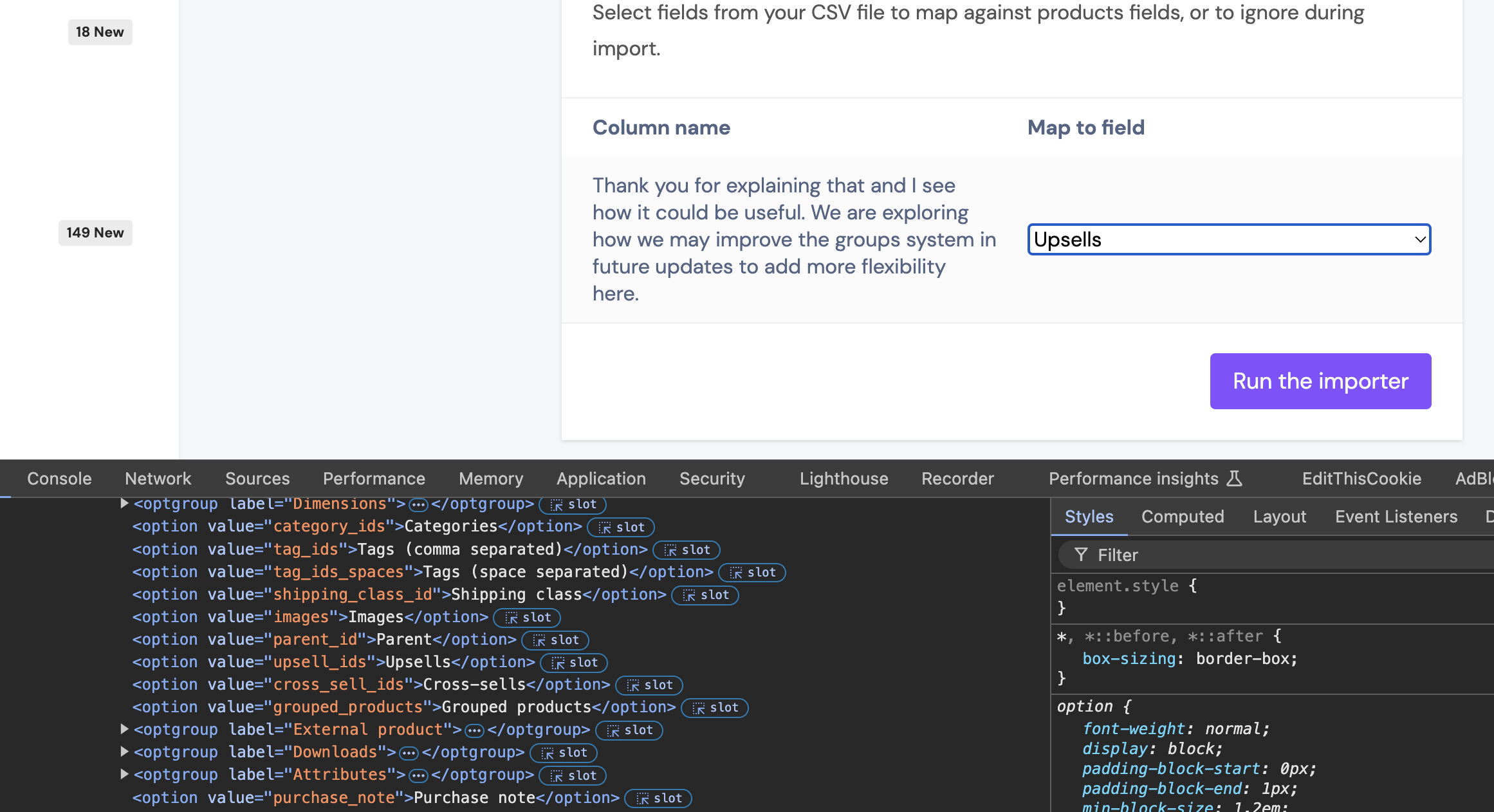
Regarding ACF imports, I do not have specific information on this. Are you seeing that ACF fields show in the admin site backend import but do not show in the frontend import?
Kind regards,
Stefan
7 Tickets
2
this seems to work except when there's a label involved? like name, sku, description I can hide but not sale_price etc.
2,762
To hide the sale price, please use:
unset($options['price']['options']['sale_price']);
It is similar for other fields with a label. For example to hide the "width" field, you can use:
unset($options['dimensions']['options']['width']);
7 Tickets
2
thanks. got them almost all hidden except the what's under the download label and attributes label
2,762
To completely remove all options under Downloads and Attributes, you can use:
add_filter('marketking_available_options_import', function($options, $vendor_id){

	foreach ($options['downloads']['options'] as $option_name => $title){
		$name = explode(':', $option_name);
		if ($name[0] === 'downloads'){
			unset($options['downloads']['options'][$option_name]);
		}
	}

	foreach ($options['attributes']['options'] as $option_name => $title){
		$name = explode(':', $option_name);
		if ($name[0] === 'attributes'){
			unset($options['attributes']['options'][$option_name]);
		}
	}

	unset($options['downloads']['options']['download_limit']);
	unset($options['downloads']['options']['download_expiry']);

	return $options;
}, 10, 2);
It seems some of those have a dynamic name such as "downloads:fieldname", so it is needed to remove them in a more complex way, as above.