 4 Tickets
Hi there,
I want to add some text to the login-form. I want to add it, not translate. Can you tell me how I can edit this form? Thanks in advance.
Best wishes
Bert
 4 Tickets
Hi there,
I want to add some text to the login-form. I want to add it, not translate. Can you tell me how I can edit this form? Thanks in advance.
Best wishes
Bert
 2,762
2,762
Hi Bert,
Thanks for getting in touch. I understand you'd like to add some custom text to the login form.
I believe this uses the [b2bking_login_only] shortcode, is that correct?
It would be helpful if you could indicate exactly where you'd like to add the text - before or after the login form?
While we can help you add text before or after the form itself, we unfortunately cannot add text within the form itself (such as between the login and password fields) since it uses the core WooCommerce login form function (woocommerce_login_form) which we don't have full control over.
Kind regards,
Stefan
4 Tickets
After the form. It´s a text like "If you want to register, please contact us, but you can only register if you are b2b. This text will be later appear in several languages.
2,762
This message is private.
4 Tickets
Hi there,
unfortunately it does not, what it should do. I installed the plugin, but deactivated the oldone after installing. I hope this does not matter. I tried both: Put the php-Code into the functions.php and put it into the snippets-plugin. I cleared the cash with the tools off b2bking and the browsercash.
There is no message and on the top of that, if I try to enter the /shop /balani /margaret-astor, the filter is shown. Can you tell me, what I did wrong? Thanks in advance.
Best wishes
Bert
2,762
Hi Bert,
I looked further into that and tested locally as well,
The filter is something we could hide (happens because of the order in which code runs), but I realized now that the text is still not meaningfully added to the form, because the form function generates everything including the text.
I went over the WooCommerce code that generates that function. There are a few hooks there we can use. I suggest we try that as a new approach.
We can use this as a code snippet:
add_filter('woocommerce_login_form_start', function($val){
    echo 'start text here';
}, 10, 1);

add_filter('woocommerce_login_form', function($val){
    echo 'middle text here';
}, 10, 1);

add_filter('woocommerce_login_form_end', function($val){
    echo 'end text here';
}, 10, 1);
On my local site it displays as
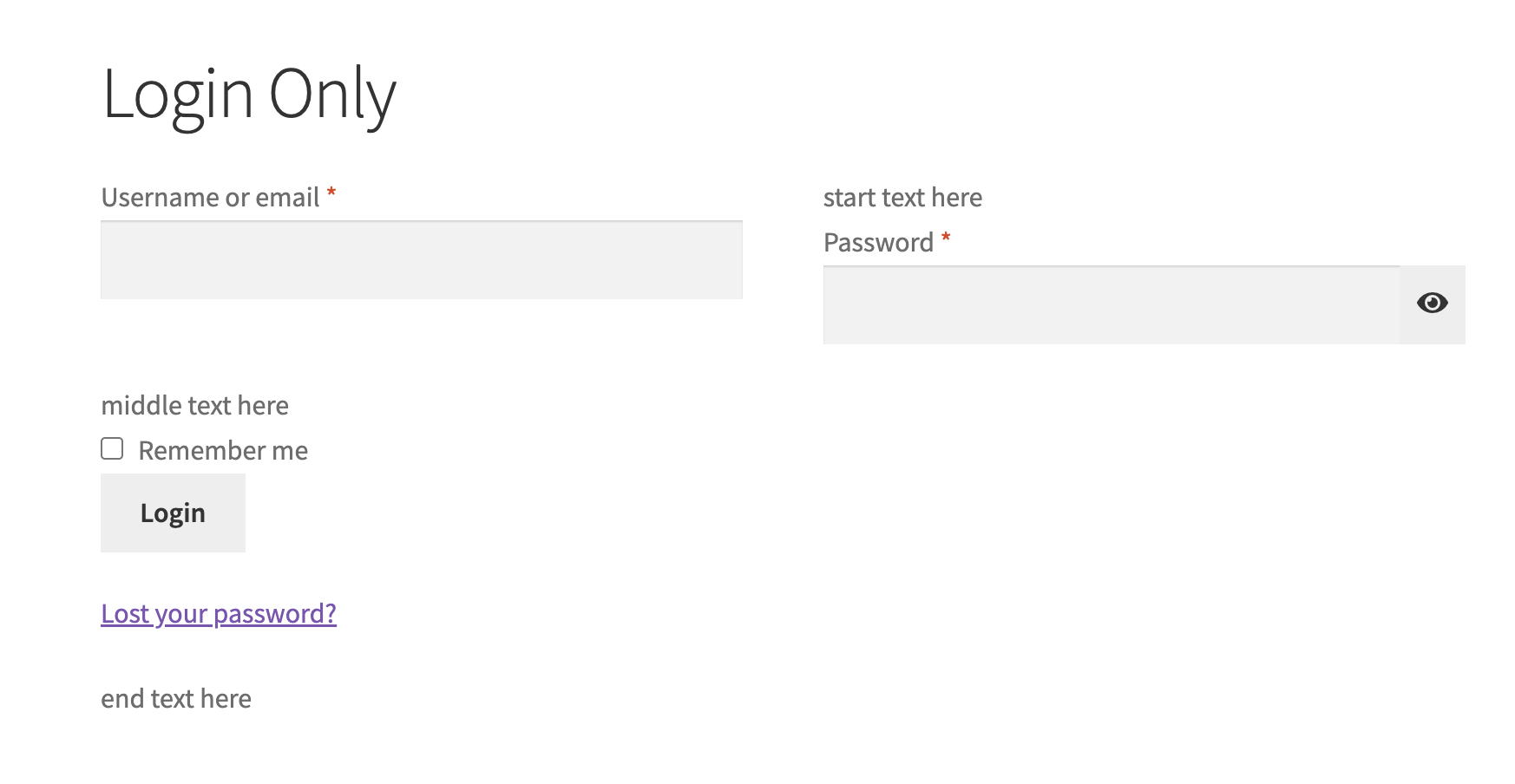
I'd suggest adding the same code snippet to your site, and checking which text is best positioned for your needs, then keeping only that part of the snippet.
KInd regards,
Stefan
4 Tickets
Hi Stefan,
the message-coed-snippet works fine, thank you. But the search-filters are still shown. Can you please repair this too, thanks a lot.
Best wishes Bert
2,762
Hi Bert,
I've added some CSS to hide the filters. If you're still seeing them anywhere on your site, please let me know which specific page URLs you're seeing them on and I'll help you get those hidden as well.
Kind regards,
Stefan
4 Tickets
Hi Stefan,
I don´t know how to manage the fault in the attached registration form. At "Land und Staat" the field description does not fit the fields. You can check this at https://quantumoptik.de/shop
Thanks for your help.
Best wishes
Bert
2,762
Hello Bert,
It looks like there's a CSS conflict there.
To solve that, please add the following CSS to your site:
#customer_login .select2-container--default .select2-selection--single .select2-selection__rendered {
    line-height: 7px !important;
}
This can be added to any area that supports CSS. Usually a good place to add it is to Appearance -> Customize -> Additional CSS.
Kind regards,
Stefan