
Public Ticket #4003064

Multiple Dynamic Rules of same type not working

Closed
Comments
11 Tickets 5
Dominique started the conversation 1 year ago on May 21, 2025 at 3:14pm

Hi,

I want to create 3 different dynamic rules to be able to achieve a different version of tiered pricing. Instead of providing a discount for quantity, I want to do it based on cart totals. 

1. Give 10% discount if cart total is between $5000-$7499. 

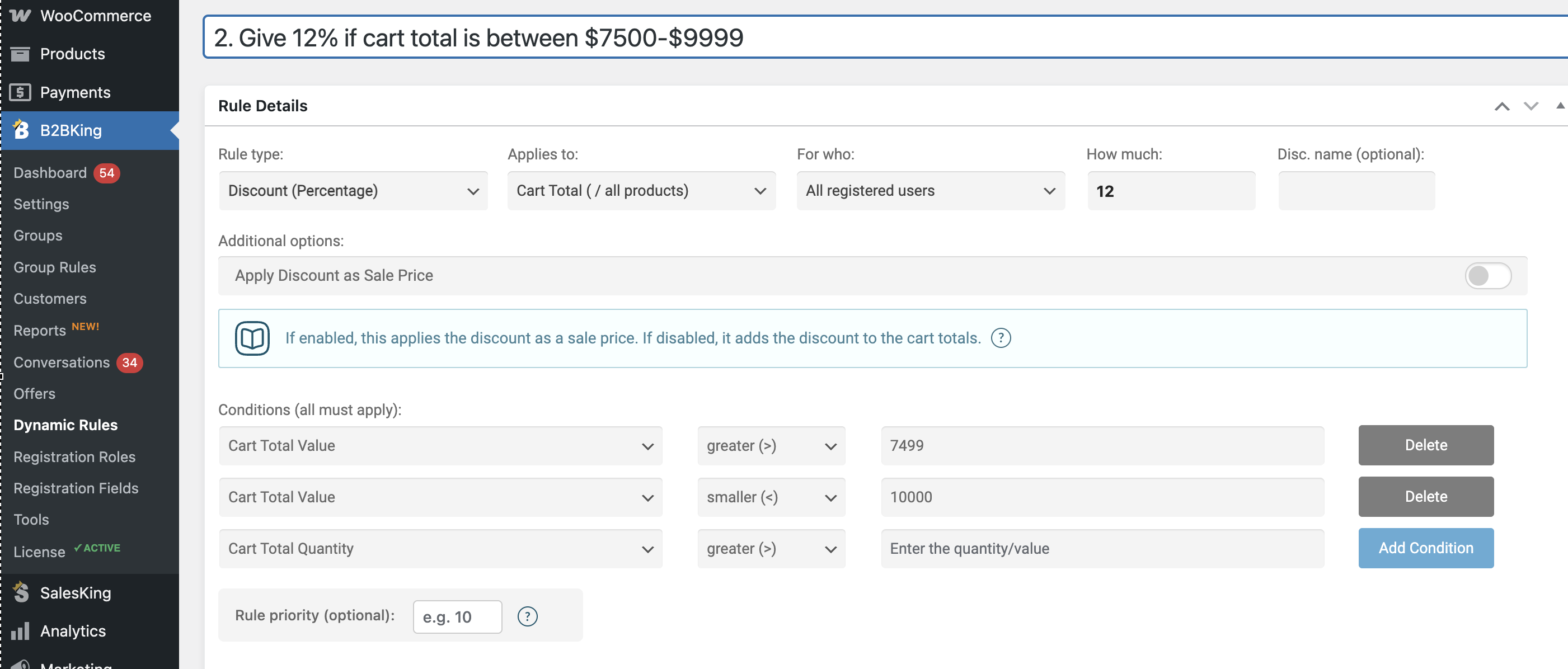
2. Give 12% if cart total is between $7500-$9999. and 

3. Give 15% if cart total is above $10,000.

 
I have three dynamic rules set up right now but only one discount tier works at a time (when only one is enabled). I tried setting priorities, and that doesn't seem to do anything. If only one rule is enabled, the correct logic of the tier works but not if all three are enabled. Is it possible to have more than one dynamic rule of the same type work?

11 Tickets 5
Dominique replied 1 year ago on May 21, 2025 at 3:40pm

I've since installed a different plugin to handle automatic discount codes vs using the dynamic rule option. So the dynamic rules are now disabled but still wondering if there are limitations to the rules


2,762
KingsPlugins replied 1 year ago on May 27, 2025 at 12:36am

Hi Dominique,

Thanks for explaining the situation in detail. Multiple dynamic rules can indeed work together to achieve that as long as you use conditions.

I believe what you described could be configured using 3 rules, setting a 'cart total value' condition for each one.


For example for the 2nd tier, you can use this dynamic rule:

5435197696.png

The key would be configuring the cart total conditions correctly and making sure only 1 rule applies at a time (there must be no overlap between them).


Kind regards,

Stefan

Sign In