Public Ticket #4536219

Regressione carrello dopo ultimo aggiornamento – reiniezione _salesking_set_price

Closed
Comments
2 Tickets 1
account-6690 started the conversation 9 months ago on January 22, 2026 at 8:29am

Hello,

after updating to the latest version of SalesKing we are experiencing a regression in the cart behavior related to price handling.

Context: we use an external WooCommerce-based discount system that correctly applies product discounts before the cart is displayed.

Before the update, SalesKing behavior was:

  • it read the already discounted product price

  • it built the price editing UI starting from that value

  • it did not override the price unless the agent explicitly changed it

After the update, the behavior changed:

  • _salesking_set_price is always injected and submitted during update_cart

  • the price is forcibly reapplied even when the agent has not modified anything

  • as a result, clicking “Update cart” resets externally applied discounts

The issue occurs only during the cart update cycle (form submit).
Product page, mini-cart, and the initial cart load all show the correct discounted price.

We verified that the problem is related to how _salesking_set_price is handled during cart recalculation and seems consistent with changes introduced in the latest version (likely timing or priority changes in the cart lifecycle).

We currently apply a local workaround to prevent the override when the agent has not interacted with the price, but we would like to ask:

  • whether this new behavior is intentional

  • or if it is possible to restore the previous logic (do not force _salesking_set_price unless the agent actually changes the price)

We are happy to provide additional technical details or reproducible examples if needed.

Thank you.

2,762
KingsPlugins replied 8 months ago on January 25, 2026 at 4:46pm

Hi there,

Glad to assist,

I've checked our code that sets `salesking_set_price` going back to Version 1.7.70 (July 25th, 2025), but I haven't found any differences in how this is handled. Our internal function 'set_price_in_cart' is identical between that version and the current one.

Therefore I'm not sure the issue is related to changes in SalesKing itself. It's possible that one of the other plugins in your setup has had changes in terms of pricing or cart functionality. This kind of setup can be quite fragile since multiple plugins are applying pricing code on the same WooCommerce hooks without being aware of each other.


If you'd like, I can look into this in more detail and investigate further, including running some tests with older versions of SalesKing to see if it behaves differently. For that, I'd need a backend login to the site or a staging clone site. In that case it would also help if you could share a specific example of the exact steps / clicks to be able to reproduce the issue,


Kind regards,
Stefan

2,762
KingsPlugins replied 8 months ago on January 29, 2026 at 9:56pm

Hi there,

Thanks for explaining this in detail.

I actually tried to test this using the plugin you attached, but I encountered some errors and couldn't create discounts. I suspect it's because the plugin is adapted to your specific setup and groups.


I was wondering, would the problem be solved if we got SalesKing to not change the price unless a price has been deliberately set by the agent? Do you think that would be a complete solution?

The best way I can help is if you could share access to a staging site, along with a quick example of how I can reproduce the issue. I can then test directly on the site and look at the various SalesKing functions to see how we can get it to no longer interfere unless the agent has set a price.

Kind regards,
Stefan

2 Tickets 1
account-6690 replied 8 months ago on February 6, 2026 at 10:40am

Hello,

I’m writing to give you a full update and to ask a final question.

First of all, I managed to resolve the issue I mentioned earlier. After further investigation, I confirmed that the problem was not related to SalesKing at all, but to a custom plugin I’m using.
Even so, I really want to thank you for your kindness, availability, and professionalism — your support has been excellent and very much appreciated.

Regarding the custom plugin I shared with you during this ticket:
if you ever decide to review it, take inspiration from it, or even implement something similar in SalesKing, you are absolutely free to do so. There is no issue or restriction from my side.

I do have one final question:

Is there a recommended or best-practice way to ensure that an agent remains logged in to the dashboard without having to re-enter credentials every time?
In my case, agents access a custom dashboard, and I’d like to make sure the login session persists correctly and securely.

Thank you again for the great support and for such a solid, well-built plugin.

2,762
KingsPlugins replied 8 months ago on February 6, 2026 at 5:06pm

Hi again,

Thanks for the update and glad to hear you were able to resolve the issue!

Regarding keeping agents logged in - I believe it would require some custom code using WordPress's `auth_cookie_expiration` filter.

This filter allows you to extend the login session duration. Here's an example of how you could implement it:

add_filter('auth_cookie_expiration', function($expiration, $user_id, $remember) {
// Extend to 30 days (in seconds)
return 30 * DAY_IN_SECONDS;
}, 10, 3);

Alternatively, you could check and only extend the session for agents.

Thanks again for your kind words about the plugin, and if you run into any other issues or anything we can help with, please let us know.

Also, if you have a moment, I would really appreciate it if you considered leaving a quick rating for our plugins here - it's a big help to us."

Kind regards,
Stefan

2 Tickets 1
account-6690 replied 8 months ago on February 9, 2026 at 8:50am

Hi Stefan,

thank you very much for the tip and for sharing the code 🙏
It was exactly the missing piece I needed.

Since I created a PWA app for my sales agents, I really needed to intervene on the session duration using auth_cookie_expiration. I’m implementing this solution now and will test it directly within the app over the next few days.

I’d also like to take this opportunity to say that I will definitely leave a review: I’m genuinely happy to do so, because the plugins are excellent and the support has been impeccable.

I only have one last small request, if possible.
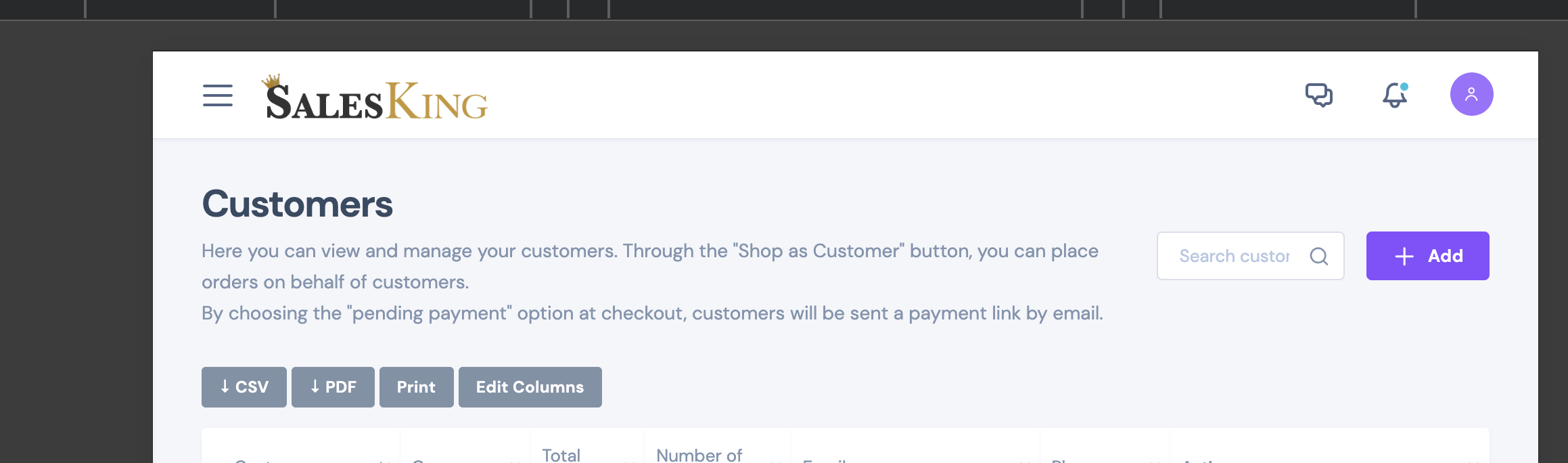
All of my agents use the system on tablets (iPad and Android), and I’ve noticed that in the agent dashboard the “Search customers…” bar at the top appears quite narrow, especially when it’s placed next to the “+ Add” button.
On desktop and mobile the layout looks correct; the issue only occurs on tablets.

I tried adjusting this with custom CSS and also by modifying the dashlite.css file directly, but without success.
Is there any hook, specific class, or tablet layout guideline you would recommend using to properly widen the search bar without affecting the desktop and mobile layouts?

Thanks again for all the support and availability.

2,762
KingsPlugins replied 8 months ago on February 14, 2026 at 3:11pm

Hi again,

Thank you very much for the review!

I looked into the tablet display issue you mentioned and I see you are right; there was a layout issue on tablets.

I believe I have fixed this now. Please update to the attached SalesKing version and let me know if it resolves the issue for you.

Kind regards,
Stefan

2 Tickets 1
account-6690 replied 8 months ago on February 18, 2026 at 1:27pm

Hi, sorry for the wait. I managed to download and install it. But it looks exactly the same as usual. You can see from the photo. I also tried editing it myself, but I can't. I just needed a longer field. I can also remove the left column with the text if necessary.

Attached files:

2,762
KingsPlugins replied 8 months ago on February 21, 2026 at 6:50pm

Hi again,

Thanks for getting back to me,


This seems to appear now as I expected it.

Previously I was seeing it as:

1908015040.png

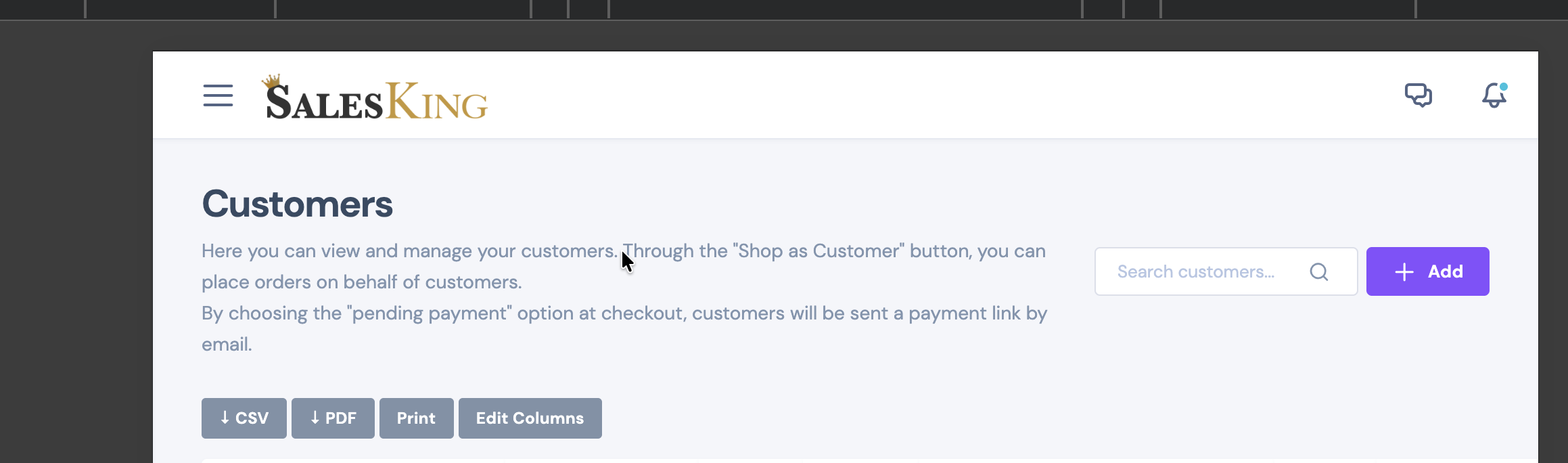
and the change I made is that I added a minimum width to the field, so it now displays as:

4714237581.png


If you'd like to make that even longer, you can do so with a code snippet:

add_action('salesking_dashboard_head', function(){
    ?>
    <style>

        input#salesking_customers_search {
            min-width: 300px !important;
        }
        
    </style>
    <?php
});

Please add this as a PHP snippet to functions.php or any snippets plugin.

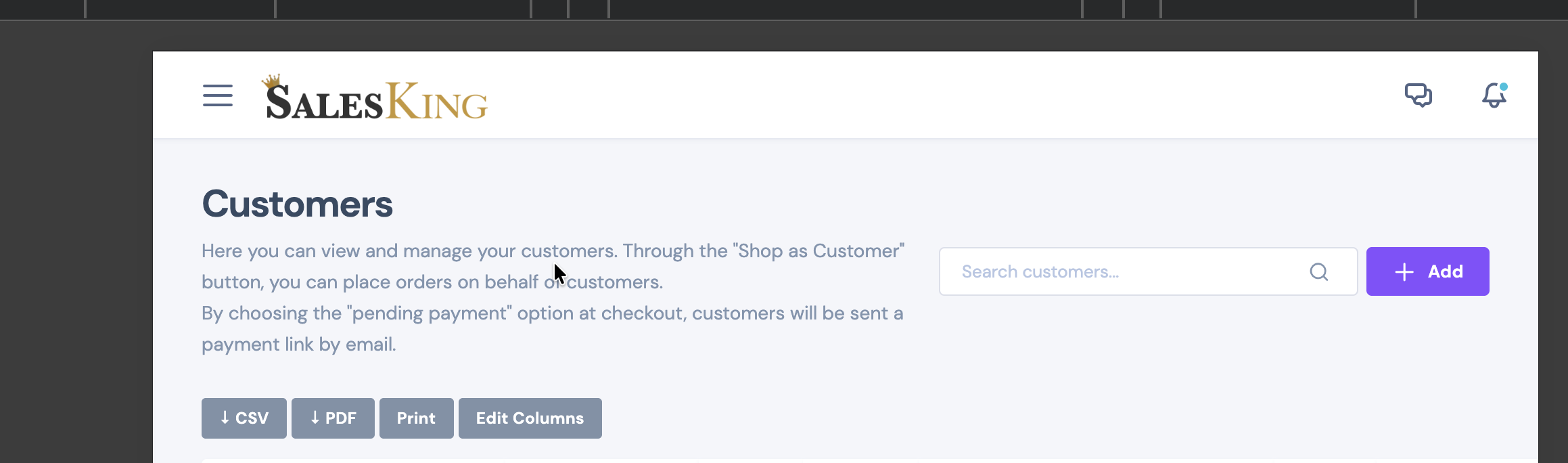
It should then appear as 

6581424970.png

Feel free to adjust 300px to your desired size.


Let me know if that solves it for you or if you need any adjustments,

Kind regards,

Stefan

Sign In